
 Arabic
  English
  Turkish
  Chinese
  Japanese
  Russian
  Spanish
  German
  French
  Hindi
Hindi Download E2ESOFT WeCam 2.5.2 for Windows
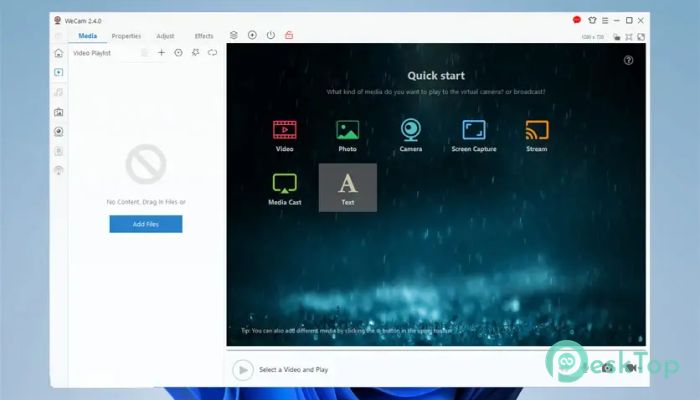
Download E2ESOFT WeCam 2.5.2 for Windows.
E2ESOFT WeCam Overview
This tool is designed for users who want a capable yet straightforward way to manage video inputs, create dynamic scenes, and stream with improved quality. It brings together screen capture, media files, webcam input, effects, and casting options into a single, seamless workspace. With its clean, intuitive design, anyone can use it without encountering complexity.Features of E2ESOFT WeCam
WYSIWYG video scene editor that works with several media formats
Casting from mobile devices for photos, videos, and music
A large range of video effects and expandable filters
Text and subtitle tools featuring textures, animations, and styling options
GPU acceleration for smoother performance with reduced load on your system
Standard camera driver for compatibility with many applications
Multi-channel high-quality video output with adjustable resolutions
Camera replacement feature for swapping webcam feeds
Hardware-encoded streaming to servers without extra tools
Easy interface with changeable color themes
Works in both 32-bit and 64-bit versions
How It Works
The software lets you mix different media sources into a single, clean video output. You can add images, webcam feeds, screen captures, and streaming links, then arrange them in a drag-and-drop panel. Everything appears exactly as you build it, helping you avoid guesswork. This makes the whole process feel like creating a digital collage.
Media Support and Scene Creation
The editor accepts various media types, so you can mix full HD videos, static images, background textures, or even your smartphone’s camera feed. Each item can be resized, layered, or animated. This flexibility creates a space where you can design live scenes in real time.
Live Streaming Output
Once your scene is ready, the program lets you output the final video in different ways. You can preview it inside the interface, send it as a virtual camera, or push it directly to a streaming server. Its hardware-based encoding offers smooth, stable performance even during long streaming sessions.
Camera Replacement Function
The camera replacement option lets you swap your built-in webcam feed with your customized output. This feature works in many chatting and streaming applications, offering polished visuals for presentations, teaching, or content creation.
Performance and GPU Acceleration
Thanks to GPU-accelerated algorithms, the tool maintains low CPU usage. You can run multiple programs while streaming without slowing your system. Smooth transitions and effects help your video appear cleaner and more professional.
Customization Options
The interface includes changeable skins and color themes, allowing you to adjust the layout to your comfort. You can choose light or dark themes and organize panels as needed.
System Requirements and Technical Details
Operating System: Windows 11 / 10 / 8.1 / 7
Processor: Minimum 1 GHz Processor (2.4 GHz recommended)
RAM: 2GB (4GB or more recommended)
Free Hard Disk Space: 200MB or more is recommended

-
Program size28.92 MB
-
Version2.5.2
-
Program languagemultilanguage
-
Last updatedBefore 9 Month
-
Downloads55
 Cyotek WebCopy
 Linphone
 Cinny
Cinny AllMapSoft Bing Maps Downloader
  AllMapSoft Yandex Maps Downloader
  AllMapSoft google earth images downloader