
 Arabic
  English
  Turkish
  Chinese
  Japanese
  Russian
  Spanish
  German
  French
  Hindi
Hindi Download Exlade Disk Password Protection 1.0 for Windows
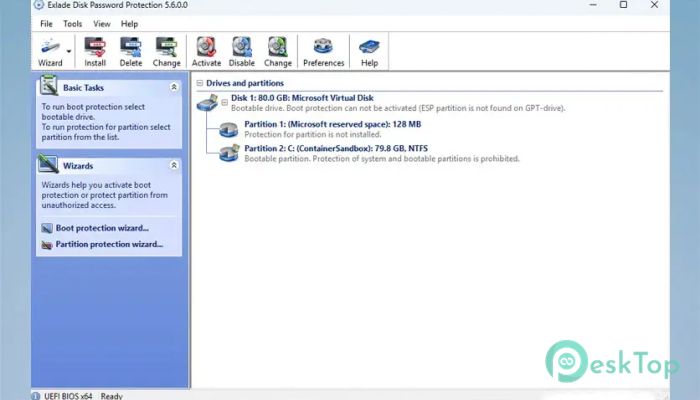
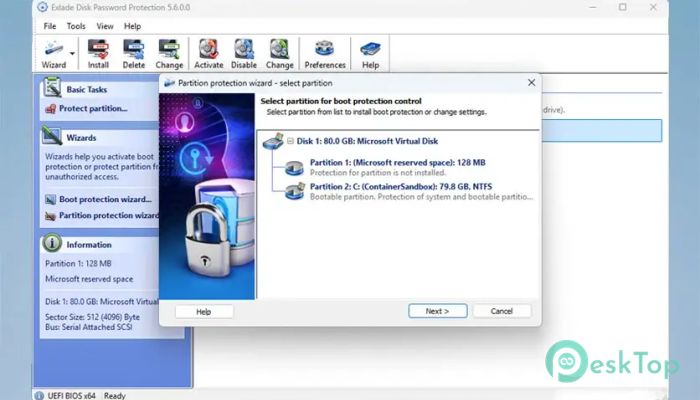
Download Exlade Disk Password Protection 1.0 for Windows.
Exlade Disk Password Protection Overview
Data security has become more important than ever. Whether you store personal files, business documents, or confidential information, protecting your drives is essential. This software provides advanced disk protection by locking physical drives, partitions, and even the Windows boot process. Unlike traditional security tools, it operates at a low system level, making it extremely difficult for unauthorized users to bypass its protections. The tool hides protected partitions from the drive's partition table, making them invisible to Windows and other programs. Even if someone connects your drive to another computer, the protected partitions remain locked and hidden. This makes it ideal for users who need reliable, secure disk protection without a complicated setup. Another major advantage is that protection remains active even if the software is uninstalled. To unlock a partition, the correct password must be entered using the utility. Once verified, the partition becomes visible and accessible again for normal use.Features of Exlade Disk Password Protection
Advanced Drive Protection
This tool goes beyond simple folder protection. Instead of just hiding files, it locks entire partitions and physical drives. Think of it as placing a digital vault around your data. Once enabled, unauthorized users cannot even see the protected drive.
This level of protection is especially useful for businesses, professionals, and anyone dealing with sensitive information. It ensures that your data remains safe even if someone tries to access it using another operating system or device.
Hide Partitions Completely
One standout feature is the ability to hide partitions entirely. When protection is enabled, the partition disappears from the system. Windows, third-party tools, and even disk management utilities cannot detect it.
This feature works like making a secret room inside your computer. Only users with the correct password can access it. This adds an extra layer of security compared to traditional encryption tools.
Password Protect Windows Boot
The software also allows password protection for the Windows boot process. This means that before Windows starts, users must enter the correct password. Without it, the operating system remains inaccessible.
This feature is especially helpful for laptops and shared computers. It prevents unauthorized users from starting the system and accessing data. Even if someone removes the hard drive and connects it to another computer, the protection remains intact.
Protection Even After Uninstallation
Many security tools lose effectiveness once removed. However, this utility keeps protection active even if it is uninstalled. Protected partitions remain hidden and locked.
This is like locking a safe and throwing away the key. The data remains secure regardless of software removal. To disable protection, users must reinstall the tool and enter the correct password.
Support for Modern Platforms
The software supports both BIOS and UEFI systems. This makes it compatible with modern computers and older devices. Users do not need to worry about system compatibility.
This flexibility ensures that the tool works smoothly across various hardware configurations. Whether you are using a new laptop or an older desktop, protection remains reliable.
Support for MBR and GPT Partition Tables
Compatibility is another strong point. The tool supports both MBR and GPT partition tables. This means users can protect drives regardless of their format.
Many modern systems use GPT, while older systems use MBR. Supporting both ensures maximum usability and convenience for all users.
Simple and User-Friendly Interface
Despite offering powerful security features, the interface remains simple and easy to use. Users can quickly select drives, set passwords, and enable protection without technical knowledge.
The setup process is straightforward. Even beginners can configure protection in just a few steps. This balance between power and simplicity makes it suitable for everyone.
Reliable Data Security
This tool is designed for maximum reliability. It protects data from unauthorized access, accidental deletion, and misuse. Once protection is enabled, users gain peace of mind knowing their data is safe.
The low-level protection ensures that even advanced users cannot easily bypass the security. This makes it ideal for both personal and professional environments.
System Requirements and Technical Details
Operating System: Windows 11 / 10 / 8.1 / 7
Processor: Minimum 1 GHz Processor (2.4 GHz recommended)
RAM: 2GB (4GB or more recommended)
Free Hard Disk Space: 200MB or more is recommended

-
Program size19.49 MB
-
Version1.0
-
Program languagemultilanguage
-
Last updatedBefore 4 Month
-
Downloads52
 Bravely Diskaroo
 DiskGenius Free
 Disk Pulse
 DiskGenius Professional
 Disk Sorter
 Hasleo Disk Clone Free