
 Arabic
  English
  Turkish
  Chinese
  Japanese
  Russian
  Spanish
  German
  French
  Hindi
Hindi Download Explorer 1.4.0 for Windows
Download Explorer 1.4.0 for Windows.
Explorer Overview
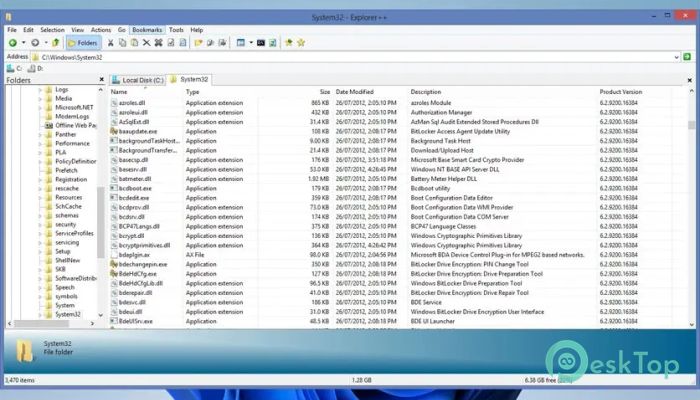
This software is designed for users who want speed, simplicity, and better control over their files without changing the familiar Windows-style layout. It feels instantly comfortable, yet adds powerful features that make daily file management smoother and more efficient. Think of it as a well-organized toolbox that helps you finish tasks faster with less effort.Features of Explorer
Lightweight and Fast Performance
One of the tool's key strengths is its compact size and quick response time. It launches almost instantly and runs smoothly even on older systems. Because it uses minimal system resources, you can keep it open all day without slowing your PC. It works quietly in the background like a reliable assistant that never gets in your way.
Tabbed Browsing for Better Organization
Instead of opening multiple windows, it lets you use tabs to switch between folders. This keeps everything neat and easy to manage. You can quickly jump between locations, compare folders side by side, and avoid desktop clutter. It feels similar to browsing the web with multiple tabs, but for your files.
Portable and Flexible Setup
The software can save its settings either in the Windows registry or in a simple configuration file. This makes it fully portable. You can carry it on a USB drive and use it on different computers without installation. Your preferences travel with you, like a personalized workspace that fits in your pocket.
Familiar Interface with Useful Enhancements
The layout closely matches the standard Windows file explorer, so there is no steep learning curve. At the same time, minor improvements make a big difference. Extra options are placed where they make sense, helping you work faster while still feeling at home.
Preview Files Before Opening
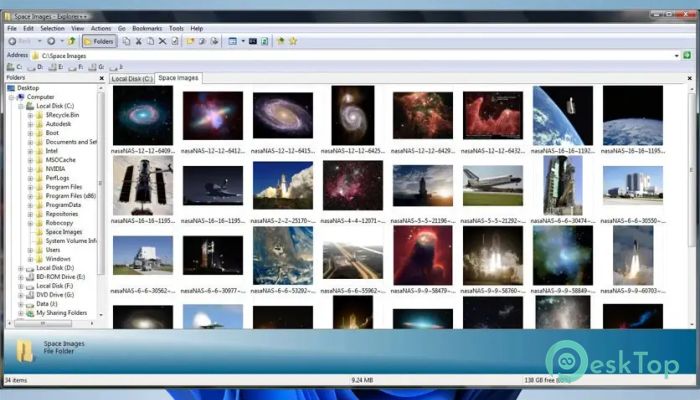
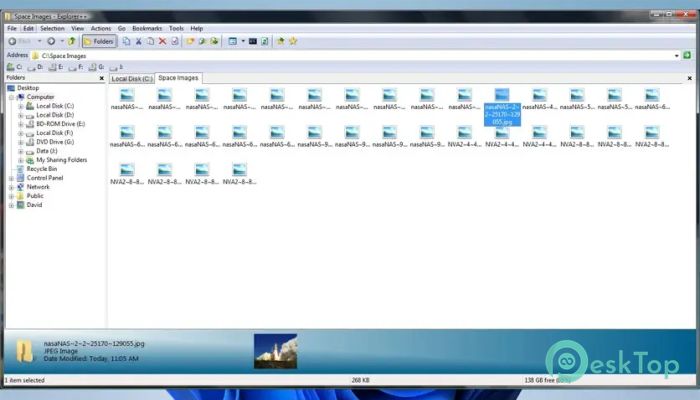
A built-in display panel shows file previews as you select them. This saves time by allowing you to quickly review images, documents, and other files without opening separate applications. It works like a glance through a window before deciding to step inside.
Keyboard Shortcuts for Speed
Easy-to-remember keyboard shortcuts are included for common actions. Once you get used to them, navigation becomes much faster. Your hands stay on the keyboard, and tasks feel more fluid, almost like typing instead of clicking.
Customizable User Interface
The interface can be adjusted to match your working style. You can choose different views such as icons, lists, details, thumbnails, or tiles. This flexibility lets you shape the workspace however you prefer, whether you prefer visual browsing or detailed file information.
Advanced File Operations
Beyond basic copying and moving, the tool supports advanced actions like merging and splitting files. You can also easily change file dates and attributes. These features are invaluable for power users who need more control without installing heavy software.
Drag and Drop Support
Full drag-and-drop support works seamlessly with other applications, including the default Windows Explorer. You can seamlessly move files between applications, making multitasking easier and more natural.
Bookmarks and Saved Tabs
Frequently used folders can be bookmarked for quick access. Tabs can also be saved and restored, so your workflow stays consistent every time you open the program. It is like leaving notes for yourself exactly where you need them.
Search and File Filtering
Finding files is simple with built-in search options. You can search for items by name or attributes and filter results to narrow them. This helps you locate files quickly, even in large directories.
Save Directory Listings
The ability to save a directory listing is useful for reports or sharing folder contents with others. Instead of taking screenshots or writing lists manually, you can generate them directly.
System Requirements and Technical Details
Operating System: Windows 11 / 10 / 8.1 / 7
Processor: Minimum 1 GHz Processor (2.4 GHz recommended)
RAM: 2GB (4GB or more recommended)
Free Hard Disk Space: 200MB or more is recommended

-
Program size1.95 MB
-
Version1.4.0
-
Program languagemultilanguage
-
Last updatedBefore 10 Month
-
Downloads40Ralated programs
![Operant Peak Spectroscopy]() Operant Peak Spectroscopy
Operant Peak Spectroscopy ![NeverWrite]() NeverWrite
NeverWrite![FluentCleaner]() FluentCleaner
FluentCleaner![Snippai]() Snippai
Snippai![ChillShot AI]() ChillShot AI
ChillShot AI![Splunk Enterprise]() Splunk Enterprise
Splunk Enterprise
 Operant Peak Spectroscopy
  NeverWrite
 FluentCleaner
 Snippai
 ChillShot AI
 Splunk Enterprise