
 Arabic
  English
  Turkish
  Chinese
  Japanese
  Russian
  Spanish
  German
  French
  Hindi
Hindi Download File Arbor 1.0 for Windows
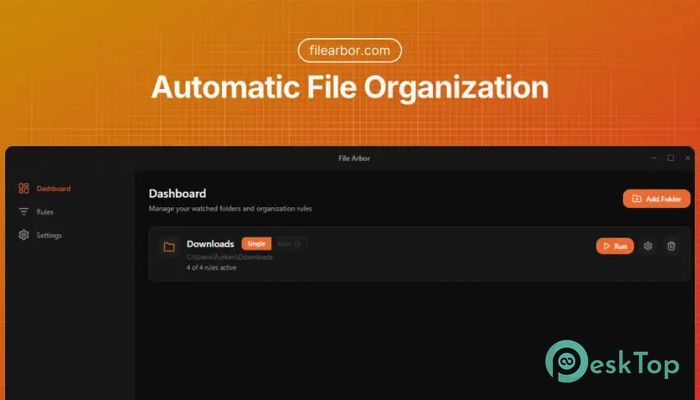
Download File Arbor 1.0 for Windows.
File Arbor Overview
Keeping files organized can feel like trying to clean a room during a storm. New downloads, documents, images, and videos appear constantly, making folders messy and difficult to manage. This is where the tool steps in as a powerful yet simple automation solution designed specifically for Windows users. This smart file organization tool automatically sorts files into structured folders according to rules you define. Instead of manually moving files every day, it handles everything in real time. Whether you're dealing with downloads, documents, media, or project files, it keeps everything organized without requiring constant attention. The software works completely offline, ensuring privacy and security while offering powerful sorting features. It supports advanced filtering, smart automation, and unlimited rules for better file management. Once configured, it continues working quietly in the background, keeping your folders neat and organized.Features of File Arbor
Automatic File Organization in Real Time
One of the most useful aspects of this tool is its real-time sorting capability. As soon as a file appears in a monitored folder, it is moved to the correct location. This means no more cluttered download folders or misplaced documents.
The automation works continuously in the background. Imagine downloading multiple files throughout the day. Instead of sorting them manually, everything is automatically placed into dedicated folders such as images, documents, videos, or music. It works like having a digital assistant that organizes your files instantly.
This real-time functionality is especially helpful for professionals who handle large amounts of files daily. Designers, developers, content creators, and office workers benefit greatly from automatic organization.
Smart Rules for Advanced Organization
The smart rules feature makes file sorting highly flexible and customizable. Users can create rules based on multiple conditions, such as file extension, name pattern, size, and date. This provides complete control over how files are organized.
For example, users can automatically move all PDF files into a Documents folder. Similarly, large video files can be sent to a Videos folder, while images can be sorted by date or name pattern. This level of automation saves time and reduces manual work.
Another powerful feature is regex support. Advanced users can create complex sorting conditions using regular expressions. This makes the tool suitable for both beginners and advanced users.
Quick Rules for One-Click Setup
Not everyone wants to create detailed rules manually. That is why quick rules are included to simplify the setup process. These presets let users organize files with a single click.
Common presets include images, documents, videos, music, and more. Once enabled, files are automatically sorted into appropriate folders. This makes the tool extremely beginner-friendly.
Even users with no technical knowledge can start organizing files in just a few seconds. The quick rules feature removes complexity and provides instant organization.
Multi-Folder Sorting Support
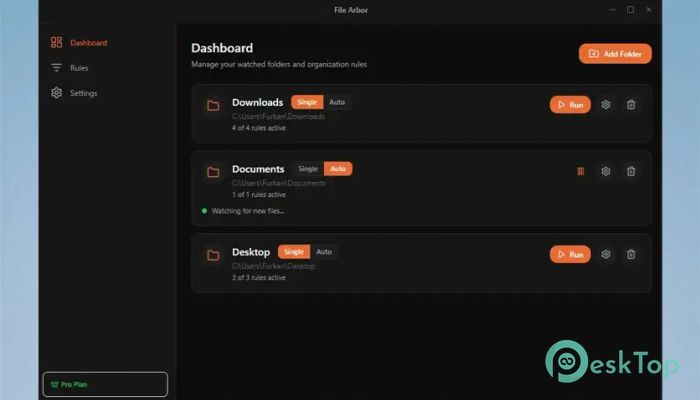
The tool supports sorting across multiple folders simultaneously. Users can monitor downloads, desktop, documents, and other directories simultaneously.
This feature is particularly useful for users who manage files from multiple sources. Instead of organizing each folder separately, everything can be managed from a single place.
It runs quietly in the background and keeps all monitored folders clean and organized.
Privacy-Focused Offline Operation
Privacy is becoming increasingly important in modern software. Many file management tools rely on cloud connections, which may raise concerns. This tool operates completely offline.
Since everything runs locally, files never leave the computer. This ensures maximum privacy and security. Users can organize sensitive documents without worrying about data exposure.
The offline functionality also improves performance and reliability. No internet connection is required for sorting files.
Unlimited Rules with Pro License
The free version offers powerful features, but the Pro version unlocks unlimited rules. This is ideal for users who want deeper automation and customization.
With unlimited rules, users can create advanced sorting workflows. For example, files can be organized by project, date, or content type. This helps maintain a structured workflow.
The Pro version also provides additional flexibility for power users and professionals.
Clean and User-Friendly Interface
A clean interface makes file organization simple and enjoyable. Everything is clearly displayed, making rule creation easy. Users can add, edit, and manage rules without confusion.
The dashboard shows monitored folders and active rules. This allows users to quickly check how files are being organized.
The interface's simplicity ensures users spend less time configuring and more time staying organized.
Performance and Efficiency
Efficiency is one of this software's biggest strengths. It uses minimal system resources and runs smoothly in the background. Users can continue working without performance slowdowns.
The lightweight design makes it suitable for both older and newer systems. It works quietly without interrupting workflow.
This ensures continuous file organization without affecting computer performance.
Benefits of Automatic File Sorting
Automatic file sorting saves time and reduces stress. Instead of manually organizing files, everything happens automatically. This improves productivity and keeps folders clean.
Users can easily locate files without having to search through messy directories. Organized folders also improve workflow efficiency.
This automation works like a smart filing cabinet, keeping everything in the right place.
System Requirements and Technical Details
Operating System: Windows 11 / 10
Processor: Minimum 1 GHz Processor (2.4 GHz recommended)
RAM: 2GB (4GB or more recommended)
Free Hard Disk Space: 200MB or more is recommended

-
Program size75.95 MB
-
Version1.0
-
Program languagemultilanguage
-
Last updatedBefore 6 Month
-
Downloads32Ralated programs
![Operant Peak Spectroscopy]() Operant Peak Spectroscopy
Operant Peak Spectroscopy ![NeverWrite]() NeverWrite
NeverWrite![FluentCleaner]() FluentCleaner
FluentCleaner![Snippai]() Snippai
Snippai![ChillShot AI]() ChillShot AI
ChillShot AI![Splunk Enterprise]() Splunk Enterprise
Splunk Enterprise
 Operant Peak Spectroscopy
  NeverWrite
 FluentCleaner
 Snippai
 ChillShot AI
 Splunk Enterprise