
 Arabic
  English
  Turkish
  Chinese
  Japanese
  Russian
  Spanish
  German
  French
  Hindi
Hindi Download Filezo 6.0.18 for Windows
Download Filezo 6.0.18 for Windows.
Filezo Overview
This software brings lightning-fast file search to your Windows system, letting you jump to any file, folder, or app in seconds. Designed to reduce everyday stress caused by deep navigation and cluttered desktops, it gives you an enjoyable and straightforward way to manage your digital world.Features of Filezo
Automatically knows your frequently used files
Supports tagging for organization
Allows annotation of files and folders
Offers a built-in preview for many file types
Helps pick files faster in open/save windows
Introduces innovative copy methods
Launches any file or folder effortlessly
Smart & Instant Search
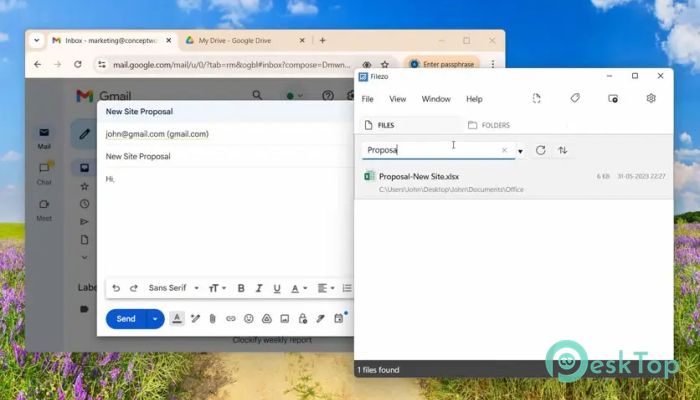
The tool provides a quick and efficient search experience. With a couple of keystrokes, you can open documents, folders, apps, cloud directories, and even network locations. It's smart engine filters your results so only meaningful items appear, keeping distractions away.
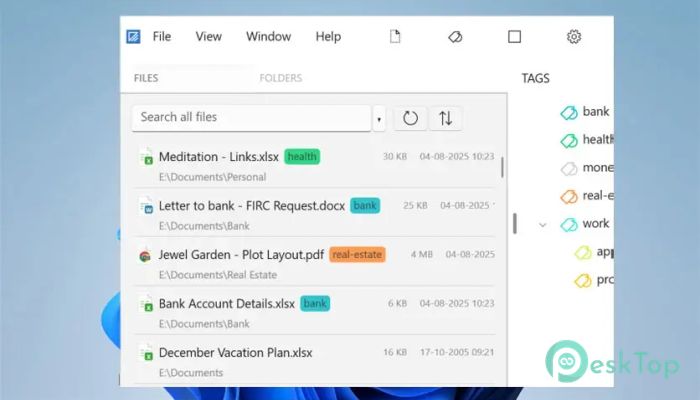
Tagging for Faster Access
You can add tags to files and folders to organize your workspace. These tags can be arranged in a hierarchy and color-coded, helping you group items by projects or tasks. You can also assign tags directly from Windows File Explorer, making the process smooth and familiar.
Reduces Daily Digital Stress
This tool helps eliminate the hidden stress caused by messy desktops, scattered files, and slow navigation. Instead of browsing through deep directories or sluggish drives, you type and launch. It cuts down countless clicks and saves tremendous time.
Integration With Windows
It fits neatly into Windows’ file-open/save dialog boxes, allowing you to pick files directly from its interface. You also get a built-in previewer to scan images, documents, videos, and audio files before opening them.
Recently Accessed Files Tracking
The software automatically keeps track of your recently opened or downloaded items. Listing important and frequently accessed files first makes your workflow faster and more natural.
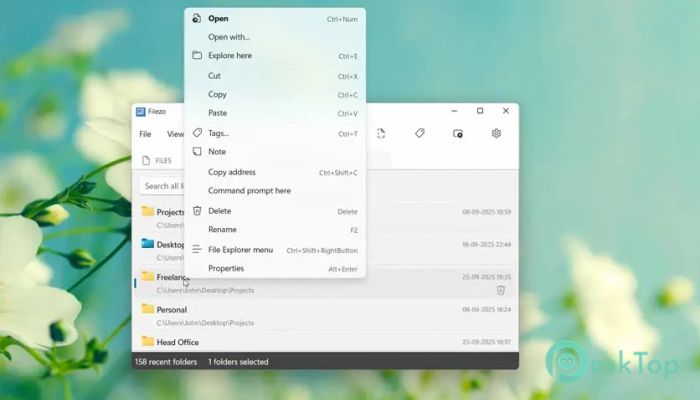
Perform File Operations Easily
You can copy, delete, or rename files without even using your file manager. This direct-access approach speeds up routine tasks and avoids unnecessary steps.
Add Notes to Files
A helpful feature allows you to add small text notes to any file or folder. These notes become searchable, making it easier to locate items based on reminders or descriptions you have written yourself.
Fast Access to Remote Folders
Even network drives are handled effortlessly. The software automatically shows your frequently used network paths, letting you reach deeply nested folders in just a couple of seconds.
Enhanced Productivity Tools
You can drag and drop files to attach them to emails, use the previewer to compare media files, and rely on intuitive shortcuts to move through your tasks without friction. Everything is built to streamline your workflow.
System Requirements and Technical Details
Operating System: Windows 11 / 10
Processor: Minimum 1 GHz Processor (2.4 GHz recommended)
RAM: 2GB (4GB or more recommended)
Free Hard Disk Space: 200MB or more is recommended

-
Program size89.10 MB
-
Version6.0.18
-
Program languagemultilanguage
-
Last updatedBefore 2 Month
-
Downloads35Ralated programs
![Operant Peak Spectroscopy]() Operant Peak Spectroscopy
Operant Peak Spectroscopy ![NeverWrite]() NeverWrite
NeverWrite![FluentCleaner]() FluentCleaner
FluentCleaner![Snippai]() Snippai
Snippai![ChillShot AI]() ChillShot AI
ChillShot AI![Splunk Enterprise]() Splunk Enterprise
Splunk Enterprise
 Operant Peak Spectroscopy
  NeverWrite
 FluentCleaner
 Snippai
 ChillShot AI
 Splunk Enterprise