
 Arabic
  English
  Turkish
  Chinese
  Japanese
  Russian
  Spanish
  German
  French
  Hindi
Hindi Download Find My Font 1.0 for Windows
Download Find My Font 1.0 for Windows.
Find My Font Overview
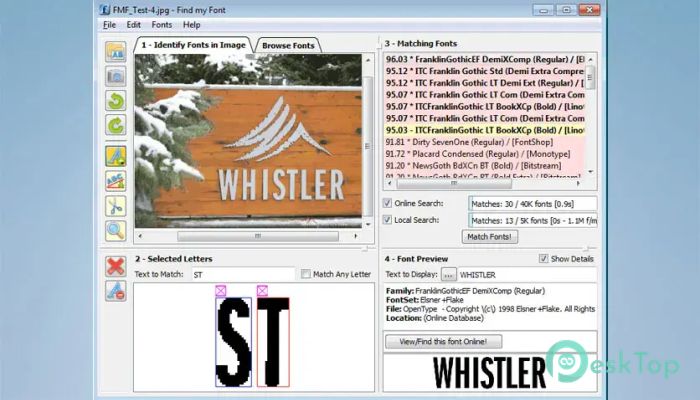
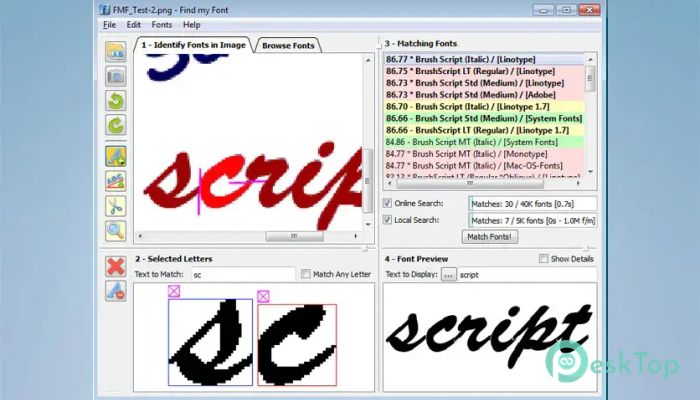
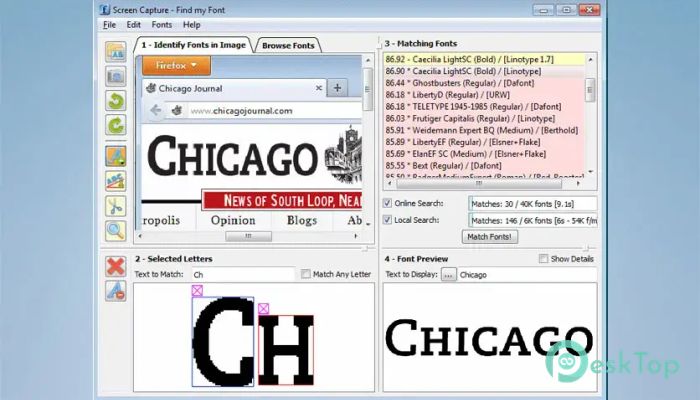
Identifying a font from an image can sometimes feel like searching for a needle in a haystack. Designers, publishers, marketers, and creative professionals often spend hours trying to figure out which typeface was used in a logo, poster, advertisement, or social media graphic. This software makes that process fast, simple, and highly accurate. The application is designed to automatically detect fonts from images. Users only need to upload an image or capture one using a compatible device, select the text area they want to analyze, and let the tool do the work. Within seconds, it searches a massive font database and displays matching and similar font results. Available in Free Trial and Pro editions for Windows computers, it offers a practical solution for anyone who regularly works with typography and graphic design projects.Features of Find My Font
Automatic Font Identification
The biggest advantage of the software is its ability to automatically identify fonts. Instead of manually comparing hundreds of typefaces, users can simply provide an image and receive accurate matches almost instantly.
The tool analyzes the shapes, curves, spacing, and unique characteristics of letters to find the closest possible results. This saves valuable time and helps users focus on their creative work rather than lengthy font searches.
Massive Online Font Database
One of the reasons the application performs so well is its access to an extensive collection of online fonts. With more than 1 million fonts in its database, it offers a wide range of matching options.
Whether the text comes from a modern website, an old printed document, a company logo, or a marketing banner, the software has a strong chance of finding the correct typeface or a very close alternative.
Search Local Computer Fonts
In addition to online searches, the Windows edition can also scan fonts already installed on the computer. This feature is especially useful for designers who maintain large font libraries.
Instead of browsing through endless font folders, users can quickly determine whether a matching typeface already exists on their system. This improves productivity and reduces unnecessary font purchases.
Simple and User-Friendly Interface
Many professional design tools come with complicated menus and settings. Fortunately, this application keeps things simple. The interface is clean, organized, and easy to understand.
Even beginners can start identifying fonts within minutes. The process requires only a few steps, making the experience smooth and frustration-free. Everything is presented clearly so users can focus on finding the right font without distractions.
Accurate Matching Results
Accuracy is one of the most important factors in font recognition. The software provides a ranked list of matching fonts, along with confidence scores indicating how closely each result matches the original image.
This feature helps users make informed decisions. Instead of guessing which result is best, they can review multiple suggestions and choose the one that most closely resembles the source text.
Preview Fonts Before Using Them
Finding a font is only part of the process. Users often want to see how it will look in their own projects before making a decision.
The tool allows custom text previews so users can type any words or phrases and compare them directly with the original image. This visual comparison helps confirm whether the selected font is the right choice.
Helpful for Designers and Creative Professionals
Graphic designers frequently encounter unknown fonts while working on branding, advertising, packaging, and web design projects. The software acts like a typography assistant, helping professionals identify fonts quickly and accurately.
Creative agencies, freelancers, publishers, printers, and marketing teams can all benefit from its capabilities. By reducing manual work, it improves efficiency and speeds up project completion.
Supports Various Image Sources
The application works with a wide range of image types. Users can import screenshots, scanned documents, photographs, logos, posters, and digital artwork for analysis.
This flexibility makes it suitable for many different situations. Whether the source comes from a website, a printed brochure, or a social media graphic, the software can analyze the text and provide useful results.
Time-Saving Workflow
Manually identifying fonts often involves searching through countless typefaces and comparing letters one by one. That approach can consume hours of valuable work time.
The tool automates the entire process, transforming a difficult task into a simple workflow. What once required extensive effort can now be completed in just a few clicks.
Ideal for Everyday Typography Tasks
Typography plays an important role in branding and communication. Choosing the right font helps create professional and visually appealing designs.
By providing quick identification and comparison tools, the application becomes a valuable resource for everyday design tasks. It helps users maintain consistency, improve design quality, and work more efficiently.
System Requirements and Technical Details
Operating System: Windows 11 / 10 / 8.1 / 7
Processor: Minimum 1 GHz Processor (2.4 GHz recommended)
RAM: 2GB (4GB or more recommended)
Free Hard Disk Space: 200MB or more is recommended

-
Program size32.07 MB
-
Version1.0
-
Program languagemultilanguage
-
Last updatedBefore 3 Month
-
Downloads13Ralated programs
![Operant Peak Spectroscopy]() Operant Peak Spectroscopy
Operant Peak Spectroscopy ![NeverWrite]() NeverWrite
NeverWrite![FluentCleaner]() FluentCleaner
FluentCleaner![Snippai]() Snippai
Snippai![ChillShot AI]() ChillShot AI
ChillShot AI![Splunk Enterprise]() Splunk Enterprise
Splunk Enterprise
 Operant Peak Spectroscopy
  NeverWrite
 FluentCleaner
 Snippai
 ChillShot AI
 Splunk Enterprise