
 Arabic
  English
  Turkish
  Chinese
  Japanese
  Russian
  Spanish
  German
  French
  Hindi
Hindi Download FluxDisk 1.0 for Windows
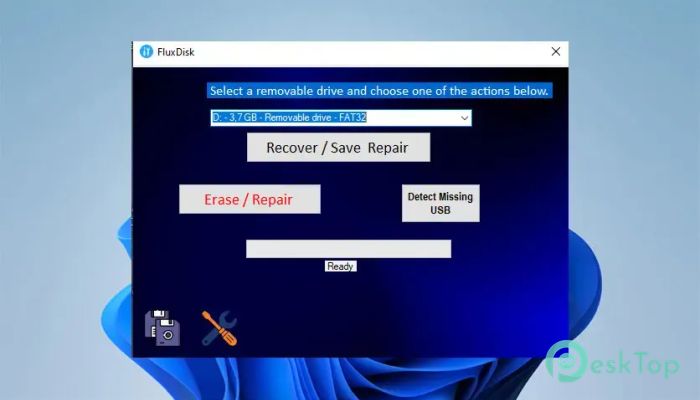
Download FluxDisk 1.0 for Windows.
FluxDisk Overview
It is a simple, open-source utility designed to solve common USB drive problems without requiring users to deal with complicated settings. Whether your flash drive has hidden files, file system errors, or software-based write protection, the tool provides quick repair options through a clean one-window interface. The software focuses on ease of use. Instead of navigating complex menus, you simply select your USB drive and the action you want to perform. It is designed for everyday users who need a fast way to fix removable storage devices.Features of FluxDisk
Simple One-Window Interface
The software comes with a lightweight executable that does not require a complicated installation process. Its clean interface places all the important options in one window, making it easy for anyone to use.
After launching the application, you only need to select the connected USB drive from the list. If the device is not detected immediately, the tool can search for missing USB drives and add them automatically. This saves time and eliminates the frustration of repeatedly reconnecting the device.
Recover Hidden Files and Folders
One of the biggest advantages of the software is its ability to recover hidden files and folders from USB flash drives. Sometimes malware or unexpected system issues make files invisible even though they still exist on the drive.
The tool attempts to restore access to those hidden items without requiring advanced technical knowledge. It acts like turning on the lights in a dark room, making files visible again so you can continue using them.
Fix Write Protection Problems
Write protection is one of the most common USB drive issues. When it happens, you cannot copy, delete, or edit files stored on the device.
The software includes an option to repair soft write protection. This can restore normal read-and-write access to compatible USB drives, allowing you to use the device again without unnecessary hassle.
Repair File System Errors
File system problems may prevent a flash drive from working correctly. These errors can appear after an unsafe removal, a sudden power loss, or an interrupted file transfer.
The tool offers repair functions that attempt to fix these logical errors and improve the drive's accessibility. While severe physical damage cannot always be repaired, many common software-related problems can be resolved successfully.
Restore Damaged USB Drives
If your removable drive starts behaving strangely, there is still hope before replacing it. The software includes recovery options that aim to restore damaged USB storage devices whenever possible.
Although no repair tool can guarantee success in every situation, it provides a convenient starting point before considering more advanced recovery methods or purchasing a new drive.
Securely Erase USB Data
Sometimes, a complete cleanup is the best solution before repairing a drive. The software provides a secure erase option that permanently removes all data from the selected USB device.
This feature is useful when preparing a drive for reuse or when regular formatting does not solve existing problems. Since erased files cannot be recovered easily, creating a backup before using this option is strongly recommended.
Automatic USB Device Detection
Occasionally, Windows may fail to display a connected USB drive. Instead of forcing users to disconnect and reconnect the device several times, the software includes a detection feature that searches for missing removable drives.
This extra convenience helps users save time and improves the overall repair experience, especially when dealing with problematic USB devices.
Open-Source and Lightweight
One feature that makes the tool stand out is its open-source nature. Anyone interested in understanding how it works can inspect its source code, adding an extra layer of transparency.
Because it is lightweight, it runs quickly without consuming many system resources. You can keep it on your computer or even carry it on another USB drive for emergency repairs.
Things to Keep in Mind
While the software offers several useful repair functions, it provides very little explanation about what happens behind each repair option. Beginners may wish there were more detailed instructions or built-in tutorials before performing operations.
The secure erase function also permanently removes data, so backing up important files beforehand is essential. Taking a few extra minutes to create a backup can prevent permanent data loss later.
System Requirements and Technical Details
Operating System: Windows 11 / 10
Processor: Minimum 1 GHz Processor (2.4 GHz recommended)
RAM: 2GB (4GB or more recommended)
Free Hard Disk Space: 200MB or more is recommended

-
Program size127.79 KB
-
Version1.0
-
Program languagemultilanguage
-
Last updatedBefore 3 Month
-
Downloads21Ralated programs
![Operant Peak Spectroscopy]() Operant Peak Spectroscopy
Operant Peak Spectroscopy ![NeverWrite]() NeverWrite
NeverWrite![FluentCleaner]() FluentCleaner
FluentCleaner![Snippai]() Snippai
Snippai![ChillShot AI]() ChillShot AI
ChillShot AI![Splunk Enterprise]() Splunk Enterprise
Splunk Enterprise
 Operant Peak Spectroscopy
  NeverWrite
 FluentCleaner
 Snippai
 ChillShot AI
 Splunk Enterprise