
 Arabic
  English
  Turkish
  Chinese
  Japanese
  Russian
  Spanish
  German
  French
  Hindi
Hindi Download FolderFresh 3.0.3 for Windows
Download FolderFresh 3.0.3 for Windows.
FolderFresh Overview
It is designed to remove the daily headache of messy folders. Instead of manually dragging files around, it watches your directories and takes action the moment a file appears. It works quietly in the background, following rules you control, and keeps everything neatly arranged without breaking your workflow.Features of FolderFresh
Automatic Folder Organization
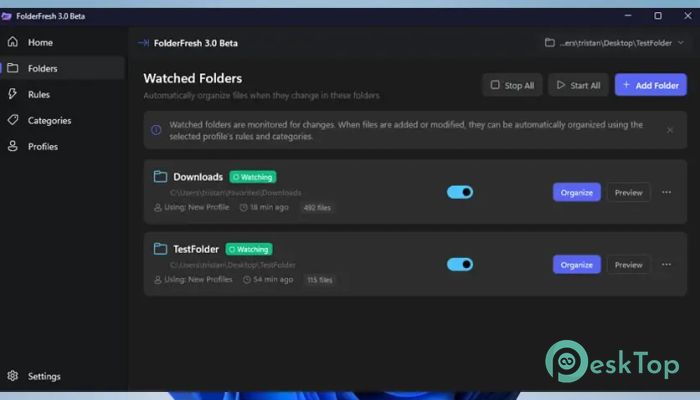
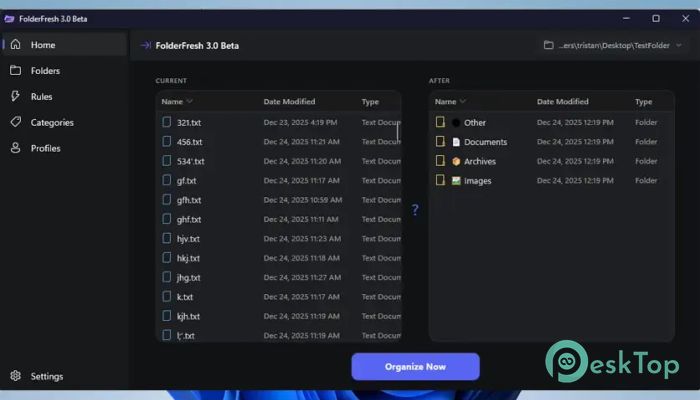
The tool automatically sorts files into clear categories, including Documents, Images, Videos, Audio, Archives, Code, and Others. The moment a file lands in a watched folder, it is moved to the right place. No delays, no clicks, and no confusion. Everything stays easy to find.
Rule-Based Automation Explained
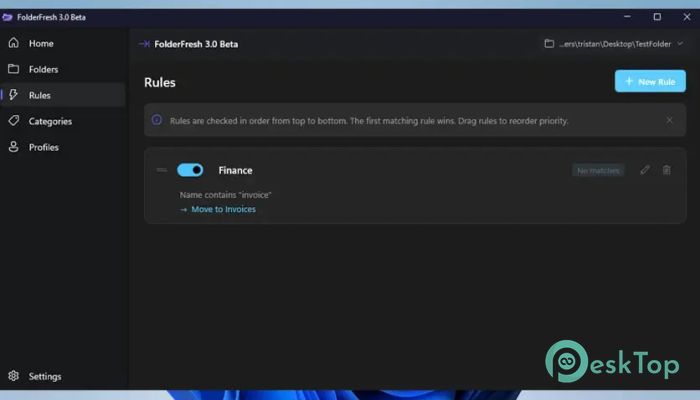
Rules are the heart of how it works. You can define conditions based on file type, name, size, or even custom patterns. Once a rule is active, the software follows it every time. It feels like setting traffic signals for your files so they always move in the right direction.
Safe and Reversible Actions
Nothing is ever deleted. All actions are safe and fully reversible. If you change your mind or want to undo a sorting action, you can do it without stress. This makes it perfect for users who want automation without risking important data.
Real-Time Processing
The moment a new file appears, the system reacts instantly. There is no need to press a button or run a scan. It works in real time, keeping folders clean. This real-time approach saves hours over the long run.
Perfect for Power Users and Developers
For advanced users, this software feels like a toolbox. Developers can automatically keep project folders organized, while power users can maintain structured download or work directories. It adapts easily to complex workflows without slowing things down.
Simple Interface with Deep Control
Even with advanced features, the interface stays friendly. You do not need to be an expert to start. Basic users can rely on default categories, while experienced users can dive deeper and fine-tune every rule to match their habits.
Improves Productivity
Clutter wastes time. By automatically organizing folders, the tool helps you focus on real work rather than searching for files. It is like cleaning your desk once and never having to do it again.
Lightweight and Efficient
The software is small and runs smoothly in the background. It does not slow down your system or consume heavy resources. You get powerful automation without sacrificing performance.
Use Cases in Daily Life
It works great for download folders, office documents, media libraries, and coding projects. Students, professionals, and creators can all benefit from automatic organization that stays out of the way.
System Requirements and Technical Details
Operating System: Windows 11 / 10 / 8.1 / 7
Processor: Minimum 1 GHz Processor (2.4 GHz recommended)
RAM: 2GB (4GB or more recommended)
Free Hard Disk Space: 200MB or more is recommended

-
Program size47.65 MB
-
Version3.0.3
-
Program languagemultilanguage
-
Last updatedBefore 3 Month
-
Downloads71Ralated programs
![Operant Peak Spectroscopy]() Operant Peak Spectroscopy
Operant Peak Spectroscopy ![NeverWrite]() NeverWrite
NeverWrite![FluentCleaner]() FluentCleaner
FluentCleaner![Snippai]() Snippai
Snippai![ChillShot AI]() ChillShot AI
ChillShot AI![Splunk Enterprise]() Splunk Enterprise
Splunk Enterprise
 Operant Peak Spectroscopy
  NeverWrite
 FluentCleaner
 Snippai
 ChillShot AI
 Splunk Enterprise