
 Arabic
  English
  Turkish
  Chinese
  Japanese
  Russian
  Spanish
  German
  French
  Hindi
Hindi Download Hardware Info 1.0 for Windows
Download Hardware Info 1.0 for Windows.
Hardware Info Overview
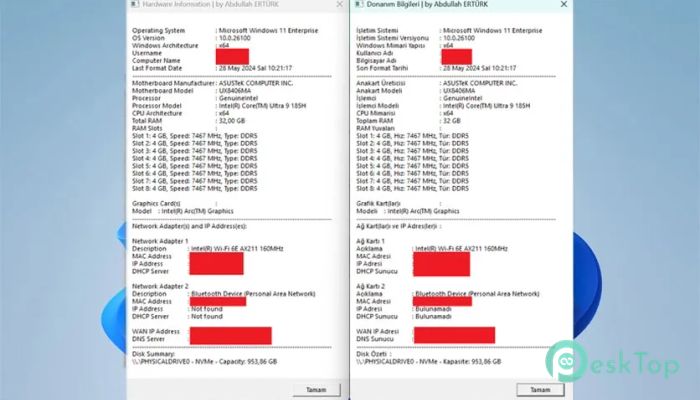
If you’ve ever wanted a quick snapshot of your computer’s internal components without installing heavy tools, this solution makes it incredibly easy. It uses a lightweight script file, typically in VBScript or BAT format, to gather all system details using built-in Windows commands. Think of it like opening a window into your PC’s brain, where everything from the processor to the storage is neatly displayed. The beauty of this approach is its simplicity. No downloads, no setup, and no clutter. Just run the script, and within seconds, you get a clear overview of your machine’s configuration. It’s perfect for beginners who want to understand their system and for advanced users who need quick diagnostics.Features of Hardware Info
Simple and Lightweight Design
One of the biggest advantages is its lightweight design. Unlike bulky software that consumes system resources, this tool has minimal impact. It relies entirely on Windows' built-in commands, which means it doesn’t slow down your PC or run background services.
You can carry it on a USB drive and use it on any system without installation. It’s like having a portable system inspector in your pocket, ready to give insights anytime you need them.
Operating System Information
The script provides detailed information about your operating system. It shows the Windows version, system architecture, and even the last time your system was formatted. This helps you quickly identify whether your OS is up to date or needs attention.
Knowing your system type is also useful when installing new programs or drivers. You won’t have to guess whether your system is 32-bit or 64-bit because the tool tells you instantly.
Motherboard Details
The motherboard is the backbone of your computer, and this script provides clear information about it. It displays the manufacturer and model, helping you understand the hardware on which your system is built.
This can be especially useful when upgrading components or troubleshooting issues. Instead of opening your PC case, you can simply run the script and get the details right on your screen.
Processor Information
Your CPU is the engine of your system, and this solution reveals everything you need to know about it. It displays the processor model, manufacturer, and architecture in a clean, readable format.
This is helpful for gamers, developers, or anyone running demanding applications. You can easily check whether your processor meets the requirements for specific tasks or software.
RAM Configuration and Performance
Memory plays a crucial role in system performance, and the script doesn’t miss it. It displays the total RAM capacity, the number of installed modules, and even speed information.
This allows you to understand how your memory is being used. If your system feels slow, you can quickly see if upgrading RAM could make a difference.
Graphics Card Information
For those who care about visuals and performance, the graphics card details are very useful. The script shows the GPU brand, memory size, and driver version.
This information is important for gaming, video editing, and design work. It helps you ensure that your drivers are up to date and that your hardware can handle demanding tasks.
Network and IP Details
Networking information is also included, making it easier to understand your connection setup. It displays network adapter details, local IP addresses, and DNS and DHCP server information.
It even shows your WAN IP address, which is helpful when setting up remote connections or troubleshooting internet issues. It’s like having a mini network analyzer built into your script.
Disk and Storage Information
Storage details are clearly presented, including disk type such as HDD, SSD, or USB drives. It also shows capacity, giving you a full view of your storage setup.
This makes it easier to manage your files and plan upgrades. You can quickly see which drives are running low on space or identify the type of storage installed.
System Requirements and Technical Details
Operating System: Windows 11 / 10 / 8.1 / 7
Processor: Minimum 1 GHz Processor (2.4 GHz recommended)
RAM: 2GB (4GB or more recommended)
Free Hard Disk Space: 200MB or more is recommended

-
Program size497.23 KB
-
Version1.0
-
Program languagemultilanguage
-
Last updatedBefore 3 Month
-
Downloads21Ralated programs
![Operant Peak Spectroscopy]() Operant Peak Spectroscopy
Operant Peak Spectroscopy ![NeverWrite]() NeverWrite
NeverWrite![FluentCleaner]() FluentCleaner
FluentCleaner![Snippai]() Snippai
Snippai![ChillShot AI]() ChillShot AI
ChillShot AI![Splunk Enterprise]() Splunk Enterprise
Splunk Enterprise
 Operant Peak Spectroscopy
  NeverWrite
 FluentCleaner
 Snippai
 ChillShot AI
 Splunk Enterprise