
 Arabic
  English
  Turkish
  Chinese
  Japanese
  Russian
  Spanish
  German
  French
  Hindi
Hindi Download HDT4ALL v1.1 for Windows
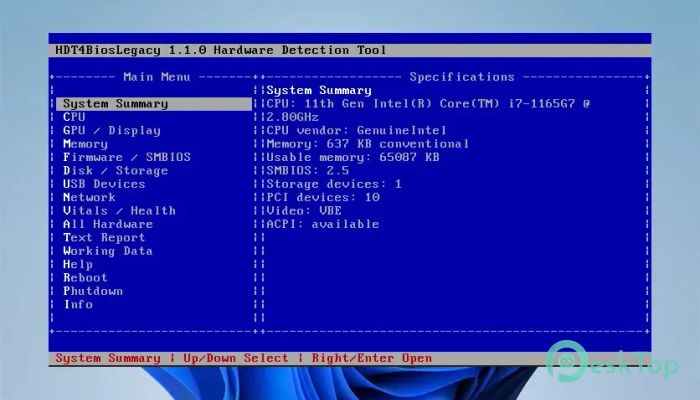
Download HDT4ALL v1.1 for Windows.
HDT4ALL Overview
It is a modern Hardware Detection Tool created to provide complete information about your computer before Windows even starts. Whether your PC uses UEFI or Legacy BIOS firmware, the software runs directly from a bootable USB drive, boot manager, or EFI partition. It is an excellent solution for technicians, system builders, and everyday users who want to inspect hardware without relying on an operating system. The tool works like a flashlight in a dark room. Instead of guessing what hardware is inside your computer, it quickly reveals every important component with detailed information. This makes troubleshooting, upgrading, or verifying hardware much easier and faster.Features of HDT4ALL
Boot Directly Without an Operating System
One of the biggest advantages of the software is its ability to work independently of Windows or Linux. Since it launches directly during the boot process, users can inspect hardware even if the installed operating system is damaged or refuses to start.
This approach makes the tool extremely useful for system recovery, hardware diagnostics, and maintenance. You simply boot from the supported media and immediately access detailed hardware information.
Supports Both UEFI and Legacy BIOS
The tool is designed to work on both modern and older computers. Whether your system uses UEFI firmware or the traditional Legacy BIOS, it provides the same reliable hardware detection experience.
Separate boot versions are available for each platform, allowing users to launch the appropriate edition directly from a USB drive, boot manager, or dedicated boot partition. This broad compatibility ensures that it remains useful across different generations of PCs.
Detailed Hardware Detection
The software scans almost every important component installed in your computer. Instead of showing only basic information, it provides detailed specifications that help users better understand their hardware configuration.
It displays complete information about the processor, memory modules, graphics hardware, storage devices, firmware, USB devices, network adapters, and many other important system components. Everything is organized in easy-to-read sections for quick navigation.
Complete Hardware Information
The program organizes detected information into several dedicated categories. Users can easily browse every section without feeling overwhelmed.
System summary
CPU specifications
GPU and display information
RAM details
Firmware and SMBIOS data
Disk and storage information
Connected USB devices
Network status and parameters
System health and available sensors
Complete hardware report
Working data information
Program details
This organized structure allows users to locate the required information within seconds.
Easy Navigation with the Main Menu
The software includes a simple menu that provides direct access to every available hardware section. Even users with limited technical knowledge can navigate the interface comfortably and without confusion.
The menu includes System Summary, CPU, GPU, and Display, Memory, Firmware, Disk and Storage, USB Devices, Network, System Health, Complete Hardware Report, Text Report, Working Data, Help, Reboot, Power Off, and Program Information. Everything is only a few keystrokes away.
Readable Hardware Databases
Hardware devices usually contain numeric identifiers that are difficult to understand. To solve this problem, the tool supports external hardware databases that convert these numbers into readable manufacturer and device names.
It supports databases such as pci.ids, usb.ids, acpi_id_registry.csv, and optional IEEE files. These databases can be updated manually by replacing the files inside the IDS directory. Since the software never downloads information from the Internet while running, users maintain complete control over their environment.
Generate Comprehensive Hardware Reports
Beyond displaying live information, the software can generate comprehensive hardware reports summarizing detected devices and system details. These reports are useful for documenting a computer's configuration before upgrades, repairs, or deployments.
Users can also create text reports that make it much easier to share hardware information with technical support or colleagues.
Useful for Technicians and Everyday Users
The tool is suitable for far more than professional repair shops. Home users can verify installed components before purchasing upgrades, while IT administrators can quickly inventory multiple systems.
Because everything works before the operating system loads, it becomes a dependable companion when diagnosing startup failures, checking replacement parts, or confirming hardware compatibility.
Works Well with SARDU
For users who prefer an easier setup, the software can also be launched through SARDU, where it is already included among the available system utilities. This simplifies the creation of a multi-purpose, bootable USB drive containing several maintenance and recovery tools.
Whether launched individually or through another boot environment, it delivers the same detailed hardware detection experience.
System Requirements and Technical Details
Operating System: Windows 11 / 10 / 8.1 / 7
Processor: Minimum 1 GHz Processor (2.4 GHz recommended)
RAM: 2GB (4GB or more recommended)
Free Hard Disk Space: 200MB or more is recommended

-
Program size26.56 MB
-
Versionv1.1
-
Program languagemultilanguage
-
Last updatedBefore 3 Month
-
Downloads22Ralated programs
![Operant Peak Spectroscopy]() Operant Peak Spectroscopy
Operant Peak Spectroscopy ![NeverWrite]() NeverWrite
NeverWrite![FluentCleaner]() FluentCleaner
FluentCleaner![Snippai]() Snippai
Snippai![ChillShot AI]() ChillShot AI
ChillShot AI![Splunk Enterprise]() Splunk Enterprise
Splunk Enterprise
 Operant Peak Spectroscopy
  NeverWrite
 FluentCleaner
 Snippai
 ChillShot AI
 Splunk Enterprise