
 Arabic
  English
  Turkish
  Chinese
  Japanese
  Russian
  Spanish
  German
  French
  Hindi
Hindi Download Heimer 4.5.0 for Windows
Download Heimer 4.5.0 for Windows.
Heimer Overview
This desktop application is designed for users who want to visualize ideas quickly without complex tools. It focuses on simplicity, speed, and clarity. Whether you're planning a project, studying a topic, or brainstorming ideas, it helps you map everything in a clean and structured way. Developed using the Qt framework, the software runs smoothly on Windows systems and offers a distraction-free experience. It is designed for beginners and advanced users alike, making it a perfect choice for anyone who needs a reliable diagramming tool without spending money.Features of Heimer
Simple and Clean Interface
One of the best things about this tool is its easy-to-use interface. You don’t need any prior experience to get started. Everything is laid out clearly, so you can jump right in and start creating mind maps.
It feels like using a digital whiteboard where you can freely place ideas. The design avoids clutter, allowing you to focus only on your thoughts rather than struggling with complicated menus.
Fast Performance and Smooth Experience
The software is built to be fast. It responds instantly to your actions, making the whole process feel smooth and natural. Whether you are adding nodes or connecting ideas, there is no delay.
This speed makes it perfect for brainstorming sessions where ideas come quickly. You won’t lose your flow because of lag or slow performance.
Flexible Grid and Layout Options
It includes an adjustable grid system that helps you neatly align your ideas. Think of it like graph paper that keeps everything organized.
On top of that, automatic layout optimization ensures your diagrams look clean with minimal effort. It rearranges elements smartly so your mind map stays readable and visually balanced.
Easy Node and Edge Creation
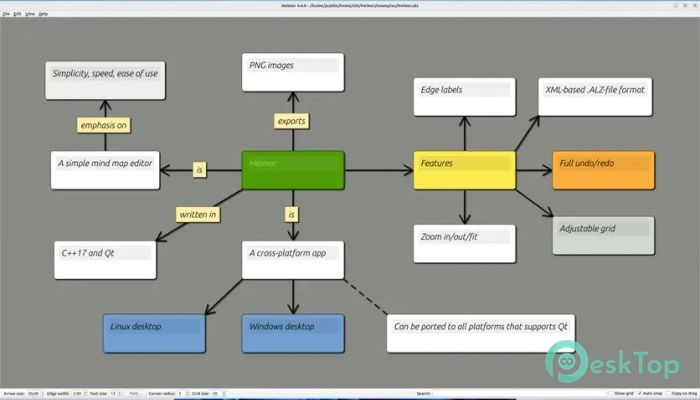
Adding new ideas is incredibly simple. You can quickly insert nodes and connect them with edges. Each node can contain text, and each connection can have labels, making it easy to explain relationships.
This feature is especially useful when you are building complex diagrams. It keeps everything understandable, even when your map grows large.
Autosave and Autoload Features
Ever lost your work due to a sudden shutdown? This tool solves that problem with autosave and autoload features. It automatically saves your progress, so you don’t have to worry.
When you reopen the application, your previous workloads are instantly restored. It feels like picking up exactly where you left off.
Export and File Support
The software allows you to export your diagrams as PNG or SVG files. This makes sharing your work easy, whether you want to include it in a presentation or send it to someone.
It also supports saving and loading files in an XML-based format. This ensures that your data is stored in a structured, reliable manner.
Undo and Redo Functionality
Mistakes happen, especially during creative work. Thankfully, this tool offers full undo and redo support. You can easily go back and fix anything without stress.
It’s like having a safety net that lets you experiment freely without worrying about breaking your design.
Zoom and Navigation Controls
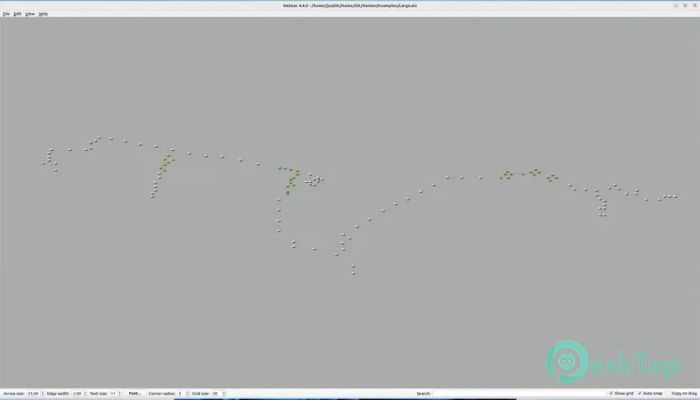
Navigating large diagrams is effortless thanks to zoom controls. You can zoom in for details or zoom out to see the bigger picture.
Using the mouse wheel for zooming feels natural and intuitive, making it easier to explore your mind map without losing context.
Multi-Language Support
This application supports multiple languages, including English, French, German, Spanish, and more. This makes it accessible to users from different regions.
Having language options improves usability and ensures that more people can benefit from its features.
Lightweight and Completely Free
Unlike many other tools, this one is completely free. There are no hidden costs or premium features locked behind paywalls.
It is also lightweight, meaning it doesn’t take up much space or slow down your system. You get a powerful tool without sacrificing performance.
Perfect for Multiple Use Cases
This tool can be used in many ways. Students can use it for studying, professionals for planning projects, and creators for brainstorming ideas.
It works like a digital notebook, where your thoughts are visually connected. This makes understanding and remembering information much easier.
Animations and Visual Appeal
The software includes subtle animations that enhance the experience. These animations are not distracting but add a smooth feel to your workflow.
It’s like having a polished interface that reacts naturally to your actions, making the tool feel modern and engaging.
System Requirements and Technical Details
Operating System: Windows 11 / 10 / 8.1 / 7
Processor: Minimum 1 GHz Processor (2.4 GHz recommended)
RAM: 2GB (4GB or more recommended)
Free Hard Disk Space: 200MB or more is recommended

-
Program size14.36 MB
-
Version4.5.0
-
Program languagemultilanguage
-
Last updatedBefore 3 Month
-
Downloads9Ralated programs
![Operant Peak Spectroscopy]() Operant Peak Spectroscopy
Operant Peak Spectroscopy ![NeverWrite]() NeverWrite
NeverWrite![FluentCleaner]() FluentCleaner
FluentCleaner![Snippai]() Snippai
Snippai![ChillShot AI]() ChillShot AI
ChillShot AI![Splunk Enterprise]() Splunk Enterprise
Splunk Enterprise
 Operant Peak Spectroscopy
  NeverWrite
 FluentCleaner
 Snippai
 ChillShot AI
 Splunk Enterprise