
 Arabic
  English
  Turkish
  Chinese
  Japanese
  Russian
  Spanish
  German
  French
  Hindi
Hindi Download iBeesoft Disk Partition Wizard 3.5.0 for Windows
Download iBeesoft Disk Partition Wizard 3.5.0 for Windows.
iBeesoft Disk Partition Wizard Overview
Managing storage can feel like organizing a messy room. Without the right tool, things get confusing fast. This software steps in like a smart organizer, helping you organize, resize, and free up disk space without risking your data. It combines multiple advanced features into one clean interface, making it suitable for both beginners and experienced users. It is designed to improve system performance while keeping your files safe. Whether you want to resize partitions, recover lost data, or migrate your operating system, the tool makes everything smooth and simple. With more than 40 practical functions, it covers almost every disk management need in one place.Features of iBeesoft Disk Partition Wizard
All-in-One Disk Management Solution
Instead of using multiple tools for different tasks, this software puts everything under one roof. Think of it like a Swiss army knife for your hard drive. From basic partition adjustments to advanced disk conversions, everything is available with just a few clicks.
It helps users avoid complicated technical steps and offers a clean workflow. You do not need to be an expert to handle complex operations such as cloning or rebuilding the system's boot structure.
Partition Management Features
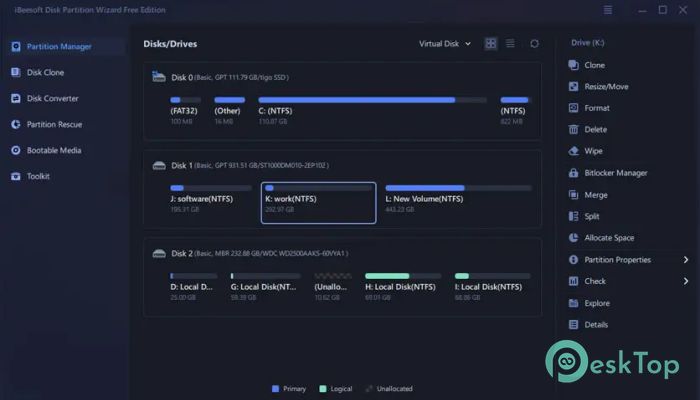
Partitions are like sections in a bookshelf. Keeping them organized ensures everything runs smoothly. This tool allows you to create, resize, merge, and split partitions without losing data.
You can easily expand or shrink partitions as needed. For example, if your system drive is running out of space, you can extend it without reinstalling anything. Similarly, large partitions can be divided into smaller ones for better organization.
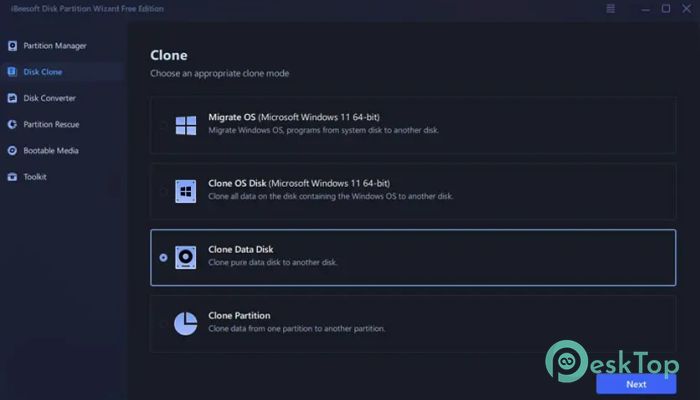
It also supports cloning partitions. This means you can copy everything from one partition to another while keeping the data intact. This is useful when upgrading or backing up your data.
Another standout feature is partition recovery. If a partition is deleted or damaged, the tool can restore it, including its contents. This gives users peace of mind when handling critical data.
Advanced Disk Management Capabilities
Beyond partitions, the software offers powerful disk-level operations. Disk cloning allows you to copy an entire hard drive to another. This is especially useful when upgrading to a new SSD or replacing old hardware.
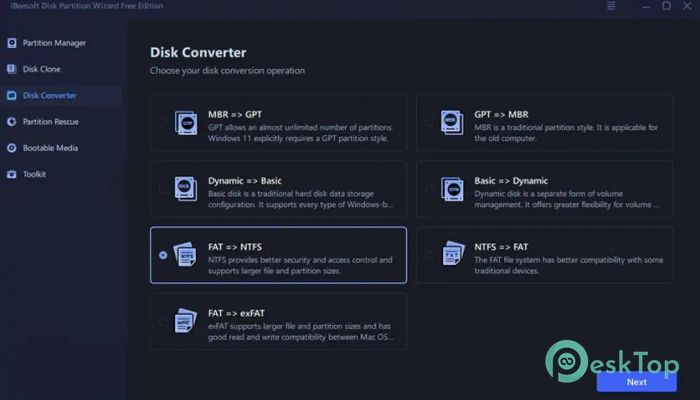
It also includes disk conversion features. You can switch between different disk types like MBR and GPT without losing data. This is important when setting up modern systems or working with large storage drives.
The MBR rebuild feature helps fix boot issues. If your system fails to start due to corruption, this function can repair it and get your computer running again.
Another helpful feature is bad sector scanning. It identifies damaged areas on your disk and prevents data from being written there. This protects your files and improves system stability.
File System Conversion Tools
Different file systems serve different purposes. This tool makes it easy to switch between them without having to format your drive.
You can convert FAT to NTFS for better security and support for larger files. On the other hand, converting NTFS to FAT can improve compatibility with older devices. It also supports conversion to exFAT, which works well across both Windows and macOS systems.
This flexibility ensures that your storage setup matches your needs, whether you are working with modern systems or legacy devices.
Operating System Management
Handling the operating system can be tricky, especially when moving it to a new drive. This software simplifies the process by allowing you to migrate your OS to another disk without reinstalling everything.
This is perfect when upgrading from a traditional hard drive to a faster SSD. It transfers the system, applications, and settings in a single step, saving time and effort.
It also lets you create bootable media. If your system fails to start, you can use a USB drive to boot into recovery mode and fix issues or recover important files.
Additional features include password resets, ISO creation, and boot option management. These tools make system management more flexible and reliable.
Performance Optimization Features
Performance matters, especially when dealing with large amounts of data. The software includes 4K alignment, which improves read and write speed. This is particularly useful for SSDs, as it enhances their efficiency and lifespan.
It also allows cluster resizing, helping you optimize how data is stored on your disk. This improves space usage and overall performance.
By combining these optimization tools, the software ensures your system runs smoothly and efficiently.
Ease of Use and Interface
One of the best things about the tool is its simplicity. The interface is clean and easy to navigate. Even if you are new to disk management, you will find it straightforward to use.
Each feature is clearly labeled, and operations are guided step by step. This reduces the chances of mistakes and makes the experience stress-free.
It feels like having a helpful assistant guiding you through every task, making complex processes feel simple and manageable.
System Requirements and Technical Details
Operating System: Windows 11 / 10 / 8.1 / 7
Processor: Minimum 1 GHz Processor (2.4 GHz recommended)
RAM: 2GB (4GB or more recommended)
Free Hard Disk Space: 200MB or more is recommended

-
Program size99.26 MB
-
Version3.5.0
-
Program languagemultilanguage
-
Last updatedBefore 4 Month
-
Downloads120
 Bravely Diskaroo
 DiskGenius Free
 Disk Pulse
 DiskGenius Professional
 Disk Sorter
 Hasleo Disk Clone Free