
 Arabic
  English
  Turkish
  Chinese
  Japanese
  Russian
  Spanish
  German
  French
  Hindi
Hindi Download iDruf Daily Task Planner 1.0 for Windows
Download iDruf Daily Task Planner 1.0 for Windows.
iDruf Daily Task Planner Overview
This tool is designed to bring clarity to your daily routine. Instead of juggling between apps, spreadsheets, and notes, it gathers everything into a single, clean, interactive workspace. It connects your tasks, projects, and calendar into a single flow, making planning feel less like work and more like a natural process. Think of it like a digital command center for your day. Everything you need is visible, flexible, and easy to adjust. Whether you are managing personal goals or professional deadlines, it helps you stay on track without feeling overwhelmed.Features of iDruf Daily Task Planner
Seamless Calendar Integration
One of the most useful features is its smooth connection with Google Calendar. You can link your account in seconds, and all your events appear instantly. The best part is that the sync works both ways. Any changes you make are updated automatically, keeping everything aligned.
This makes life easier because you do not need to switch between apps. Your meetings, reminders, and tasks live together in one place. It feels like having your entire schedule under one roof.
Multiple Views for Better Planning
The software offers different ways to view your schedule. You can switch between charts, agenda lists, calendar layouts, and summary views. Each view offers a unique perspective, helping you clearly understand your workload.
It is like looking at a map from different angles. Sometimes you need a close-up view, and sometimes a wide overview. This flexibility helps you plan smarter and avoid missing important details.
Drag-and-Drop Simplicity
Planning should feel natural, and that is exactly what this tool delivers. You can drag, drop, resize, and organize tasks with ease. It feels similar to moving objects on your desktop.
This simple interaction saves time and reduces frustration. Instead of typing and editing repeatedly, you can adjust your schedule in seconds. Every change is saved locally and synced automatically, giving you peace of mind.
Visual Project Management
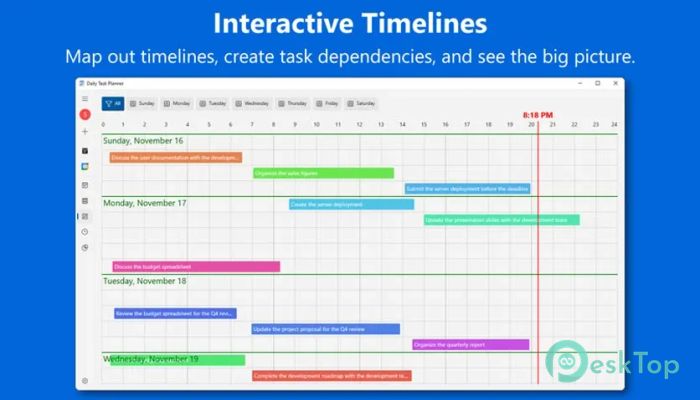
Managing projects becomes much easier when you can see everything clearly. This tool lets you map out timelines, define task dependencies, and see how each step connects to the next.
Imagine building a puzzle where each piece fits perfectly. You can zoom in to focus on details or zoom out to see the big picture. This balance helps you stay organized while keeping your goals in sight.
Hour-by-Hour Daily Timeline
The vertical 24-hour timeline is a standout feature. It shows your entire day in a structured format, making it easy to spot gaps and plan effectively.
You can instantly see when you are free or busy. A live indicator shows your current position in the day, helping you stay aware of time. It feels like having a personal guide that keeps you moving forward.
Monthly Overview at a Glance
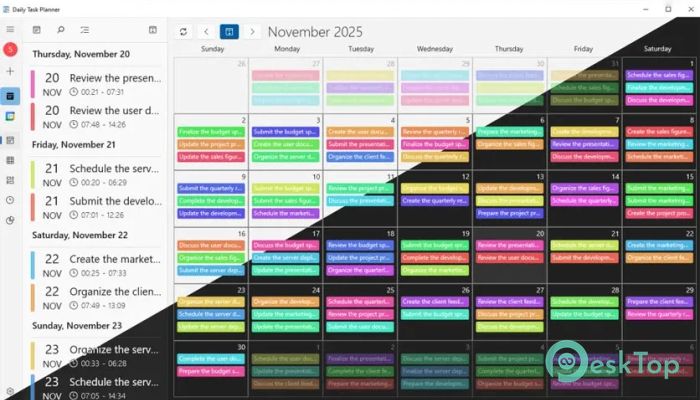
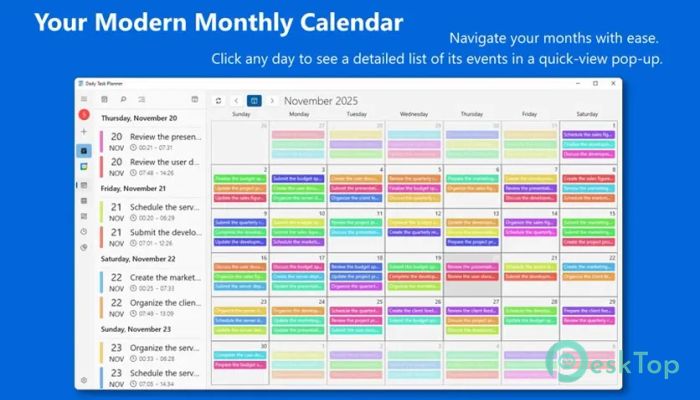
For long-term planning, the calendar view provides a clear monthly overview. Each day is marked with color-coded indicators that show how busy it is.
This makes it easy to identify heavy days and lighter ones. With a single click, you can view detailed tasks for any day. It helps you prepare in advance and avoid last-minute stress.
Unique Circular Clock View
The circular clock layout offers a fresh way to see your day. Instead of a standard list, your schedule is displayed like a clock, showing how time is distributed.
This visual approach makes it easier to understand how your day is structured. It is simple, intuitive, and surprisingly effective in helping you stay balanced.
Time Tracking and Insights
Understanding where your time goes is important. This tool automatically tracks your activities and generates reports. You can see how much time you spend on work, study, or personal tasks.
It turns guesswork into clear data. These insights help you improve your routine and make better decisions. Over time, you can build habits that align with your goals.
Clean and User-Friendly Interface
The interface is designed to be simple yet powerful. Everything is organized in a way that feels natural. Even if you are new to planning tools, you can get started quickly.
There are no unnecessary distractions. Every feature has a purpose, making the experience smooth and enjoyable. It feels like using a tool that truly understands your needs.
Offline and Cloud Support
Your data is stored locally, so you can access it even without an internet connection. At the same time, it syncs with the cloud to keep everything up to date.
This balance gives you flexibility and security. You can work from anywhere without worrying about losing your progress.
Perfect for Personal and Professional Use
Whether you are a student, freelancer, or working professional, this tool fits perfectly into your routine. It adapts to your needs and helps you stay organized.
It is like having a personal assistant that never forgets anything. From daily tasks to long-term projects, everything is handled smoothly.
System Requirements and Technical Details
Operating System: Windows 11 / 10
Processor: Minimum 1 GHz Processor (2.4 GHz recommended)
RAM: 2GB (4GB or more recommended)
Free Hard Disk Space: 200MB or more is recommended

-
Program size7.83 MB
-
Version1.0
-
Program languagemultilanguage
-
Last updatedBefore 3 Month
-
Downloads14Ralated programs
![Operant Peak Spectroscopy]() Operant Peak Spectroscopy
Operant Peak Spectroscopy ![NeverWrite]() NeverWrite
NeverWrite![FluentCleaner]() FluentCleaner
FluentCleaner![Snippai]() Snippai
Snippai![ChillShot AI]() ChillShot AI
ChillShot AI![Splunk Enterprise]() Splunk Enterprise
Splunk Enterprise
 Operant Peak Spectroscopy
  NeverWrite
 FluentCleaner
 Snippai
 ChillShot AI
 Splunk Enterprise