
 Arabic
  English
  Turkish
  Chinese
  Japanese
  Russian
  Spanish
  German
  French
  Hindi
Hindi Download Instant Text 1.0 for Windows

Download Instant Text 1.0 for Windows.
Instant Text Overview
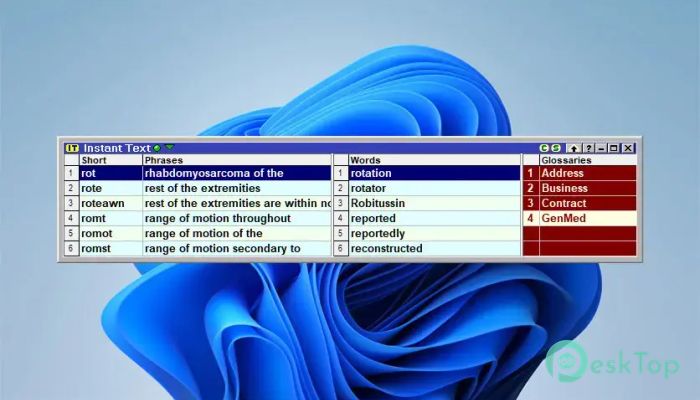
Writing long documents can often feel like climbing a mountain one step at a time. This software changes that experience by allowing users to type only a few letters and instantly expand them into complete words, phrases, or even entire paragraphs. It helps reduce repetitive typing and increases productivity in daily work. The tool is especially useful for professionals who create large amounts of text every day. Whether you work in medical transcription, legal documentation, proposal writing, or technical documentation, it helps save valuable time while maintaining accuracy.Features of Instant Text
Fast and Intelligent Text Entry
The software is built around the idea of speed. Instead of typing every word manually, users can create abbreviations that automatically expand into longer text. This makes document creation much faster and reduces the effort required to produce professional content.
Think of it as having a personal assistant sitting beside you. A few keystrokes can instantly generate entire sentences, allowing you to focus on ideas rather than repetitive typing tasks.
No Need to Memorize Complex Abbreviations
One of the most impressive features is its ability to work without forcing users to memorize hundreds of shortcuts. Traditional text expansion tools often require extensive learning before they become useful. This solution takes a smarter approach.
Analyzing your writing habits and frequently used terms provides suggestions and expansions that feel natural. This significantly reduces the learning curve and helps users become productive quickly.
Automatic Glossary Creation
The tool can examine existing documents and automatically create glossaries from commonly used words and phrases. This feature eliminates the need to manually build extensive shortcut libraries from scratch.
Once the glossary is created, users can reuse important content repeatedly with minimal typing. This is particularly beneficial for professionals who regularly work with standard templates, reports, and recurring terminology.
Sentence Continuation Technology
Another valuable capability is sentence continuation. The software can predict and suggest likely text based on previous content, helping users complete thoughts more quickly.
This feature feels similar to having an intelligent writing companion that understands your style and assists with document creation. It helps maintain workflow momentum and reduces interruptions while writing.
Perfect for Professional Documentation
Many industries rely heavily on repetitive text. Medical professionals often use standard terminology and report structures. Legal experts frequently prepare contracts, agreements, and case documents. Technical writers repeatedly use specialized phrases and descriptions.
The software simplifies these tasks by allowing commonly used content to be inserted instantly. This improves consistency while reducing the risk of typing errors.
Line Number Selection
The line number selection feature makes navigating and managing large text collections much easier. Users can quickly locate and select specific entries without wasting time searching through lengthy lists.
This functionality is particularly useful when working with extensive glossaries and large document libraries.
Formatted Entries Support
Maintaining document formatting is essential in professional environments. The tool supports formatted entries, ensuring that expanded text retains its intended appearance.
Whether you are working with styled documents, structured reports, or formatted templates, the software helps preserve a clean and professional look.
Useful Shortcuts and Speedmenus
The built-in shortcuts provide quick access to frequently used actions. When combined with Speedmenus, users can insert content quickly without interrupting their workflow.
These productivity enhancements act like express lanes on a busy highway, helping writers reach their destination faster and with less effort.
Space Bar Expansion and Smart Compilation
The space bar expansion feature automatically expands abbreviations when the space bar is pressed. This creates a smooth and natural typing experience that feels effortless.
Smart Compilation further improves efficiency by intelligently organizing and managing entries. It helps users maintain a well-structured glossary system even as their content library grows.
Customization and Easy Importing
Every user has unique preferences, and the software offers several customization options. Advisory windows can be resized easily, while fonts and colors can be adjusted to match individual needs.
The import capability allows users to quickly bring existing data into the system. This makes transitioning from other tools simple and convenient.
Improved Productivity and Accuracy
Speed is important, but accuracy matters just as much. By reducing repetitive typing, the software helps minimize mistakes and ensures consistent terminology throughout documents.
As a result, users can create high-quality content faster while spending less time on corrections and revisions.
System Requirements and Technical Details
Operating System: Windows 11 / 10 / 8.1 / 7
Processor: Minimum 1 GHz Processor (2.4 GHz recommended)
RAM: 2GB (4GB or more recommended)
Free Hard Disk Space: 200MB or more is recommended

-
Program size57.68 MB
-
Version1.0
-
Program languagemultilanguage
-
Last updatedBefore 4 Month
-
Downloads17Ralated programs
![Operant Peak Spectroscopy]() Operant Peak Spectroscopy
Operant Peak Spectroscopy ![NeverWrite]() NeverWrite
NeverWrite![FluentCleaner]() FluentCleaner
FluentCleaner![Snippai]() Snippai
Snippai![ChillShot AI]() ChillShot AI
ChillShot AI![Splunk Enterprise]() Splunk Enterprise
Splunk Enterprise
 Operant Peak Spectroscopy
  NeverWrite
 FluentCleaner
 Snippai
 ChillShot AI
 Splunk Enterprise