
 Arabic
  English
  Turkish
  Chinese
  Japanese
  Russian
  Spanish
  German
  French
  Hindi
Hindi Download Irisdown Countdown Timer 2.0.17 for Windows
Download Irisdown Countdown Timer 2.0.17 for Windows.
Irisdown Countdown Timer Overview
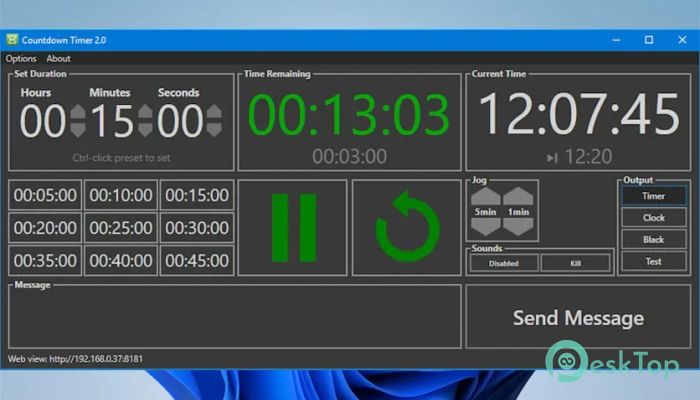
Timing is everything, especially during live productions, presentations, events, and broadcasts. A single second can make the difference between a smooth performance and a chaotic one. This is where this tool steps in. It provides a clean, simple interface that focuses on what truly matters: accuracy, visibility, and control. The software is built specifically for show operators by someone who understands real-world event requirements. That means no unnecessary clutter, no confusing controls, and no complicated setup. Instead, you get a reliable timer that displays time remaining, current time, and custom messages on a secondary display. Whether you are running a live show, managing stage cues, controlling presentations, or coordinating team workflows, the tool offers the flexibility you need. It also supports network control through external devices like Stream Deck using Bitfocus Companion, giving you remote control over timing and triggers.Features of Irisdown Countdown Timer
Simple and Intuitive Interface
The first thing you will notice is the clean and minimal interface. Everything is designed to be accessible without overwhelming the user. Unlike complex timing systems that require training, this solution works right away.
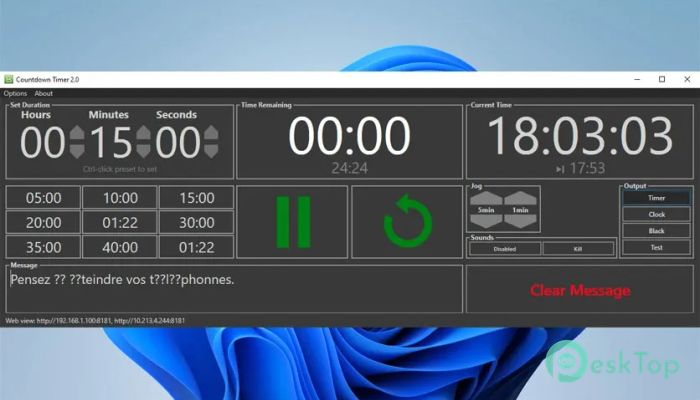
It focuses on essential controls. You get play, pause, reset, and jog buttons. That is it. But beneath this simplicity lies a powerful system capable of handling professional-level timing requirements.
This design approach makes it ideal for live events where quick action matters. Instead of searching through menus, you can control everything instantly.
Flexible Timer Controls
The timer control system is built for real-world use. Once started, it displays the time remaining, total elapsed time, and expected end time. This helps operators stay aware of progress without having to do mental calculations.
You can also adjust the time while the countdown is running. The jog buttons allow you to add or subtract time on the fly. This feature is extremely useful during live productions where schedules change frequently.
For example, if a speaker finishes early or an event runs late, you can adjust the timer instantly without restarting everything. It is like having a flexible clock that adapts to your workflow.
Preset Functionality
The preset system makes repeated timing tasks simple. You can save up to nine presets and load them instantly. This removes the need to manually enter time values every time.
For example, you might create presets for:
Presentation sessions
Break intervals
Performance segments
Countdown announcements
Technical setup Windows
These presets save time and reduce mistakes. Instead of entering values repeatedly, you just select the preset and start.
Secondary Display Support
One standout feature is the ability to display information on a secondary screen. This is incredibly useful in professional environments.
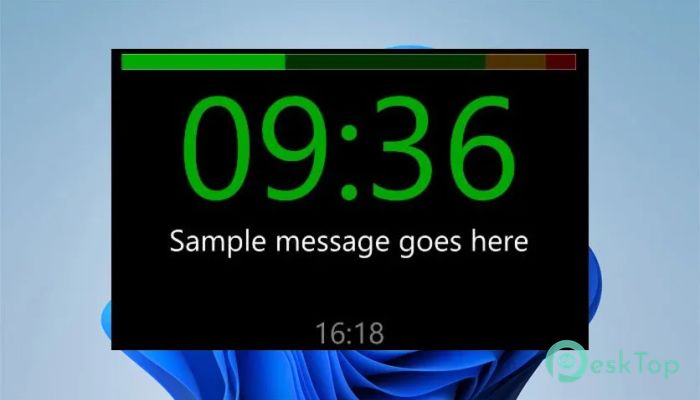
The secondary display can show:
Time remaining
Current system time
Custom messages
This means you can show countdown information to presenters, performers, or crew members without cluttering your main screen.
It works perfectly for stage monitors, backstage displays, or presentation screens. Think of it as a silent assistant that clearly communicates timing information.
Custom Message Display
The messaging feature allows you to send text directly to the secondary display. Messages briefly flash and then remain visible until cleared.
This can be used for:
Presenter reminders
Countdown notifications
Technical instructions
Stage cues
Break announcements
It adds another layer of communication without needing verbal instructions. This is especially helpful in quiet environments or live productions.
Audio Trigger Support
The audio trigger system allows you to play sound files at specific timer values. This creates automated cues that help keep everything on track.
For example, you can set sounds for:
5-minute warning
1-minute warning
End of session
Break start
Transition cues
This automation reduces manual work and improves timing accuracy. Instead of constantly watching the clock, you can rely on audio reminders.
Network Control Capability
The tool supports full network control via compatible controllers, such as Stream Deck with Bitfocus Companion. This opens the door for remote control functionality.
With network control, you can:
Start timer remotely
Pause timer remotely
Reset timer remotely
Trigger presets
Send messages
This feature is ideal for complex production environments where timing control needs to be shared across teams.
Designed for Show Operators
This solution was built by a show operator, which makes a big difference. The workflow reflects real-life scenarios rather than theoretical design.
Every feature feels purposeful. Nothing is added just for the sake of complexity. Instead, each function solves a real problem.
It is like having a timing assistant that understands how live productions actually work.
Lightweight Performance
The software runs smoothly without consuming heavy system resources. This makes it reliable even on older machines.
Because it is lightweight, you can run it alongside other production software without performance issues.
This reliability is essential during live events where stability matters most.
Professional Yet Easy to Use
The balance between simplicity and power makes this solution stand out. Beginners can start quickly, while professionals can access advanced features.
System Requirements and Technical Details
Operating System: Windows 11 / 10 / 8.1 / 7
Processor: Minimum 1 GHz Processor (2.4 GHz recommended)
RAM: 2GB (4GB or more recommended)
Free Hard Disk Space: 200MB or more is recommended

-
Program size26.54 MB
-
Version2.0.17
-
Program languagemultilanguage
-
Last updatedBefore 3 Month
-
Downloads16Ralated programs
![Operant Peak Spectroscopy]() Operant Peak Spectroscopy
Operant Peak Spectroscopy ![NeverWrite]() NeverWrite
NeverWrite![FluentCleaner]() FluentCleaner
FluentCleaner![Snippai]() Snippai
Snippai![ChillShot AI]() ChillShot AI
ChillShot AI![Splunk Enterprise]() Splunk Enterprise
Splunk Enterprise
 Operant Peak Spectroscopy
  NeverWrite
 FluentCleaner
 Snippai
 ChillShot AI
 Splunk Enterprise