
 Arabic
  English
  Turkish
  Chinese
  Japanese
  Russian
  Spanish
  German
  French
  Hindi
Hindi Download Kazutaka Senaga SenagaTimeMiru 1.0 for Windows
Download Kazutaka Senaga SenagaTimeMiru 1.0 for Windows.
Kazutaka Senaga SenagaTimeMiru Overview
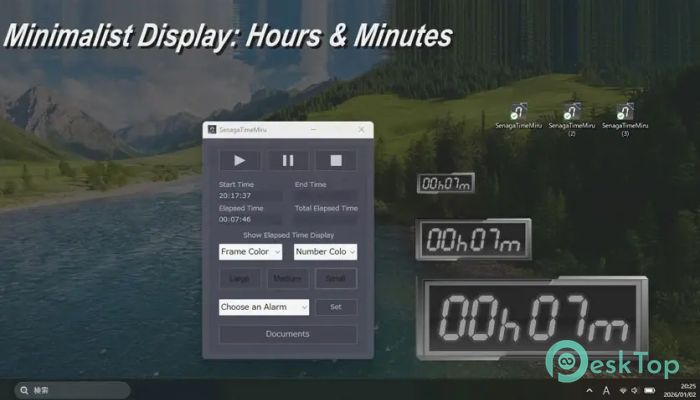
This handy utility focuses on one simple idea: tracking elapsed time without behaving like a traditional clock. It does not show the current hour or date. Instead, it stays focused on counting time forward, making it ideal for users who care about duration rather than schedules. Think of it like a digital kitchen timer that lives quietly on your screen and never gets in the way.Features of Kazutaka Senaga SenagaTimeMiru
Designed for Distraction-Free Time Tracking
The software keeps things clean and minimal. There are no crowded menus or confusing options. You open it, start the timer, and instantly see time passing. This simplicity makes it feel natural, especially for people who want quick answers, like how long a task took or how much time has passed during a session.
Always-On-Top Floating Display
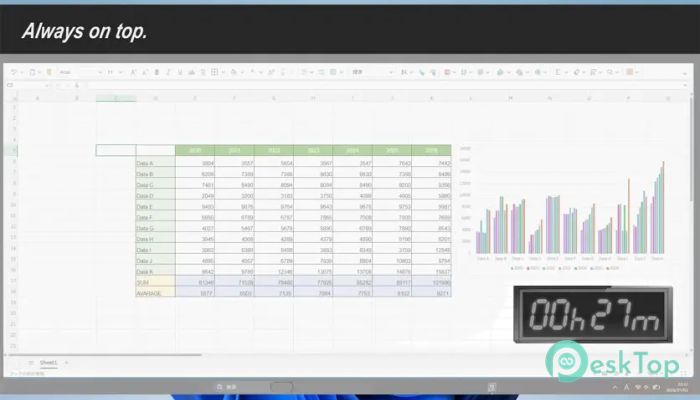
One of its most useful features is the always-on-top floating window. This means the timer stays visible above all other windows. While gaming, streaming, editing videos, or working on detailed projects, the display never disappears. It feels like a sticky note on your screen, quietly keeping count for you.
Easy Start, Pause, and Stop Controls
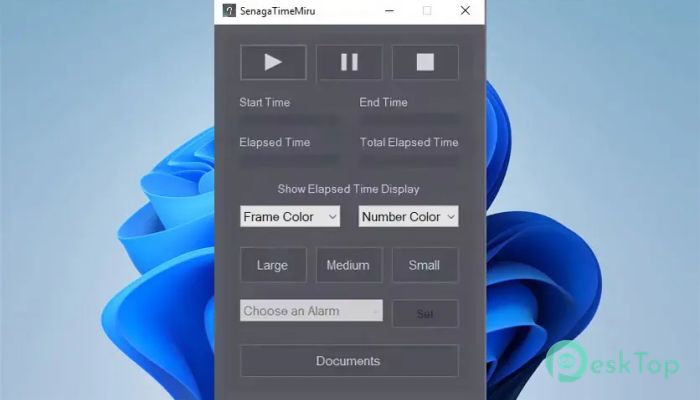
Using it is as simple as pressing a button. You can start timing with a single click, pause it when needed, and stop it when you are done. There is no learning curve. It works like a physical stopwatch, without the need to pick anything up from your desk.
Copy Elapsed Time Instantly
When the timer is paused, the measured duration can be copied directly from the text box. This is especially helpful for logging work hours, tracking speedrun attempts, or saving task durations into reports. Instead of writing numbers manually, you can copy and paste the exact value in seconds.
Useful Alarm Function
Beyond simple measurement, it also includes an alarm feature. You can set a specific number of minutes, and once that time is reached, a message window appears. At the same time, background music plays to grab your attention. It works like a gentle tap on the shoulder when time is up.
Perfect for Gaming and Streaming Sessions
For gamers and streamers, knowing how long a session has been running is important. The floating display makes it easy to track playtime without opening overlays or checking external tools. It is like having a silent referee counting every second in the background.
Helpful for Focused Work and Productivity
During work, especially deep-focus tasks, it helps track how long you stay locked in. Writers, developers, and designers can measure effort without breaking concentration. Since it does not show the current time, it avoids the stress of deadlines and keeps attention on progress.
Lightweight and System-Friendly
The software runs smoothly without putting pressure on system resources. It opens fast, consumes minimal memory, and stays responsive even during long sessions. This makes it suitable for both older systems and modern setups.
Clean Interface with Practical Behavior
Everything is placed where you expect it to be. Buttons respond instantly, text is easy to read, and the floating window remains subtle. It feels like a simple tool that respects your workflow instead of demanding attention.
Reliable Time Measurement for Everyday Use
Whether you are timing study sessions, workouts, or creative tasks, it delivers consistent results. There are no unnecessary features trying to impress you. It sticks to what matters and does it well.
System Requirements and Technical Details
Operating System: Windows 11 / 10
Processor: Minimum 1 GHz Processor (2.4 GHz recommended)
RAM: 2GB (4GB or more recommended)
Free Hard Disk Space: 200MB or more is recommended

-
Program size13.49 MB
-
Version1.0
-
Program languagemultilanguage
-
Last updatedBefore 8 Month
-
Downloads2Ralated programs
![Operant Peak Spectroscopy]() Operant Peak Spectroscopy
Operant Peak Spectroscopy ![NeverWrite]() NeverWrite
NeverWrite![FluentCleaner]() FluentCleaner
FluentCleaner![Snippai]() Snippai
Snippai![ChillShot AI]() ChillShot AI
ChillShot AI![Splunk Enterprise]() Splunk Enterprise
Splunk Enterprise
 Operant Peak Spectroscopy
  NeverWrite
 FluentCleaner
 Snippai
 ChillShot AI
 Splunk Enterprise