
 Arabic
  English
  Turkish
  Chinese
  Japanese
  Russian
  Spanish
  German
  French
  Hindi
Hindi Download Keyboard Sounds Pro 0.3.2 for Windows
Download Keyboard Sounds Pro 0.3.2 for Windows.
Keyboard Sounds Pro Overview
Typing on a standard keyboard can sometimes feel dull, especially if you enjoy the satisfying clicks of mechanical keyboards. This tool solves that problem by adding realistic sound effects while you type or click your mouse. It turns an ordinary typing session into something that feels lively and engaging. The application works quietly in the background and reacts to every keystroke and mouse action. Instead of hearing silence, you get the pleasant click, clack, or tap sound of different keyboard styles. It is like giving your keyboard a new personality without buying new hardware. The tool is also cross-platform and lightweight, which means it runs smoothly on most computers without slowing anything down. Whether you are writing documents, coding, or chatting online, it adds a small but enjoyable layer of feedback to your daily work.Features of Keyboard Sounds Pro
Realistic Typing Experience
One of the most interesting aspects of the software is how it recreates the feel of mechanical keyboards through sound. Many people love the sound of mechanical switches, but not everyone owns such a keyboard. This tool bridges that gap by simulating the same experience.
Imagine typing on a quiet laptop keyboard, then suddenly hearing crisp clicks, like a mechanical setup. It feels almost like upgrading your keyboard without spending money. The audio feedback makes typing feel more responsive and satisfying.
For writers, programmers, or students who spend hours typing, this small detail can actually make work more enjoyable. It brings a bit of personality to the otherwise silent act of typing.
Built-In Sound Profiles
The software includes 20 ready-to-use sound profiles designed for keyboard and mouse actions. Each profile represents a different typing style or sound pattern. Some mimic classic mechanical keyboards, while others produce softer, quieter sounds.
Switching between profiles is very simple. You can experiment with different sound types and instantly hear the change as you type. It feels similar to choosing a ringtone for your phone, except here you are customizing the sound of your keyboard.
These built-in profiles make it easy for beginners to start using the tool without creating their own settings.
Custom Sound Profile Editor
While the built-in sounds are great, the real magic appears when users begin customizing their own profiles. The application includes a built-in editor that allows you to create completely unique sound experiences.
You can import your own audio files and assign them to keyboard or mouse actions. The editor supports both WAV and MP3 formats, giving you a wide range of possibilities. Some users create soft typing sounds, while others prefer louder mechanical clicks.
This level of personalization means every user can design a typing environment that matches their taste.
Application-Specific Sound Rules
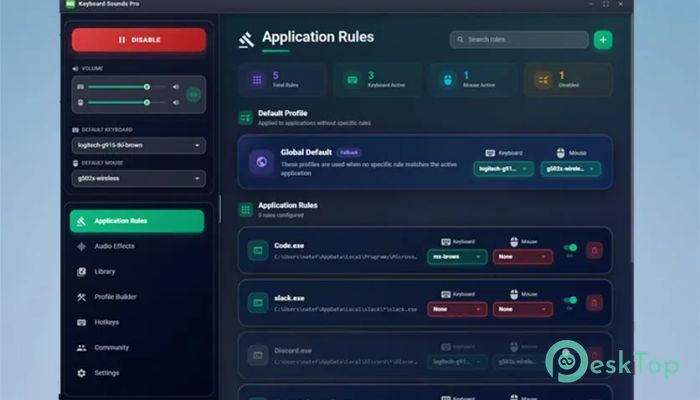
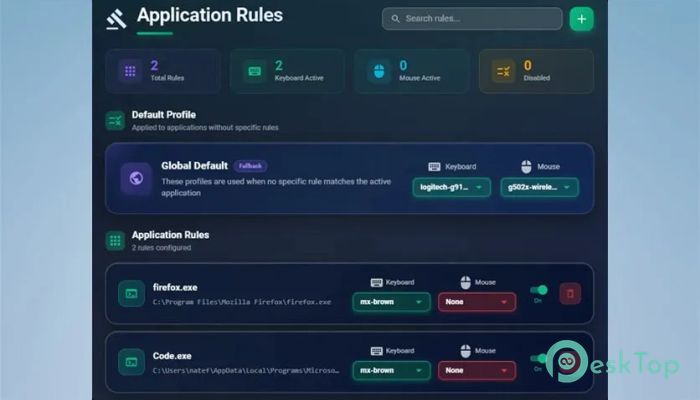
Another useful feature is the ability to assign different sound profiles to specific applications. For example, you could use one sound style while writing documents and another while coding or gaming.
This feature works like smart automation. The tool recognizes which application is active and automatically switches to the assigned sound profile. It helps maintain different moods for different tasks.
Think of it as having different sound themes for each activity on your computer.
Per-Device Volume Control
Audio control is another important part of the experience. The software allows separate volume adjustments for different devices or sound effects.
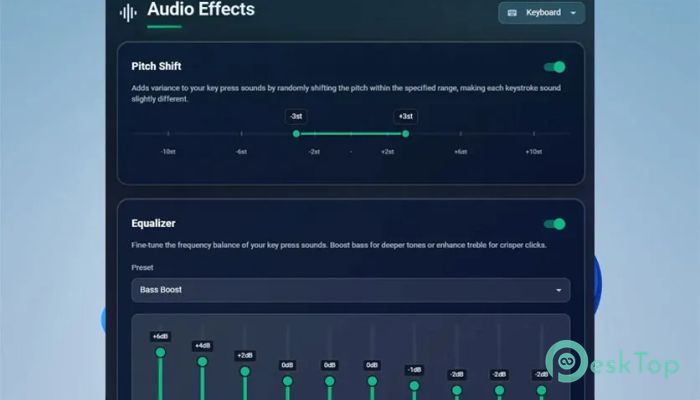
This means keyboard sounds can be louder while mouse clicks stay subtle, or vice versa. Users can also apply audio effects to enhance the sound quality.
Such flexibility ensures that the sounds remain enjoyable rather than become distracting.
Import and Export Profiles
The tool encourages creativity by allowing users to share their sound profiles with others. Profiles can be exported and imported easily.
This means someone can create a unique typing sound pack and share it with friends or online communities. In the same way, users can download others' profiles and try them instantly.
It turns the experience into a small creative ecosystem where people exchange ideas and sound styles.
Custom Hotkeys and Controls
Managing the application is easy thanks to customizable hotkeys. Users can assign keyboard shortcuts to control various features, such as enabling or disabling sound effects.
This makes it simple to toggle sounds while working or gaming without opening the main window. The controls feel quick and responsive, which helps keep the workflow smooth.
The tool also includes an on-screen keyboard shortcut display that shows which commands are available. This helps new users learn the shortcuts quickly.
Lightweight Performance
One of the best things about the software is its lightweight design. It runs quietly in the background and uses very little system resources.
This means it will not slow down your computer while you work, browse the web, or run other applications. Even older systems can handle it easily.
The small footprint makes it perfect for everyday use.
Creative Uses Beyond Typing
Although the tool is mainly designed for typing sounds, creative users often use it for fun experiments. Some assign playful sound effects to keys, turning typing into a mini musical experience.
Others use it while streaming or recording content so viewers can hear satisfying typing sounds during demonstrations or tutorials.
It is a small feature, but it adds personality and entertainment to the computer experience.
System Requirements and Technical Details
Operating System: Windows 11 / 10 / 8.1 / 7
Processor: Minimum 1 GHz Processor (2.4 GHz recommended)
RAM: 2GB (4GB or more recommended)
Free Hard Disk Space: 200MB or more is recommended

-
Program size8.19 MB
-
Version0.3.2
-
Program languagemultilanguage
-
Last updatedBefore 3 Month
-
Downloads18Ralated programs
![Operant Peak Spectroscopy]() Operant Peak Spectroscopy
Operant Peak Spectroscopy ![NeverWrite]() NeverWrite
NeverWrite![FluentCleaner]() FluentCleaner
FluentCleaner![Snippai]() Snippai
Snippai![ChillShot AI]() ChillShot AI
ChillShot AI![Splunk Enterprise]() Splunk Enterprise
Splunk Enterprise
 Operant Peak Spectroscopy
  NeverWrite
 FluentCleaner
 Snippai
 ChillShot AI
 Splunk Enterprise