
 Arabic
  English
  Turkish
  Chinese
  Japanese
  Russian
  Spanish
  German
  French
  Hindi
Hindi Download Kingshiper HEIC to JPG Converter 3.6.6 for Windows
Download Kingshiper HEIC to JPG Converter 3.6.6 for Windows.
Kingshiper HEIC to JPG Converter Overview
Managing HEIC images on Windows can sometimes feel like trying to open a locked door without the right key. While the HEIC format offers excellent image quality with smaller file sizes, many Windows applications still have limited support for it. This software solves that problem by converting HEIC images into popular formats such as JPG, PNG, and many others with just a few clicks. The tool is designed with simplicity in mind. Whether you have a handful of photos or thousands of images, it helps you convert them quickly without affecting the original quality. Just drag and drop your files, choose the output format, and start the conversion instantly.Features of Kingshiper HEIC to JPG Converter
Fast Batch Image Conversion
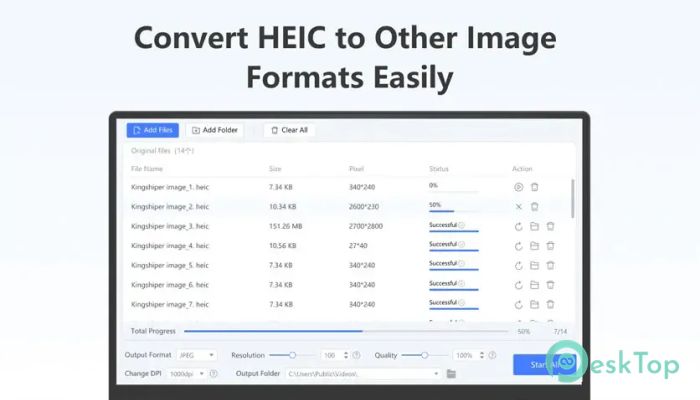
One of the biggest advantages of the software is its ability to process multiple images simultaneously. Instead of converting files one by one, you can add an entire folder and let the tool handle everything automatically.
This feature saves valuable time, especially for photographers, designers, office workers, and users who regularly transfer photos from smartphones to Windows computers. The conversion process is smooth, quick, and requires very little effort.
Convert HEIC Without Quality Loss
Image quality is often the biggest concern during file conversion. Fortunately, the tool preserves the original sharpness, colors, and fine details throughout the process. Your converted JPG or PNG images look almost identical to the originals.
This makes it perfect for personal photo collections, professional work, presentations, printing, or sharing images online without worrying about blurry or compressed results.
Supports Multiple Image Formats
Although it focuses on HEIC conversion, the software is much more versatile. It supports a wide range of popular image formats, allowing users to convert files according to different needs.
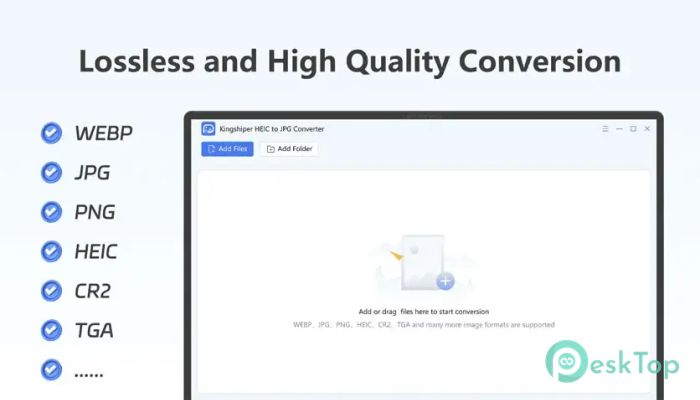
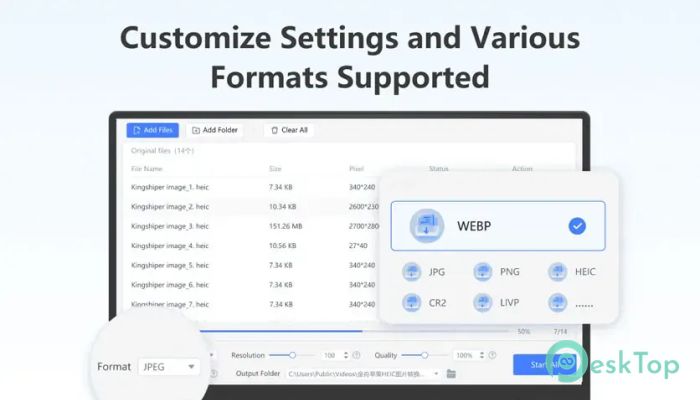
Supported formats include HEIC, Livp, WEBP, JPG, PNG, CR2, TGA, and many more. This flexibility means you don't need separate software for different image conversion tasks.
Simple Drag-and-Drop Interface
Using the software is as easy as moving files between folders. Simply drag your images into the program, select the desired output format, choose a destination folder, and click the Convert button.
The clean interface removes unnecessary options, making it suitable for beginners while still providing the speed and reliability experienced users expect.
Completely Offline Processing
Privacy is becoming more important than ever. Instead of uploading your personal images to an online server, the tool performs every conversion directly on your computer.
This local processing keeps your photos secure because no files leave your device. Whether you are working with family pictures, confidential documents, or business images, your data remains private throughout the entire conversion process.
Perfect for Windows Users
Many HEIC files captured on Apple or Android devices cannot be opened easily on Windows without installing additional codecs. The software removes this limitation by making your images compatible with almost every Windows application.
After conversion, you can edit, print, upload, or share your photos using common programs without worrying about compatibility issues.
Lightweight and Efficient Performance
The software is designed to use minimal system resources while delivering fast performance. It launches quickly, completes conversions efficiently, and runs smoothly even on older Windows computers.
Since it doesn't require powerful hardware, almost anyone can enjoy fast image conversion without slowing down the rest of their system.
Ideal for Personal and Professional Use
Whether you're organizing vacation photos, preparing images for a website, editing pictures for social media, or managing business documents, the software adapts to your workflow with ease.
Its combination of speed, reliability, privacy, and broad format support makes it a practical solution for students, professionals, photographers, office workers, and everyday users alike.
System Requirements and Technical Details
Operating System: Windows 11 / 10 / 8.1 / 7
Processor: Minimum 1 GHz Processor (2.4 GHz recommended)
RAM: 2GB (4GB or more recommended)
Free Hard Disk Space: 200MB or more is recommended

-
Program size30.68 MB
-
Version3.6.6
-
Program languagemultilanguage
-
Last updatedBefore 3 Month
-
Downloads14Ralated programs
![Operant Peak Spectroscopy]() Operant Peak Spectroscopy
Operant Peak Spectroscopy ![NeverWrite]() NeverWrite
NeverWrite![FluentCleaner]() FluentCleaner
FluentCleaner![Snippai]() Snippai
Snippai![ChillShot AI]() ChillShot AI
ChillShot AI![Splunk Enterprise]() Splunk Enterprise
Splunk Enterprise
 Operant Peak Spectroscopy
  NeverWrite
 FluentCleaner
 Snippai
 ChillShot AI
 Splunk Enterprise