
 Arabic
  English
  Turkish
  Chinese
  Japanese
  Russian
  Spanish
  German
  French
  Hindi
Hindi Download Kingshiper PC Cleaner 3.1.2 for Windows

Download Kingshiper PC Cleaner 3.1.2 for Windows.
Kingshiper PC Cleaner Overview
Keeping your computer fast is a lot like keeping your room clean. When unnecessary files pile up, everything starts to slow down. The software helps remove unwanted data, optimize storage, and improve system performance with just a few clicks. Whether your PC is running low on disk space or taking too long to start, it provides practical tools to restore speed and efficiency. Designed for everyday users, it scans the system for junk files, large files, unused applications, and memory-hungry processes. Instead of manually searching through folders, you can let the tool do the hard work and enjoy a smoother Windows experience.Features of Kingshiper PC Cleaner
Deep Cleanup for Better Performance
Over time, Windows collects temporary files, cache data, and leftover system files that serve no useful purpose. These files quietly consume storage and reduce performance.
The software performs a deep cleanup by identifying useless files across the system and safely removing them. This helps recover valuable disk space while keeping your computer running efficiently.
Clean and Optimize the C Drive
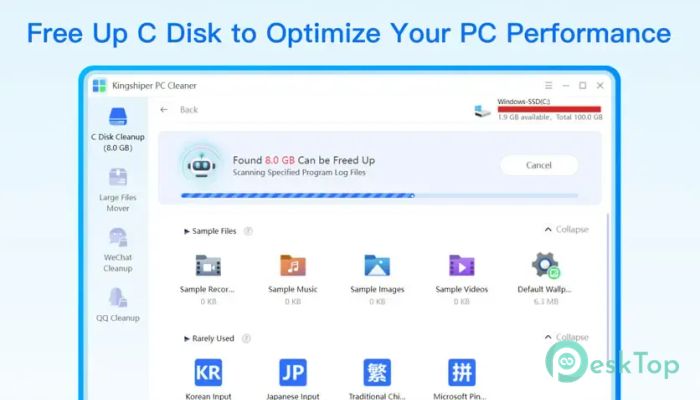
The C drive is where Windows stores important system files, installed programs, and temporary data. When it gets crowded, your computer may slow down and become less responsive.
The tool scans the C drive thoroughly, identifies unnecessary files, and removes them safely. Freeing storage on the primary drive improves system responsiveness and overall stability.
Powerful PC Booster
A slow startup can make every work session frustrating. Background programs and memory usage often increase boot time without users realizing it.
The software releases memory and optimizes resource usage to help speed up startup performance. Your PC feels lighter and more responsive without interrupting your current work.
Smart App Manager
Many computers contain applications that are rarely used or forgotten after installation. These programs occupy storage and may continue running in the background.
The built-in App Manager organizes installed software into categories such as recently installed, rarely used, and problematic applications. This makes it much easier to identify unnecessary programs and uninstall them when needed.
Move Large Files with Ease
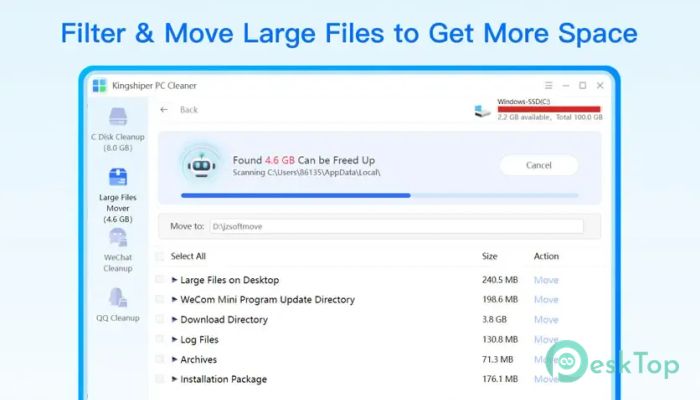
Large videos, backups, and downloaded files can quickly fill your storage drive. Finding these files manually often takes a lot of time.
The software automatically detects large files and folders, allowing you to move them safely to another drive. This simple feature helps free valuable space on the C drive without deleting important data.
Remove Junk Files Completely
Deleting an application doesn't always remove all the files it created. Hidden leftovers often remain on the system and slowly accumulate over time.
The tool scans for these remaining files and removes them safely. Cleaning these leftovers helps keep Windows organized while preventing unnecessary storage waste.
Monitor System Health
Maintaining a healthy computer starts with understanding what is consuming resources. The software performs a quick scan of the system to evaluate storage usage, application status, and overall health.
It provides useful information about disk space, unused programs, and areas that need optimization. This allows users to solve problems before they affect performance.
Detect High Resource Processes
Some background applications quietly consume large amounts of memory and processing power, making your computer feel slower.
The software detects resource-intensive processes without forcing you to close active programs. This gives you better control over system resources while maintaining a smooth workflow.
Simple Interface for Everyone
Not everyone is a computer expert, and system maintenance should not be complicated. The software features a clean interface with clearly organized tools and one-click actions.
Whether you want to clean junk files, manage applications, or optimize storage, everything is easy to find. Even beginners can improve their computer's performance without technical knowledge.
System Requirements and Technical Details
Operating System: Windows 11 / 10 / 8.1 / 7
Processor: Minimum 1 GHz Processor (2.4 GHz recommended)
RAM: 2GB (4GB or more recommended)
Free Hard Disk Space: 200MB or more is recommended

-
Program size107.12 MB
-
Version3.1.2
-
Program languagemultilanguage
-
Last updatedBefore 3 Month
-
Downloads36Ralated programs
![Operant Peak Spectroscopy]() Operant Peak Spectroscopy
Operant Peak Spectroscopy ![NeverWrite]() NeverWrite
NeverWrite![FluentCleaner]() FluentCleaner
FluentCleaner![Snippai]() Snippai
Snippai![ChillShot AI]() ChillShot AI
ChillShot AI![Splunk Enterprise]() Splunk Enterprise
Splunk Enterprise
 Operant Peak Spectroscopy
  NeverWrite
 FluentCleaner
 Snippai
 ChillShot AI
 Splunk Enterprise