
 Arabic
  English
  Turkish
  Chinese
  Japanese
  Russian
  Spanish
  German
  French
  Hindi
Hindi Download LinkRouter 3.0.1 for Windows
Download LinkRouter 3.0.1 for Windows.
LinkRouter Overview
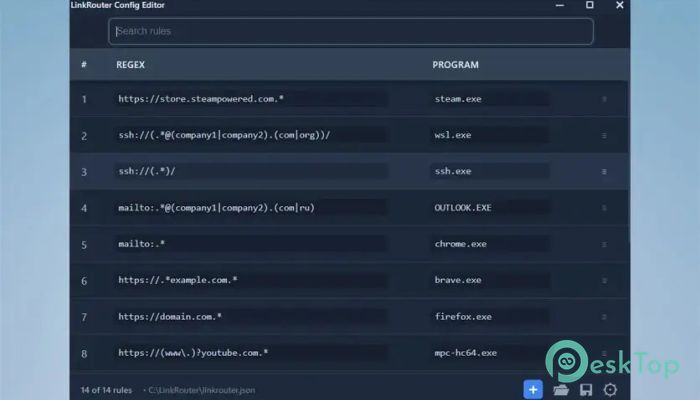
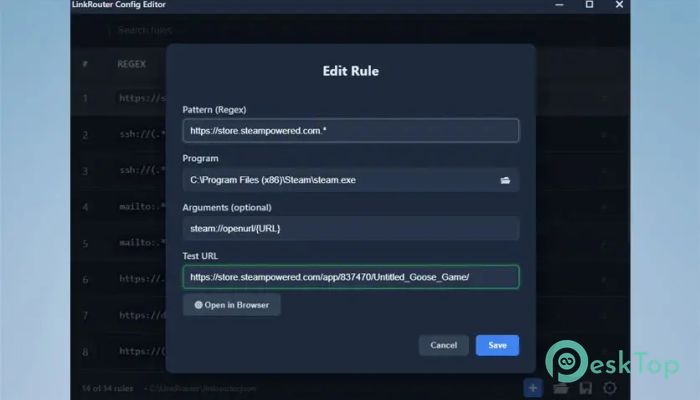
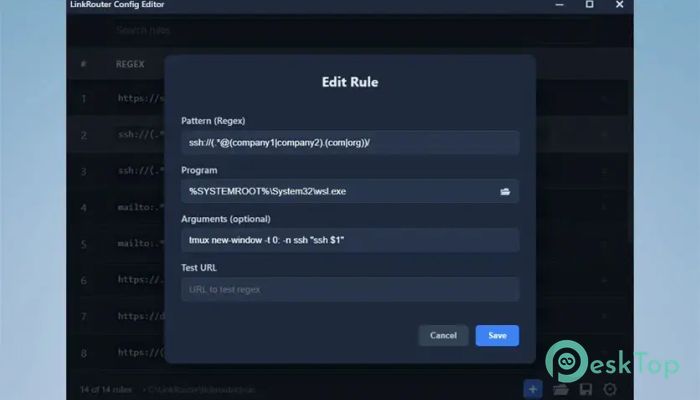
Managing links in Windows can sometimes feel limiting. By default, Windows allows only one application per protocol, such as http, https, or mailto. This can quickly become frustrating when you want different links to open in different apps or browsers. This is where this smart routing tool completely changes the experience. The software is designed to give users complete control over link handling. Instead of routing all links to one browser, it allows links to open in specific apps based on URL patterns. For example, Steam links open in Steam, Discord links open in Discord, and music links open in Spotify or Yandex Music automatically. What makes it even more powerful is its use of regex rules. These rules allow advanced users to create custom routing logic. At the same time, beginners can still use simple configurations through an easy interface. It works silently, efficiently, and without consuming system resources. Smart Link Routing Made Simple The tool works like a traffic controller for your links. Instead of sending every link to one destination, it intelligently decides where each link should go. This means you can open work-related links in one browser and personal links in another without manually switching. This approach saves time and improves workflow. Instead of manually copying and pasting links, everything happens automatically. The experience becomes smoother, especially for users who work with multiple apps and services daily. Open Links in Native Applications One of the most useful features is the ability to open links in native applications. Many services work better in their dedicated apps compared to browsers. With this routing solution, you can automatically open links directly in their intended applications. For example, Steam links open in Steam instead of the browser. Discord links launch Discord automatically. Music services open in their dedicated players. This makes the overall experience faster and more convenient. It also reduces unnecessary browser clutter. Instead of opening multiple tabs, links launch in the right apps instantly. This keeps your workspace clean and organized. Custom Routing with Regex Rules Advanced users will appreciate the powerful regex-based routing system. This allows detailed control over how links behave. You can create rules based on domain names, paths, or even specific parameters. For example, you can route company domains to a work browser while sending personal links to another browser. Sensitive links can automatically open in incognito mode. The flexibility is almost unlimited. This feature works like building your own intelligent routing map. Once configured, the tool automatically follows the rules and sends links to the correct destination. Handle Multiple Protocols Easily The software does not only handle https links. It also supports mailto, ssh, and other protocols. This makes it useful for developers, IT professionals, and advanced users. For example, email links from different companies can open in different email clients. SSH links can launch specific terminal applications. This level of customization helps streamline professional workflows. Instead of manually handling different link types, everything works automatically in the background. URL Reformatting with Capture Groups Another powerful feature is URL reformatting using capture groups. This allows users to modify links before launching them. For example, you can extract specific parts of a URL and use them in commands. This is especially useful for developers and advanced users. It provides deeper control over link behavior. The software becomes more than just a router. It becomes a flexible automation tool. Fallback to Default Browser Not every link needs a special rule. When no routing rule matches, the tool automatically sends the link to the default browser. This ensures smooth operation without breaking workflows. This fallback system works like a safety net. You never have to worry about links not opening properly. Everything continues to work naturally. Lightweight and Portable Design The tool is designed to be lightweight and efficient. It does not run in the background or consume system memory. It launches the target application and exits immediately. This fire-and-forget approach keeps your system fast. There is no constant background process. It only works when needed. Additionally, it supports portable usage. You can run it directly without installation. This makes it ideal for users who prefer minimal software footprints. Privacy Focused and Secure Privacy is a major advantage of this routing solution. It includes zero telemetry and no network access. This means your data stays on your system. Many modern applications collect usage data. This software avoids that completely. It focuses on functionality without tracking user activity. This makes it suitable for privacy-conscious users and professional environments. Companion Browser Extensions To improve compatibility, companion browser extensions are available. These extensions work with Chrome, Edge, Opera, and Firefox. Some are side-loadable while others are available in official stores. This ensures seamless link routing from browsers to applications. It enhances integration and improves overall performance. With extensions installed, link routing becomes even more reliable and smooth. Easy Configuration with GUI Editor Configuration is simple thanks to the built-in GUI editor. Users can create routing rules without complex commands. The interface is straightforward and easy to understand. Even beginners can set up rules quickly. Advanced users can dive deeper into regex options for more customization. This balance makes it suitable for both beginners and professionals.Features of LinkRouter
Smart URL routing using regex rules
Open links in native applications automatically
Supports multiple protocols, including https and mailto
Portable lightweight design
Zero telemetry and no network access
Companion browser extensions
Fallback to the default browser
Custom URL reformatting
Fire-and-forget execution
Easy GUI configuration editor
System Requirements and Technical Details
Operating System: Windows 11 / 10 / 8.1 / 7
Processor: Minimum 1 GHz Processor (2.4 GHz recommended)
RAM: 2GB (4GB or more recommended)
Free Hard Disk Space: 200MB or more is recommended
Comments

5.11 MB
Program details
-
Program size5.11 MB
-
Version3.0.1
-
Program languagemultilanguage
-
Last updatedBefore 3 Month
-
Downloads27
 Cyotek WebCopy
 Linphone
 Cinny
Cinny AllMapSoft Bing Maps Downloader
  AllMapSoft Yandex Maps Downloader
  AllMapSoft google earth images downloader