
 Arabic
  English
  Turkish
  Chinese
  Japanese
  Russian
  Spanish
  German
  French
  Hindi
Hindi Download Linwood Flow 1.0 for Windows
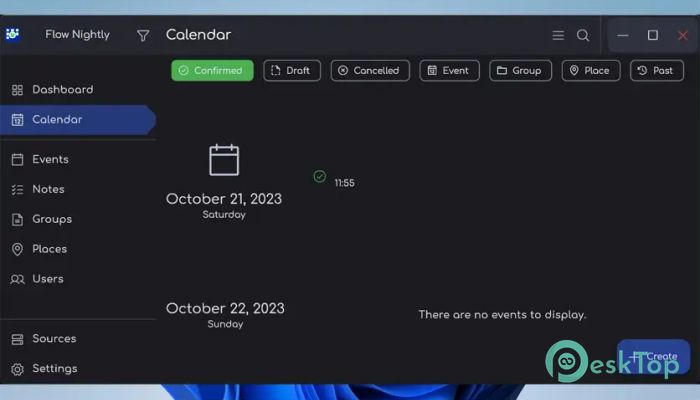
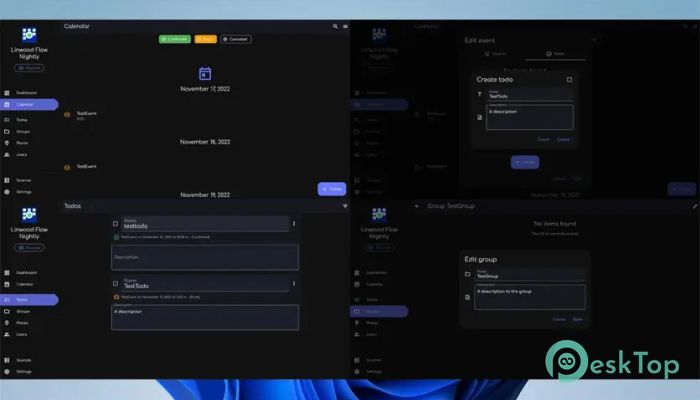
Download Linwood Flow 1.0 for Windows.
Linwood Flow Overview
Managing your daily schedule can sometimes feel like juggling too many balls at once. This tool makes the process smooth and stress-free by giving you a clean, organized way to handle events, people, and places. It is designed for users who want full control over their data while still enjoying a modern and user-friendly experience. The software is completely free and open source, which means you are not locked into any system. You decide where your data is stored, whether locally or on your own server. That kind of freedom makes it stand out from many other tools that limit your control.Features of Linwood Flow
Simple and Clean Interface
One of the first things you will notice is how clean and easy the interface feels. It does not overwhelm you with unnecessary options. Everything is laid out in a way that makes sense, even if you are new to such tools.
Think of it like walking into a well-organized room where everything is exactly where it should be. You can quickly find what you need without wasting time searching through menus.
Flexible Event Management
The tool allows you to create and manage events with great flexibility. You can group events, making it easier to handle categories like work, personal life, and special occasions.
This grouping feature works like folders for your life. Instead of mixing everything together, you can clearly separate tasks and stay focused on what matters most at any given moment.
Control Over Data Storage
Unlike many modern tools that store your information in unknown places, this one gives you full control. You can choose where your data lives and who has access to it.
This is especially useful if you value privacy. It is like keeping your personal diary in your own drawer rather than handing it to someone else.
Manage People and Places Easily
Another powerful feature is the ability to manage people and places connected to your events. You can assign participants and locations to each event, making your schedule more detailed and meaningful.
This makes planning easier, especially for meetings or gatherings. You can see who is involved and where everything is happening at a glance.
Open Source Advantage
Being open source means the software is constantly improving. Developers from around the world can contribute, fix bugs, and add new features.
This also means transparency. You can trust the tool because its code is open for anyone to inspect. It is like having a recipe where you can see every ingredient used.
Lightweight and Fast Performance
The software is designed to be lightweight, so it runs smoothly even on older systems. It does not consume too many resources, allowing you to multitask without slowing down your computer.
This makes it perfect for users who want efficiency without sacrificing performance.
Customizable Workflow
Everyone manages time differently, and this tool understands that. You can customize how you organize your events and how information is displayed.
It adapts to your style instead of forcing you to adapt to it. This flexibility makes it feel more like a personal assistant rather than just another application.
Perfect for Personal and Professional Use
Whether you are managing your daily routine or planning professional events, the tool fits both needs perfectly. It is suitable for individuals, small teams, or even larger groups.
You can use it to track meetings, deadlines, appointments, or even simple reminders. It keeps everything in one place so nothing slips through the cracks.
Easy Setup and Usage
Getting started is quick and simple. You do not need technical knowledge to begin using it. The setup process is straightforward, and you can start organizing your schedule within minutes.
This ease of use makes it accessible for everyone, from beginners to advanced users.
Secure and Reliable
Security is a key focus. Since you control your data, you can ensure it is stored safely. There are no hidden processes or unexpected data sharing.
System Requirements and Technical Details
Operating System: Windows 11 / 10 / 8.1 / 7
Processor: Minimum 1 GHz Processor (2.4 GHz recommended)
RAM: 2GB (4GB or more recommended)
Free Hard Disk Space: 200MB or more is recommended

-
Program size18.03 MB
-
Version1.0
-
Program languagemultilanguage
-
Last updatedBefore 7 Month
-
Downloads6Ralated programs
![Operant Peak Spectroscopy]() Operant Peak Spectroscopy
Operant Peak Spectroscopy ![NeverWrite]() NeverWrite
NeverWrite![FluentCleaner]() FluentCleaner
FluentCleaner![Snippai]() Snippai
Snippai![ChillShot AI]() ChillShot AI
ChillShot AI![Splunk Enterprise]() Splunk Enterprise
Splunk Enterprise
 Operant Peak Spectroscopy
  NeverWrite
 FluentCleaner
 Snippai
 ChillShot AI
 Splunk Enterprise