
 Arabic
  English
  Turkish
  Chinese
  Japanese
  Russian
  Spanish
  German
  French
  Hindi
Hindi Download Lispr 0.96 for Windows

Download Lispr 0.96 for Windows.
Lispr Overview
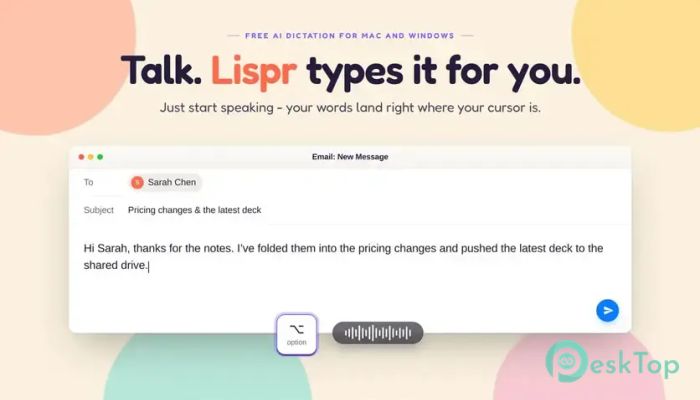
Voice typing has become one of the fastest ways to get work done, and this software takes that idea even further. Instead of switching between apps or copying text from one place to another, it lets you speak directly into almost any program. Whether you're writing emails, chatting with teammates, creating documents, or coding, everything appears exactly where your cursor is. Designed for speed and simplicity, the software runs quietly in the background without interrupting your workflow. Just hold the Right Ctrl key, start speaking, and your words are instantly converted into text. If you want to translate while speaking, it can do that too, making multilingual communication feel as natural as a conversation.Features of Lispr
Fast Voice Dictation
The tool makes voice typing feel effortless. Hold the Right Ctrl key, speak naturally, and your words instantly appear wherever your cursor is blinking. There is no need to open a separate window or paste text afterward.
Its quick response time keeps your thoughts flowing without breaking your concentration. Instead of waiting for processing, you simply speak and continue working.
Built-In Speech Translation
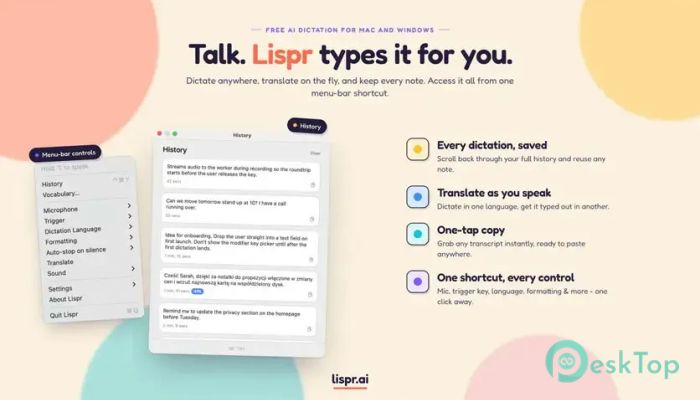
One of its most useful features is real-time translation while dictating. You can speak in your native language, and the translated text is inserted directly into the active application. This makes communicating with international clients, coworkers, or friends much easier.
The process feels smooth because translation happens almost instantly. You do not need to copy text into another translator or switch between browser tabs.
Regular Dictation Mode
Not every task requires translation. For everyday writing, the same push-to-talk shortcut works just as well as a standard dictation tool. Simply hold the key and start talking in your preferred language.
The software supports multiple languages while maintaining the same fast typing experience. This makes it suitable for writers, students, office workers, and professionals alike.
Custom Vocabulary Support
Every profession has unique words that ordinary speech recognition tools may not understand. This software solves that problem with a custom vocabulary feature.
You can add company names, client lists, technical terms, product names, programming identifiers, and other specialized words. The dictionary is respected during both dictation and translation, improving overall accuracy.
Works in Almost Any Application
The best part is its flexibility. If an application accepts keyboard input, this software can usually type there. Whether you are using Slack, Notepad, Microsoft Word, Google Docs, Terminal, Figma, Visual Studio Code, or your favorite browser, it works the same way.
There are no complicated integrations or plugins required. As long as a text cursor is available, your speech can become text instantly.
Lightning-Fast Performance
Speed is one of its biggest strengths. Dictation is completed in around 0.2 seconds, while translation usually takes about half a second. Instead of showing long loading animations or waiting screens, the typed text simply appears almost immediately.
This responsive performance makes long writing sessions feel natural and productive, almost like speaking directly onto the page.
Clipboard Protection
Many voice typing applications overwrite whatever you previously copied, which can be frustrating when working with important information. This tool avoids that problem by protecting your clipboard.
It temporarily inserts the dictated text and then restores whatever was copied before. Your copied images, code snippets, or documents remain safe while you continue working.
Lightweight and Distraction-Free
The software is designed to stay out of your way. It sits quietly in the system tray and requires only a small installation of around 8 MB. There are no unnecessary windows, advertisements, or subscription reminders interrupting your work.
Because of its minimal resource usage, it runs comfortably alongside other applications without slowing down your computer.
Simple Push-to-Talk Workflow
Using the software is refreshingly simple. Launch it once, let it run in the background, hold the Right Ctrl key whenever you want to speak, and release it when you're done. Everything is designed around speed and convenience.
This straightforward workflow reduces distractions and helps you stay focused on writing instead of managing software settings.
Perfect for Everyday Productivity
Whether you are replying to emails, writing reports, preparing documentation, chatting with teammates, or taking quick notes, the software helps you finish tasks much faster than typing manually.
Students can create assignments, developers can dictate code comments and documentation, business users can prepare emails, and multilingual professionals can communicate with clients from around the world without constantly switching between translation tools.
System Requirements and Technical Details
Operating System: Windows 11 / 10
Processor: Minimum 1 GHz Processor (2.4 GHz recommended)
RAM: 2GB (4GB or more recommended)
Free Hard Disk Space: 200MB or more is recommended

-
Program size10.86 MB
-
Version0.96
-
Program languagemultilanguage
-
Last updatedBefore 2 Month
-
Downloads29Ralated programs
![Operant Peak Spectroscopy]() Operant Peak Spectroscopy
Operant Peak Spectroscopy ![NeverWrite]() NeverWrite
NeverWrite![FluentCleaner]() FluentCleaner
FluentCleaner![Snippai]() Snippai
Snippai![ChillShot AI]() ChillShot AI
ChillShot AI![Splunk Enterprise]() Splunk Enterprise
Splunk Enterprise
 Operant Peak Spectroscopy
  NeverWrite
 FluentCleaner
 Snippai
 ChillShot AI
 Splunk Enterprise