
 Arabic
  English
  Turkish
  Chinese
  Japanese
  Russian
  Spanish
  German
  French
  Hindi
Hindi Download Microsoft Scout 0.23.578 for Windows


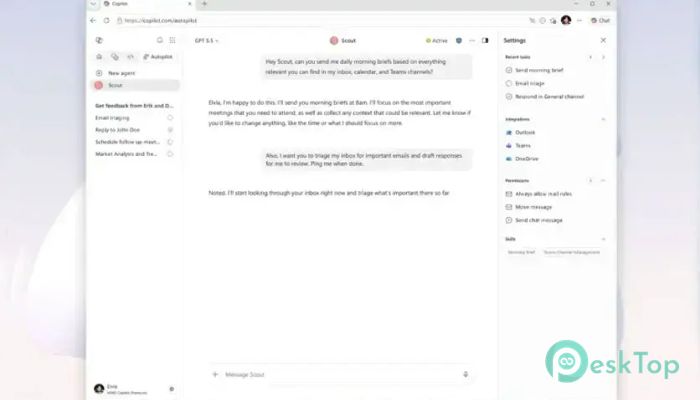
Download Microsoft Scout 0.23.578 for Windows.
Microsoft Scout Overview
It is a powerful desktop AI application designed to work directly on Windows computers. Unlike traditional chatbots that only provide answers, it can take real actions on your behalf. You simply describe what you want in a conversation, and it handles the work while keeping you in control through approval prompts for sensitive actions. The platform bridges the gap between artificial intelligence and real productivity. It can read and write files, execute shell commands, control web browsers, and connect with Microsoft 365 services. Think of it as a digital assistant that sits beside you, ready to help with everyday tasks, complex projects, and routine workflows.Features of Microsoft Scout
Desktop AI That Takes Action
Most AI tools stop after providing suggestions. The software goes a step further by actually performing tasks. Whether you need files organized, reports generated, browser actions completed, or commands executed, it can handle them directly from a simple chat request.
This action-oriented approach saves time and reduces repetitive work. Instead of switching between multiple applications, users can describe their goals and let the tool complete the required steps.
Local and Cloud Integration
One of its biggest strengths is the ability to work with both local and cloud-based resources. The application runs on your desktop and can access approved folders, files, and shell environments, and connect to your Microsoft 365 account.
This combination creates a seamless workflow. For example, it can modify project files, run a build process, prepare a report, send an email, and schedule a meeting without requiring separate tools. Everything happens within a single conversation.
Advanced File Management
Managing files becomes much easier with intelligent automation. The software can read documents, create new files, update existing content, and organize folders based on your instructions.
Instead of manually searching through directories, users can ask it to locate information, summarize content, or prepare files for sharing. It works like having a highly organized assistant that never loses track of important documents.
Shell Command Execution
For developers and power users, shell access opens up a wide range of possibilities. The tool can execute approved commands, automate development tasks, and help streamline technical workflows.
Whether compiling code, running scripts, checking logs, or performing maintenance tasks, it reduces the need for repetitive command-line work. This makes daily operations faster and more efficient.
Smart Browser Control
The application can also interact with web browsers to perform online tasks. It can open websites, gather information, complete workflows, and assist with web-based activities under user-approved permissions.
Imagine having a virtual assistant that can navigate websites for you while following your instructions. This capability helps automate many routine internet-related activities.
Granular Permission Controls
Security remains a key priority. The software includes a detailed permission system that allows users to decide exactly what actions can be performed.
Entire capability categories, such as file access, browser control, shell execution, and Microsoft 365 integration, can be enabled or disabled individually. Users can also specify which commands require approval and which can run automatically.
Sensitive folders and directories can be protected by requiring mandatory approval. This ensures that important data remains under the user's control at all times.
Autonomous Background Operations
One of the most interesting features is its autonomous operation mode. The Heartbeat feature allows periodic background check-ins every 15 to 120 minutes while the user is away.
These scheduled sessions can monitor tasks, check for updates, and automatically perform requested actions. It works like a dedicated employee who continues working even when you step away from your desk.
Powerful Automations
Automation capabilities allow users to schedule tasks or create condition-based triggers. Once configured, these workflows can execute independently without requiring constant supervision.
Routine activities such as report generation, file processing, reminders, and project updates can be handled automatically. This reduces manual effort and helps maintain productivity throughout the day.
Memory and Personalized Assistance
The software remembers preferences, decisions, and working styles across conversations. This memory feature enables it to provide increasingly personalized assistance over time.
Instead of repeating instructions for every task, users can rely on the system to remember previous choices and adapt accordingly. The result is a smoother and more natural experience.
Specialized Sub-Agent Delegation
Complex projects often require multiple tasks to run simultaneously. To handle this efficiently, the tool can launch specialized sub-agents that work in parallel.
Each sub-agent focuses on a specific responsibility and later reports its findings. This parallel processing approach can significantly improve efficiency when dealing with large workloads or complicated projects.
Improved Productivity and Collaboration
Modern work environments demand speed, accuracy, and flexibility. By combining automation, file management, browser control, Microsoft 365 integration, and intelligent memory, the software helps users accomplish more with less effort.
Whether used by developers, business professionals, project managers, or everyday users, it serves as a capable digital assistant that simplifies work and reduces repetitive tasks.
System Requirements and Technical Details
Operating System: Windows 11 / 10
Processor: Minimum 1 GHz Processor (2.4 GHz recommended)
RAM: 2GB (4GB or more recommended)
Free Hard Disk Space: 500MB or more is recommended

-
Program size289.50 MB
-
Version0.23.578
-
Program languagemultilanguage
-
Last updatedBefore 2 Month
-
Downloads61Ralated programs
![Operant Peak Spectroscopy]() Operant Peak Spectroscopy
Operant Peak Spectroscopy ![NeverWrite]() NeverWrite
NeverWrite![FluentCleaner]() FluentCleaner
FluentCleaner![Snippai]() Snippai
Snippai![ChillShot AI]() ChillShot AI
ChillShot AI![Splunk Enterprise]() Splunk Enterprise
Splunk Enterprise
 Operant Peak Spectroscopy
  NeverWrite
 FluentCleaner
 Snippai
 ChillShot AI
 Splunk Enterprise