
 Arabic
  English
  Turkish
  Chinese
  Japanese
  Russian
  Spanish
  German
  French
  Hindi
Hindi Download MurGeeMon Auto Clicker 1.0 for Windows
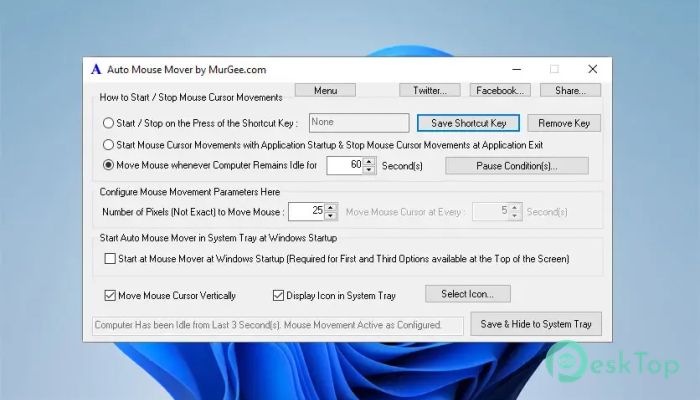
Download MurGeeMon Auto Clicker 1.0 for Windows.
MurGeeMon Auto Clicker Overview
It is a lightweight utility designed to keep your Windows PC awake by moving the mouse cursor automatically after a fixed interval. It is perfect for anyone who wants to stop the computer from locking, logging off, or entering hibernate mode without changing Windows power settings. The software works quietly in the background and requires very little setup. Simply choose how often you want the mouse to move, place the cursor where you want it, and let the tool handle the rest. It is like having a tiny helper that gently nudges your mouse just enough to keep your computer active.Features of MurGeeMon Auto Clicker
Automatically Keeps Your PC Awake
One of the biggest advantages of the software is its ability to keep your computer awake without any manual effort. Instead of changing system settings or disabling sleep mode permanently, it temporarily prevents the PC from becoming inactive while the utility is running.
This makes it useful during long downloads, presentations, remote desktop sessions, or while monitoring important tasks. Once you close the utility, your normal Windows power settings continue to work as before.
Automatic Mouse Movement
The tool automatically moves the mouse cursor after a user-defined time interval. The movement is small enough to keep the system active without interrupting your work.
You simply configure the delay, place the cursor at a suitable location on the screen, and let the software do its job. It keeps the computer awake while staying almost unnoticed in the background.
Easy to Configure
You don't need technical knowledge to use this utility. The interface is clean, simple, and beginner-friendly. Even if you have never used automation software before, you can configure everything in just a few clicks.
The straightforward controls make it easy to start, stop, or adjust automatic mouse movement whenever needed. It focuses on doing one task well instead of overwhelming users with unnecessary options.
Prevents Sleep and Hibernate Mode
The software helps prevent Windows from entering Sleep or Hibernate mode while it is active. This is especially useful when running lengthy operations that should not be interrupted.
Instead of modifying Control Panel settings every time, you can launch the utility whenever required. Think of it as placing a temporary "Do Not Disturb" sign on your computer so it stays awake until you are finished.
Useful for Many Everyday Tasks
The tool can be helpful in many situations. If you are downloading large files, uploading videos, watching long presentations, attending online meetings, or remotely accessing another computer, it helps ensure your PC stays active throughout the session.
It is equally useful for users who monitor systems, perform scheduled tasks, or simply want to avoid frequent screen locking during periods of inactivity.
Runs Smoothly in the Background
The software is lightweight and consumes very few system resources. It runs quietly without slowing down your computer or interfering with other applications.
Because of its small footprint, you can leave it running for hours without worrying about performance issues. It quietly performs its task while you focus on more important work.
No Need to Change Windows Settings
Many users change Windows power settings whenever they need the computer to remain awake. However, remembering to restore those settings later can be inconvenient.
The utility removes that hassle by providing a temporary solution. Once it stops running, your original Windows power plan remains unchanged, giving you both convenience and flexibility.
Safe and Convenient Operation
The software only performs automatic mouse movement and does not make permanent changes to your operating system. This keeps its operation simple and predictable.
Since everything works only while the utility is active, you stay in complete control. You can start or stop the automatic movement whenever your work requires it.
Simple Workflow
Using the tool is incredibly easy. Launch the application, choose the time interval, position the mouse cursor where you want it, and activate automatic movement. From there, it quietly keeps the computer active until you decide to stop it.
This straightforward workflow saves time and eliminates the need for complicated configuration, making it suitable for both home users and professionals.
System Requirements and Technical Details
Operating System: Windows 11 / 10 / 8.1 / 7
Processor: Minimum 1 GHz Processor (2.4 GHz recommended)
RAM: 2GB (4GB or more recommended)
Free Hard Disk Space: 200MB or more is recommended

-
Program size661.70 KB
-
Version1.0
-
Program languagemultilanguage
-
Last updatedBefore 3 Month
-
Downloads4Ralated programs
![Operant Peak Spectroscopy]() Operant Peak Spectroscopy
Operant Peak Spectroscopy ![NeverWrite]() NeverWrite
NeverWrite![FluentCleaner]() FluentCleaner
FluentCleaner![Snippai]() Snippai
Snippai![ChillShot AI]() ChillShot AI
ChillShot AI![Splunk Enterprise]() Splunk Enterprise
Splunk Enterprise
 Operant Peak Spectroscopy
  NeverWrite
 FluentCleaner
 Snippai
 ChillShot AI
 Splunk Enterprise