
 Arabic
  English
  Turkish
  Chinese
  Japanese
  Russian
  Spanish
  German
  French
  Hindi
Hindi Download MurGeeMon Auto Mouse Click 1.0 for Windows
Download MurGeeMon Auto Mouse Click 1.0 for Windows.
MurGeeMon Auto Mouse Click Overview
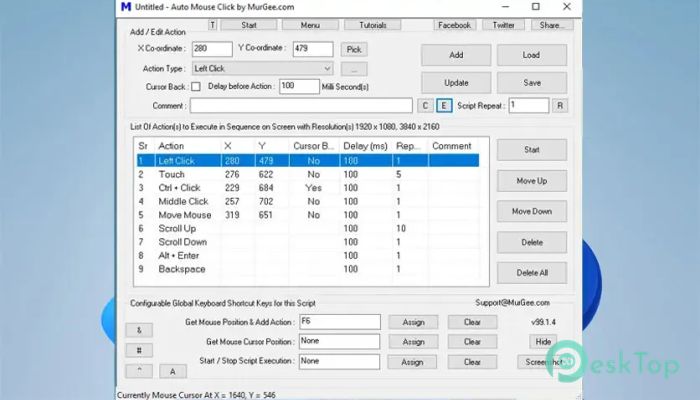
It is designed to automate repetitive mouse-clicking tasks on Windows computers. Whether you need to perform the same click hundreds of times or automate a sequence of clicks, the software makes the job quick and effortless. Instead of clicking manually again and again, you can create a click script and let the tool handle the work. The software lets you define mouse positions using X and Y coordinates, choose the click type, and set the delay between actions. Once configured, you simply press the Start button, and the automation begins exactly as planned. It saves both time and effort while reducing repetitive strain.Features of MurGeeMon Auto Mouse Click
Easy Mouse Click Automation
The software is built with simplicity in mind. Even first-time users can create automated mouse-click tasks within minutes. Just enter the screen coordinates, select the click type, define the delay, and start the automation.
It works like giving your computer a list of instructions. Once those instructions are ready, the tool follows them accurately without requiring constant supervision.
Supports Multiple Click Types
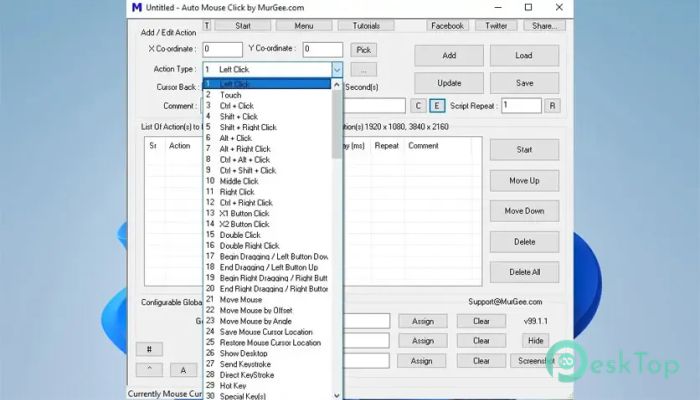
Not every task requires the same mouse action, and this utility understands that well. It allows you to simulate left-clicks, right-clicks, single-clicks, and double-clicks as needed.
This flexibility makes it useful for many situations, including software testing, repetitive office work, games, and routine computer operations that require different click actions.
Create Unlimited Mouse Click Sequences
Instead of automating only one click, the software lets you add multiple mouse clicks into a single sequence. Each click can have its own position, click type, and delay.
Think of it as creating a roadmap for your mouse. Once the route is ready, the tool follows every step in the correct order, helping you finish repetitive work much faster.
Accurate X and Y Coordinate Control
Precision is one of the strongest features of this utility. It allows you to specify exact X and Y coordinates for every automated click. This ensures that every click happens at the correct location on the screen.
Such accuracy is especially useful when working with software that requires repeated interaction with fixed buttons, menus, or controls.
Custom Delay Between Clicks
Different tasks require different speeds. The software lets you set the delay, in seconds, between each mouse click so the automation matches your workflow.
You can make the clicks happen almost instantly or slow them down for applications that need additional processing time between actions.
Save and Load Mouse Click Scripts
One of the most useful features is the ability to save your mouse click sequences into an AMK file. This means you don't have to recreate the same automation every time.
Whenever you need the same task again, simply load the saved script and run it instantly. This saves valuable time, especially for repetitive tasks.
Schedule Automatic Mouse Clicks
The tool supports scheduled automation when combined with a scheduler. After saving your mouse click script, you can configure it to run automatically at a specific date and time.
You can even launch a saved AMK file directly by double-clicking it, making it easy to execute prepared automation without opening the software first.
Return Cursor to Original Position
Sometimes you may want the mouse pointer to return to its starting position after completing the automation. The software includes an option for restoring the cursor to its original position.
This small feature makes the automation feel natural and helps you continue working immediately after the task finishes.
Ideal for Repetitive Computer Tasks
The software is suitable for anyone who performs repetitive clicking. It can assist with routine office work, application testing, data entry support, software demonstrations, and many other repetitive activities.
Instead of spending valuable time clicking repeatedly, you can let the tool handle the repetitive work while you focus on more important tasks.
Simple Interface with Powerful Results
The interface remains clean and easy to understand without sacrificing useful functionality. Every important setting is available from the main window, making it simple to configure automation in just a few steps.
Whether you are a beginner or an experienced user, you can quickly create, edit, save, and run mouse click scripts without dealing with complicated settings.
System Requirements and Technical Details
Operating System: Windows 11 / 10 / 8.1 / 7
Processor: Minimum 1 GHz Processor (2.4 GHz recommended)
RAM: 2GB (4GB or more recommended)
Free Hard Disk Space: 200MB or more is recommended

-
Program size2.99 MB
-
Version1.0
-
Program languagemultilanguage
-
Last updatedBefore 3 Month
-
Downloads5Ralated programs
![Operant Peak Spectroscopy]() Operant Peak Spectroscopy
Operant Peak Spectroscopy ![NeverWrite]() NeverWrite
NeverWrite![FluentCleaner]() FluentCleaner
FluentCleaner![Snippai]() Snippai
Snippai![ChillShot AI]() ChillShot AI
ChillShot AI![Splunk Enterprise]() Splunk Enterprise
Splunk Enterprise
 Operant Peak Spectroscopy
  NeverWrite
 FluentCleaner
 Snippai
 ChillShot AI
 Splunk Enterprise