
 Arabic
  English
  Turkish
  Chinese
  Japanese
  Russian
  Spanish
  German
  French
  Hindi
Hindi Download MurGeeMon Auto Typer 1.0 for Windows
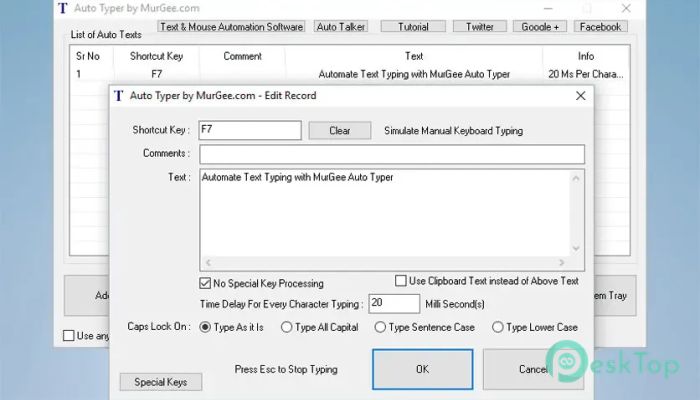
Download MurGeeMon Auto Typer 1.0 for Windows.
MurGeeMon Auto Typer Overview
It is a lightweight utility designed to automate keyboard typing on Windows computers. Instead of typing the same words, sentences, or values again and again, it lets you assign a hotkey that instantly enters the required text. This makes repetitive tasks much faster while reducing typing mistakes. The software is easy to use, even for beginners. You only need to create a typing profile, assign a shortcut key, enter the desired text, and save it. Once configured, pressing the selected hotkey automatically types the stored content wherever your cursor is active.Features of MurGeeMon Auto Typer
Automatic Typing with Hotkeys
The biggest advantage of the software is its customizable hotkey support. You can assign almost any keyboard shortcut to trigger automatic typing whenever needed. This eliminates the need to repeatedly copy and paste the same information.
Whether you need to enter names, addresses, email templates, product details, or frequently used messages, the tool performs the task instantly with a single key combination.
Perfect for Repetitive Tasks
If you regularly fill online forms or desktop applications with the same information, this utility can save a significant amount of time. Instead of typing identical values over and over, it automatically enters everything.
Think of it like having a personal typing assistant sitting beside you. Whenever you press the assigned shortcut, it immediately starts typing exactly what you have saved.
Supports Special Keyboard Commands
The software is more than just a text typing utility. It also supports special keyboard commands within the typed content. For example, you can use {Tab} to simulate pressing the Tab key and {Enter} to simulate the Enter key.
This feature is especially useful when filling forms that require moving between multiple fields automatically. It creates a smoother workflow and reduces manual effort.
Easy Configuration Process
Setting everything up takes only a few moments. After launching the application, click the Add New button, choose a hotkey, enter a comment if needed, type the desired text, and save the profile.
Once the setup is complete, the typing shortcut is ready to use whenever required. Even users with little technical knowledge can start using it without difficulty.
Runs Quietly in the System Tray
The software stays out of your way by running quietly in the Windows System Tray. Instead of occupying desktop space, it remains available in the background until you need it.
You can quickly open it through the tray icon or use the desktop shortcut whenever you want to create, edit, or manage typing profiles. This keeps your desktop clean while ensuring fast access.
Useful for Personal and Professional Work
The tool fits into many everyday situations. Office workers can automate form entries, customer support teams can send repeated responses, students can insert frequently used notes, and business users can quickly enter standard information.
It also helps reduce typing fatigue. Instead of spending time repeating the same words hundreds of times, you can let automation handle the work while you focus on more important tasks.
Reliable and User-Friendly Interface
The interface is simple and organized, making every option easy to understand. You won't need to browse through complicated menus or settings before getting started.
Everything is clearly arranged, allowing you to manage typing profiles, edit existing entries, and assign new shortcut keys with just a few clicks.
Improves Productivity
Small tasks often consume a surprising amount of time during the day. By automating repetitive typing, the software helps speed up daily work and minimizes typing errors.
Whether you use it occasionally or throughout the day, it acts like a smart shortcut that keeps your workflow moving without unnecessary interruptions.
System Requirements and Technical Details
Operating System: Windows 11 / 10 / 8.1 / 7
Processor: Minimum 1 GHz Processor (2.4 GHz recommended)
RAM: 2GB (4GB or more recommended)
Free Hard Disk Space: 200MB or more is recommended

-
Program size996.59 KB
-
Version1.0
-
Program languagemultilanguage
-
Last updatedBefore 3 Month
-
Downloads4Ralated programs
![Operant Peak Spectroscopy]() Operant Peak Spectroscopy
Operant Peak Spectroscopy ![NeverWrite]() NeverWrite
NeverWrite![FluentCleaner]() FluentCleaner
FluentCleaner![Snippai]() Snippai
Snippai![ChillShot AI]() ChillShot AI
ChillShot AI![Splunk Enterprise]() Splunk Enterprise
Splunk Enterprise
 Operant Peak Spectroscopy
  NeverWrite
 FluentCleaner
 Snippai
 ChillShot AI
 Splunk Enterprise