
 Arabic
  English
  Turkish
  Chinese
  Japanese
  Russian
  Spanish
  German
  French
  Hindi
Hindi Download MurGeeMon Random Mouse Clicker 1.0 for Windows
Download MurGeeMon Random Mouse Clicker 1.0 for Windows.
MurGeeMon Random Mouse Clicker Overview
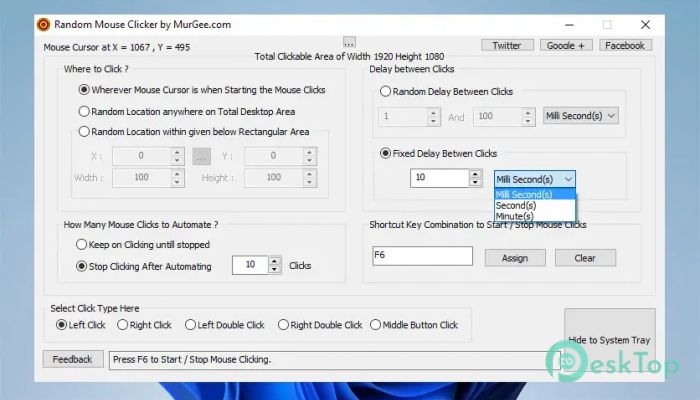
It is designed to automate repetitive mouse-clicking tasks with ease. Whether you need random clicks, fixed-position clicks, or automatic left- and right-mouse clicks, the software makes everything simple. It saves time, reduces manual effort, and helps users perform repetitive work more efficiently. The software is easy to understand even for beginners. Every important setting is neatly organized into different sections, allowing users to configure click position, click type, delay, and the total number of clicks in just a few moments. It is a practical solution for anyone who regularly performs repetitive clicking tasks.Features of MurGeeMon Random Mouse Clicker
Simple and Easy-to-Use Interface
The tool features a clean interface where every option is grouped logically. Users can quickly select where to click, choose the click type, set delays, and start automation without navigating complicated menus.
Think of it like a remote control for your mouse. Instead of clicking repeatedly yourself, you simply configure the settings once and let the software handle the work automatically.
Random and Fixed Mouse Clicking
One of the biggest advantages is its ability to click either at random locations or at a fixed position. Users can automate clicks anywhere on the screen as needed.
The software also supports clicking inside a configurable rectangular area. This makes it useful for many different workflows in which click positions need to vary while remaining within a selected region.
Multiple Mouse Click Types
The software supports five different click modes, giving users complete flexibility. You can automate single left clicks, double left clicks, single right clicks, double right clicks, or even choose the "None" option when mouse movement is needed without clicking.
These options allow the tool to adapt to many situations rather than limiting users to a single click style.
Flexible Delay Configuration
Every task requires different timing, and the software provides full control over click intervals. Users can select a fixed delay or configure a random delay between clicks.
The minimum delay can be as low as one millisecond, making automation extremely fast when required. Random delays can also make clicking patterns appear more natural during automated tasks.
Control the Number of Clicks
The tool allows users to specify exactly how many clicks should be performed. Whether you need only a few clicks or continuous clicking, the software handles both situations smoothly.
Infinite clicking mode continues until the assigned shortcut key is pressed again, giving users complete control over the automation process.
Custom Shortcut Keys
Starting and stopping automation is quick thanks to configurable keyboard shortcuts. Instead of opening the application every time, users can simply press the assigned key combination.
This feature makes daily use much faster, especially when switching frequently between manual work and automated clicking.
Supports Multiple Monitor Setups
The software works across the entire desktop, including computers connected to multiple monitors in extended display mode. It can automate clicks anywhere within the available screen space.
This makes it a great choice for users who work with multiple displays and need reliable mouse automation across all connected monitors.
Runs Quietly in the Background
After configuration, the application can be hidden from the desktop by clicking the close button. It continues to run quietly in the system tray, ready whenever needed.
To completely exit the application, users only need to right-click the system tray icon and choose the Exit option. Even when hidden, shortcut keys continue to work to start or stop automated clicks.
Informative Status Window
The software includes a useful status window that displays important information about the automation process. Users can monitor click activity and easily verify that everything is working as expected.
This feedback makes it easier to manage automated tasks and helps reduce mistakes during long-running operations.
Reliable Automation for Everyday Tasks
The software is suitable for anyone who wants to eliminate repetitive clicking. Whether working with productivity applications, testing software, performing repetitive office work, or automating simple desktop tasks, it delivers consistent, reliable performance.
Its combination of flexible click options, configurable delays, shortcut controls, and background operation makes everyday automation much easier without adding unnecessary complexity.
System Requirements and Technical Details
Operating System: Windows 11 / 10 / 8.1 / 7
Processor: Minimum 1 GHz Processor (2.4 GHz recommended)
RAM: 2GB (4GB or more recommended)
Free Hard Disk Space: 200MB or more is recommended

-
Program size1.10 MB
-
Version1.0
-
Program languagemultilanguage
-
Last updatedBefore 3 Month
-
Downloads4Ralated programs
![Operant Peak Spectroscopy]() Operant Peak Spectroscopy
Operant Peak Spectroscopy ![NeverWrite]() NeverWrite
NeverWrite![FluentCleaner]() FluentCleaner
FluentCleaner![Snippai]() Snippai
Snippai![ChillShot AI]() ChillShot AI
ChillShot AI![Splunk Enterprise]() Splunk Enterprise
Splunk Enterprise
 Operant Peak Spectroscopy
  NeverWrite
 FluentCleaner
 Snippai
 ChillShot AI
 Splunk Enterprise