
 Arabic
  English
  Turkish
  Chinese
  Japanese
  Russian
  Spanish
  German
  French
  Hindi
Hindi Download Pelton 2026.3.4 for Windows
Download Pelton 2026.3.4 for Windows.
Pelton Overview
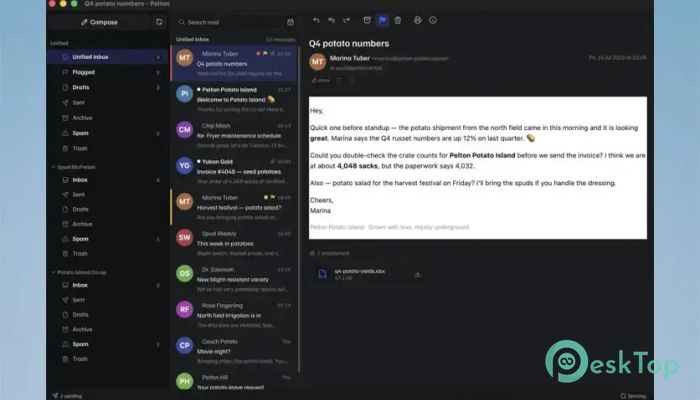
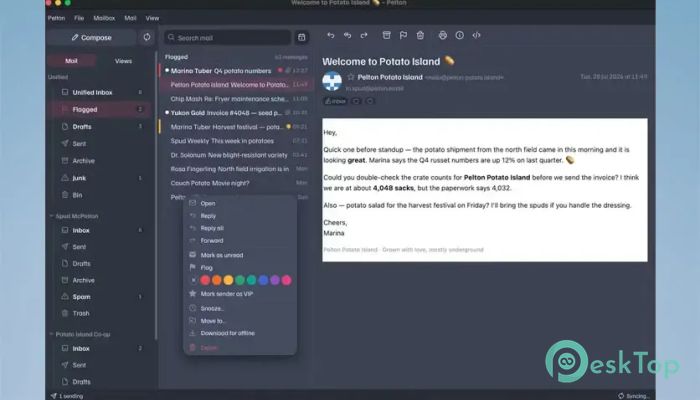
It is a privacy-focused desktop email client built for people who want a simple way to access, organize, and search their messages. Instead of relying on a separate company server for mailbox search, it searches your mail locally. This means your messages remain on your machine while you use the application for everyday email tasks. The software is useful both online and offline, so searching through old conversations does not always require an active connection. It combines familiar email features with local mailbox access, open-source development, standard mail protocols, and a customizable interface. The result feels straightforward rather than overloaded with unnecessary services.Features of Pelton
Local Mailbox Search
One of its main features is the ability to search across your whole mailbox locally. You can look for old conversations and important information without sending your search activity to the developer's servers. It is like keeping your own searchable email cabinet directly on your computer.
Local searching is also helpful when your internet connection is unavailable. Previously available mail can still be searched offline, making the application practical for users who regularly work while traveling or deal with unstable connections.
Privacy-Focused Email Experience
Privacy is a central part of how the tool works. There is no telemetry collecting usage information and no company-operated server sitting between you and your mailbox. Your email stays on your machine rather than being copied to another service simply to power the application.
This approach gives users more control over their personal communication. For people who prefer desktop software that runs locally, this design keeps the email experience cleaner and reduces unnecessary data sharing.
IMAP and SMTP Support
The software works with standard IMAP and SMTP protocols. These technologies are widely used for sending and receiving email, so the client can work with many existing email providers without requiring a specialized mail service.
IMAP allows the application to access and synchronize messages from a supported mailbox, while SMTP handles outgoing mail. Since these are established email standards, users can connect compatible accounts while continuing to use their current email addresses.
Built-In Gmail OAuth2
Users who rely on Gmail can benefit from built-in OAuth2 support. This provides a modern authorization method for connecting to an account without requiring the application to be designed around older login methods.
The open-source nature of the project also creates room for broader provider support. Community developers can contribute additional integrations over time. This makes the platform flexible and gives it the potential to grow according to real user needs.
Open-Source Development
Being open source is an important advantage for anyone who values transparency. The source code can be reviewed and improved by developers instead of being hidden behind a completely closed system. Community members can identify issues, suggest changes, and help expand the range of supported services.
This development model also fits naturally with its privacy-first direction. Users do not have to rely only on promises about how the application works. Open development provides greater visibility into the project and gives technically skilled users a chance to contribute improvements.
Custom Accent and Interface
The interface includes an accent color system that controls selections, links, and highlights. Instead of adjusting several visual options separately, you choose one accent, and the application derives related interface elements from it.
The same color picker is connected to the settings and preview, so changes are easier to understand before you settle on a look. This keeps customization simple while still giving the desktop client a more personal appearance.
Mailto Link Integration
The tool can register itself as the system's mailto: handler. During onboarding, users are offered the option to make the application open email links. This can make everyday browsing more convenient because clicking an email address can take you directly to the compose window.
A mailto link can automatically fill information such as the recipient, subject, and message body when those details are included in the link. Instead of manually copying an address and then opening your email application, the compose window is ready for you.
Smarter Handling of Open Windows
Desktop applications can become annoying when every link opens a new program window. The client handles this more neatly. If the application is already running, another supported email link can pass its draft to the existing window instead of starting a second copy.
This small behavior can make a noticeable difference during daily use. Your desktop stays cleaner, and you can continue working from the window that is already open. The mailto setting also remains available later through a quiet option in the About area rather than constantly interrupting you.
Simple Email Workflow
The overall workflow focuses on practical email management without placing extra services between the user and their messages. You can connect a compatible account, access email via standard protocols, search locally, compose messages, and open email links directly in Windows.
Its combination of offline access and local searching can be especially useful for large mailboxes. Instead of treating the desktop program as little more than a window into a web service, the software makes the local computer an important part of the email experience.
Useful for Privacy-Conscious Users
Many modern applications depend heavily on cloud infrastructure, analytics, and background data collection. This tool follows a different path by avoiding telemetry and keeping mailbox operations closer to the user's computer.
That makes it an interesting option for people who want an open desktop mail client with fewer outside layers. Standard protocol support also means the experience is not built around a completely new email ecosystem. You can continue using supported existing accounts while changing the application used to manage them.
System Requirements and Technical Details
Operating System: Windows 11 / 10 / 8.1 / 7
Processor: Minimum 1 GHz Processor (2.4 GHz recommended)
RAM: 2GB (4GB or more recommended)
Free Hard Disk Space: 200MB or more is recommended

-
Program size15.26 MB
-
Version2026.3.4
-
Program languagemultilanguage
-
Last updatedBefore 2 Month
-
Downloads4
 Cyotek WebCopy
 Linphone
 Cinny
Cinny AllMapSoft Bing Maps Downloader
  AllMapSoft Yandex Maps Downloader
  AllMapSoft google earth images downloader