
 Arabic
  English
  Turkish
  Chinese
  Japanese
  Russian
  Spanish
  German
  French
  Hindi
Hindi Download PhotoResizerOK 1.0 for Windows
Download PhotoResizerOK 1.0 for Windows.
PhotoResizerOK Overview
Managing images can feel like carrying a heavy backpack when file sizes are too large. This handy tool lightens the burden by shrinking images without sacrificing quality. It is designed for both beginners and professionals, making it simple to resize photos, convert formats, and manage large image collections in seconds. The software works smoothly on Windows systems and offers a straightforward interface. You don’t need deep technical knowledge to use it. Whether you are preparing images for websites, sharing them online, or organizing your photo library, it provides a quick and reliable solution.Features of PhotoResizerOK
Simple and User-Friendly Interface
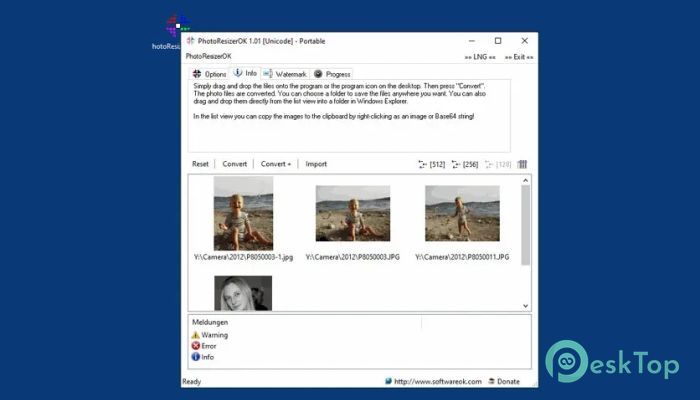
One of the best things about the tool is how easy it feels to use. The layout is clean, and all options are clearly visible. You can drag and drop images directly into the workspace, making the process feel natural.
Even if you are opening it for the first time, you will not feel lost. Everything is designed to save time and reduce confusion. It is like having a smart assistant that guides you without saying a word.
Fast Image Processing Speed
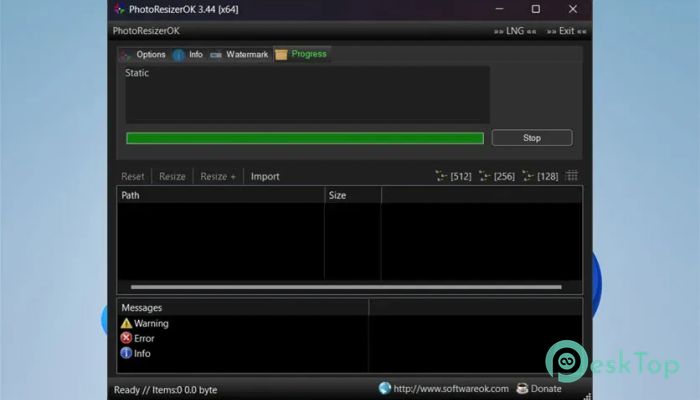
Speed is where the software truly shines. It can process more than 1 GB of images per minute, which is impressive for such a lightweight application. This means you can resize hundreds of images in a very short time.
This speed is especially useful for photographers and designers who deal with large batches of photos. Instead of waiting for long processing times, everything gets done almost instantly.
Flexible Image Resizing Options
Resizing images is the core feature, and it does it perfectly. You can adjust the dimensions to your needs, whether you want smaller images for websites or optimized versions for email sharing.
The tool maintains the original aspect ratio, so your images do not look stretched or distorted. It feels like resizing without compromise.
Supports Multiple File Formats
The ability to convert images into different formats adds great flexibility. You can easily switch between JPG, PNG, and other formats as needed.
This is helpful when working with different platforms that require specific file types. Instead of using multiple tools, everything can be done in one place.
Advanced Compression Control
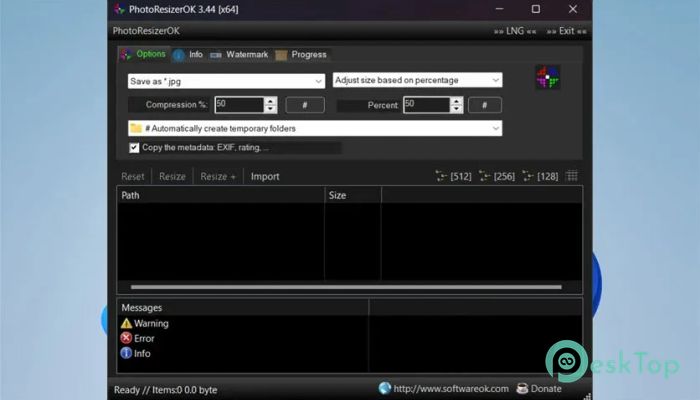
Compression plays a big role in reducing file size, and this tool gives you full control over it. You can choose how much compression you want, balancing quality and size.
It is like adjusting the volume on your favorite song. You decide how loud or soft it should be, without losing the essence.
RAW Image Support for Professionals
For photographers, working with RAW images is essential. The software supports RAW formats from cameras such as Canon, enabling professionals to easily manage their original files.
This makes it a great companion for those who want to create smaller JPG copies while keeping the original data safe.
Watermark and Customization Features
Adding a watermark is simple and flexible. You can include multi-line watermarks to protect your images or add branding. This is especially useful for photographers and content creators.
The customization options allow you to adjust placement and style, giving your images a personal touch.
Preserves Image Metadata
Another useful feature is the ability to keep image information such as EXIF data, ratings, and other details. This ensures that important information is not lost during processing.
It is like preserving the story behind each photo, even after resizing or converting it.
Batch Processing for Efficiency
Handling multiple images at once is easy with batch processing. You can apply the same settings to a large number of files, saving time and effort.
This is perfect for users who need to prepare images for projects, websites, or storage without repeating the same steps again and again.
Lightweight Yet Powerful
Despite its powerful features, the software remains lightweight. It does not slow down your system and runs smoothly even on older computers.
This balance between performance and simplicity makes it a reliable choice for everyday use.
System Requirements and Technical Details
Operating System: Windows 11 / 10 / 8.1 / 7
Processor: Minimum 1 GHz Processor (2.4 GHz recommended)
RAM: 2GB (4GB or more recommended)
Free Hard Disk Space: 200MB or more is recommended

-
Program size214.93 KB
-
Version1.0
-
Program languagemultilanguage
-
Last updatedBefore 3 Month
-
Downloads16Ralated programs
![Operant Peak Spectroscopy]() Operant Peak Spectroscopy
Operant Peak Spectroscopy ![NeverWrite]() NeverWrite
NeverWrite![FluentCleaner]() FluentCleaner
FluentCleaner![Snippai]() Snippai
Snippai![ChillShot AI]() ChillShot AI
ChillShot AI![Splunk Enterprise]() Splunk Enterprise
Splunk Enterprise
 Operant Peak Spectroscopy
  NeverWrite
 FluentCleaner
 Snippai
 ChillShot AI
 Splunk Enterprise