
 Arabic
  English
  Turkish
  Chinese
  Japanese
  Russian
  Spanish
  German
  French
  Hindi
Hindi Download PolyUploader 1.7.2 for Windows
Download PolyUploader 1.7.2 for Windows.
PolyUploader Overview
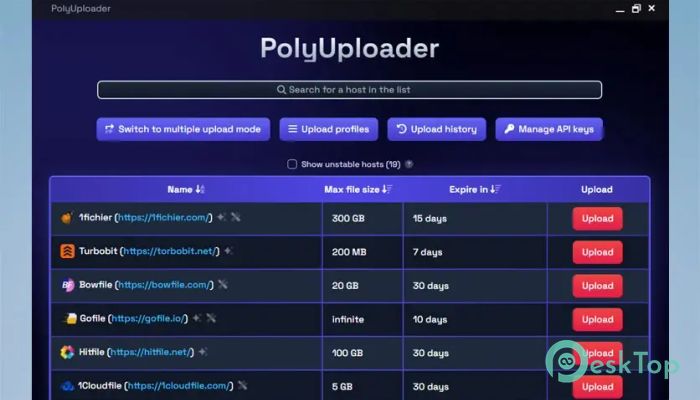
The software is a versatile and powerful upload manager that helps users send files remotely to multiple hosting services. Whether you want to upload from your computer or through a direct URL, this tool makes the process quick and straightforward. Designed with performance and usability in mind, it provides everything needed to manage large-scale file uploads efficiently.Features of PolyUploader
Multi-Host Upload Support
One of the main strengths of this tool is its ability to upload files to over 130 hosting services simultaneously. This feature is ideal for content creators, developers, and file sharers who need to distribute their files across various platforms. It saves time by eliminating the need to manually upload the same file to multiple hosts.
Local and Remote Upload Options
It supports uploads from both local storage and remote URLs. Users can drag and drop files from their computer or paste a link to upload files directly from the internet. This flexibility enables easy management of large files, ensuring you can work from anywhere without hassle.
Integrated API Key Functionality
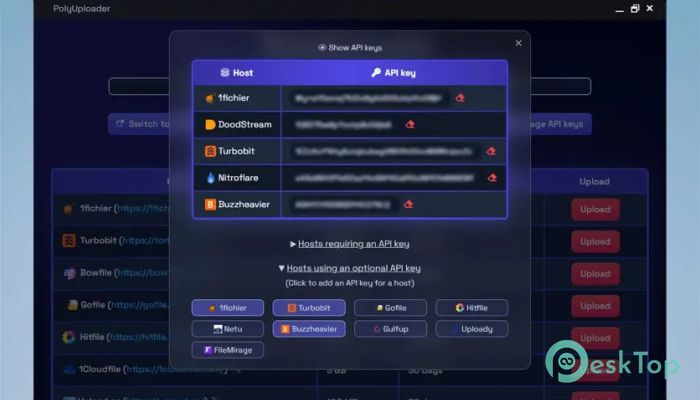
The software also provides API key integration, enabling users to link their own API keys for compatible hosts. This allows access to additional features offered by hosting services, including faster upload speeds, private storage, and automatic link generation. API linking gives users more control and customization over how their uploads are handled.
Upload History and Management
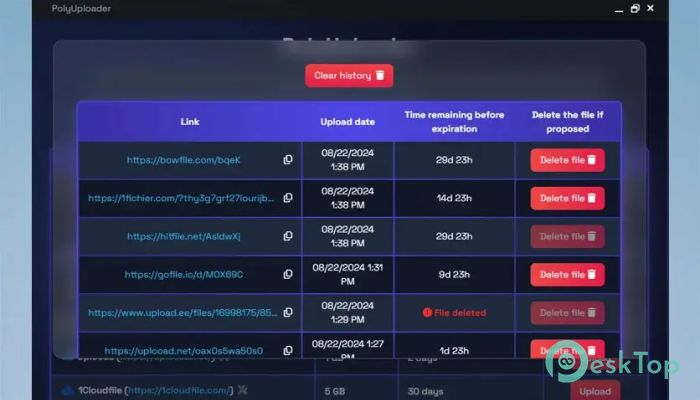
Every file uploaded through the tool is logged in a detailed history panel. Users can view expiration status, download links, and delete any file when needed. This clear history feature helps in monitoring file availability and ensures that you stay organized when managing multiple uploads simultaneously.
Custom Upload Profiles
For users who frequently upload similar types of files, creating custom upload profiles can save a lot of time. You can set default hosts, assign API keys, and even define file-handling preferences. Once configured, uploads can be done in just a few clicks, boosting productivity and convenience.
Combined Sharing Link Generation
Another time-saving feature is the ability to generate a single sharing link that combines multiple host links. Instead of sending separate links for each host, you can share a single URL that contains all the necessary file references. This is especially helpful for sharing large projects, collections, or media files with clients or collaborators.
Open-Source and Secure
The tool is fully open-source, allowing users to explore, modify, and contribute to its development. It’s built on a secure Rust backend, offering high performance while maintaining strong security. Open-source development ensures transparency, while Rust provides safety and efficiency, reducing crashes and vulnerabilities.
Speed and Simplicity
One of the standout aspects of this uploader is its focus on speed. It’s designed to handle concurrent uploads efficiently, ensuring minimal delay even when managing large files. The interface remains intuitive, clean, and straightforward, allowing even beginners to upload files without confusion.
No Account Requirement
Unlike many similar platforms, this one doesn’t require user registration. You can start uploading files instantly without needing to create an account. This not only saves time but also ensures privacy for users who prefer not to share personal information.
Use Cases and Benefits
The software is ideal for professionals who work with digital content on a daily basis. Developers can use it to upload application builds, photographers can share galleries, and students can store documents on multiple backup platforms. Its automation and profile features make it suitable for both individual users and teams managing frequent uploads.
System Requirements and Technical Details
Operating System: Windows 11 / 10 / 8.1 / 7
Processor: Minimum 1 GHz Processor (2.4 GHz recommended)
RAM: 2GB (4GB or more recommended)
Free Hard Disk Space: 200MB or more is recommended

-
Program size7.76 MB
-
Version1.7.2
-
Program languagemultilanguage
-
Last updatedBefore 2 Month
-
Downloads8
 Cyotek WebCopy
 Linphone
 Cinny
Cinny AllMapSoft Bing Maps Downloader
  AllMapSoft Yandex Maps Downloader
  AllMapSoft google earth images downloader