
 Arabic
  English
  Turkish
  Chinese
  Japanese
  Russian
  Spanish
  German
  French
  Hindi
Hindi Download Postimage 1.0 for Windows
Download Postimage 1.0 for Windows.
Postimage Overview
It is designed for users who want a quick and hassle-free way to capture screenshots and share them instantly. Whether you are saving important information, creating tutorials, or simply sharing something interesting, this tool makes the process smooth and fast. The software focuses on simplicity. You don’t need advanced skills or technical knowledge to use it. Just capture, upload, and share. It works like a digital camera for your screen, letting you capture exactly what you need and send it anywhere in moments.Features of Postimage
Simple and Clean Interface
The tool features a clean, minimal interface that feels light and easy to navigate. Everything is placed right where you expect it to be. This means you won’t waste time searching for options.
It feels like using a basic notepad app, but instead of writing text, you are capturing visuals. The simplicity ensures that even beginners can start using it instantly without confusion.
Quick Screenshot Capturing
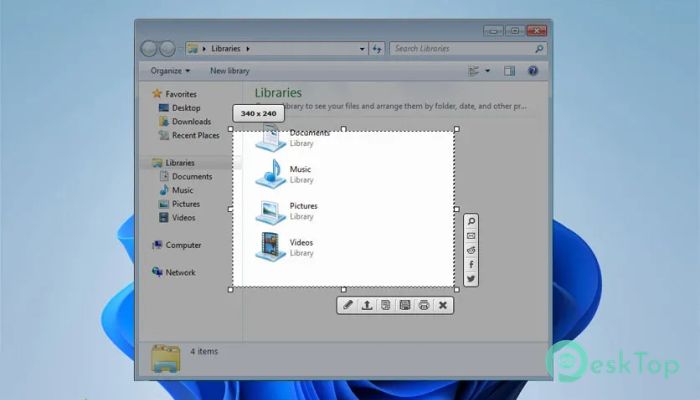
One of the strongest points of this software is how fast it captures screenshots. You can take a full-screen shot or select a specific area. It’s like cutting a precise piece out of your screen.
You also get control over the capture area size. This helps when you only need a small section instead of the entire display. It saves time and keeps your images focused on what really matters.
Instant Image Sharing
After capturing an image, sharing it is incredibly simple. The tool allows you to upload your screenshot online in just a few clicks. It feels almost like sending a message on a chat app.
Once uploaded, it generates a direct link. This link can be shared with anyone, making collaboration and communication easier. You don’t need to attach files or worry about file sizes.
Clipboard Integration
Another useful feature is automatic URL copying. When you upload an image, the link is copied directly to your clipboard. This saves you an extra step.
Think of it as a smart assistant that prepares everything for you. You just paste the link wherever you need, whether it's in an email, message, or document.
Multiple Image Upload Support
The software supports uploading multiple images simultaneously. This is perfect for users who work with batches of screenshots.
Instead of uploading each file individually, you can handle everything in one go. It’s like sending a group of photos in one go, saving time and effort.
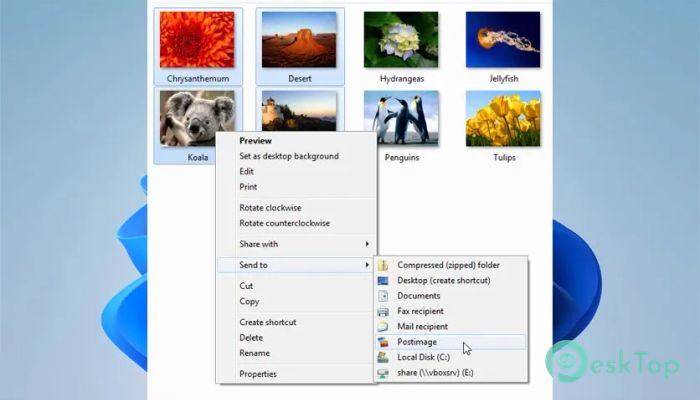
Right-Click Context Menu Upload
The tool integrates with your system’s right-click menu. This means you can upload images directly without opening the main interface.
This feature feels like a shortcut built into your workflow. Just right-click, upload, and you’re done. It keeps things fast and convenient.
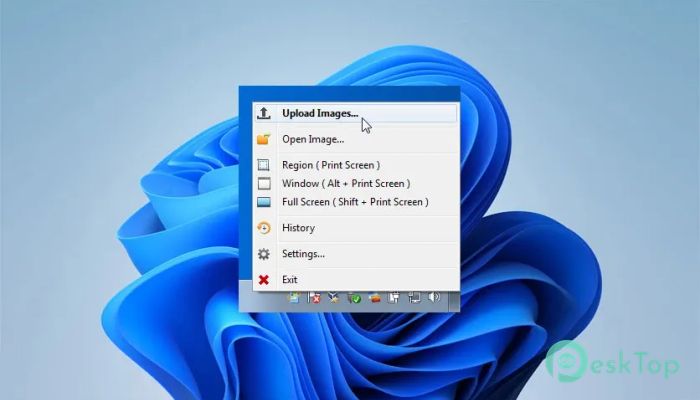
Global Hotkeys for Faster Access
Speed matters, and this software understands that. It offers global hotkeys to instantly trigger screen capture.
You don’t need to open the application every time. Just press a key combination, and you’re ready to capture. It’s like having a camera button always within reach.
Customizable Screenshot Area
Flexibility is another strong point. You can manually adjust the capture area to fit your needs. Whether it’s a small icon or a large window, you stay in control.
This makes the tool useful for a range of tasks, from creating tutorials to saving important details. It adapts to your workflow instead of forcing you to adjust.
Lightweight and Efficient Performance
The software is lightweight and does not slow down your system. It runs smoothly in the background, using few resources.
This makes it ideal for both low-end and high-end PCs. You get reliable performance without any lag or interruptions.
System Requirements and Technical Details
Operating System: Windows 11 / 10 / 8.1 / 7
Processor: Minimum 1 GHz Processor (2.4 GHz recommended)
RAM: 2GB (4GB or more recommended)
Free Hard Disk Space: 200MB or more is recommended

-
Program size5.29 MB
-
Version1.0
-
Program languagemultilanguage
-
Last updatedBefore 3 Month
-
Downloads9Ralated programs
![Operant Peak Spectroscopy]() Operant Peak Spectroscopy
Operant Peak Spectroscopy ![NeverWrite]() NeverWrite
NeverWrite![FluentCleaner]() FluentCleaner
FluentCleaner![Snippai]() Snippai
Snippai![ChillShot AI]() ChillShot AI
ChillShot AI![Splunk Enterprise]() Splunk Enterprise
Splunk Enterprise
 Operant Peak Spectroscopy
  NeverWrite
 FluentCleaner
 Snippai
 ChillShot AI
 Splunk Enterprise