
 Arabic
  English
  Turkish
  Chinese
  Japanese
  Russian
  Spanish
  German
  French
  Hindi
Hindi Download Scan & Repair Windows Image 1.0 for Windows
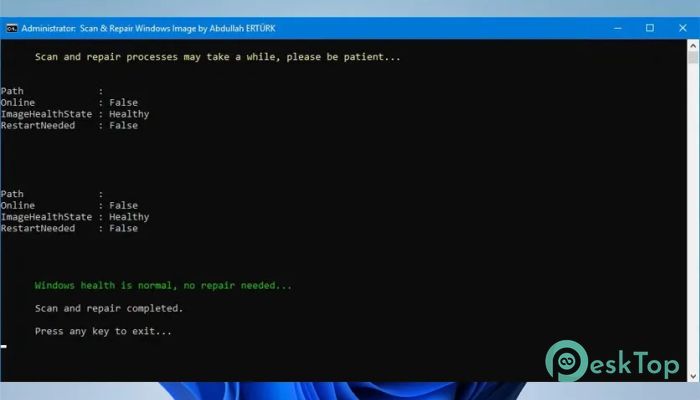
Download Scan & Repair Windows Image 1.0 for Windows.
Scan & Repair Windows Image Overview
This smart utility is designed to keep your system clean, stable, and running without hidden errors. It uses trusted Windows tools like DISM and SFC to scan for corruption and automatically repair it. Instead of running multiple commands manually, the tool streamlines the process into a single, smooth workflow. The software is especially useful for users who face system crashes, slow performance, or unexpected errors. It acts like a digital doctor for your PC, checking internal problems and fixing them without requiring deep technical knowledge. With built-in automation and clear feedback messages, system maintenance becomes easy and efficient.Features of Scan & Repair Windows Image
Smart Automation for System Repair
One of the strongest points of this tool is its automation. Normally, running system repair commands requires manual input in the Command Prompt. That process can be confusing, especially for beginners. This tool removes that complexity by handling everything in the background.
It checks the system image health, scans for corruption, and repairs issues without asking the user to enter commands. Think of it like setting a washing machine. You press a button, and it completes the entire cycle for you.
Uses DISM Commands for Deep Fixes
The tool relies on DISM, a powerful Windows utility for repairing system images. It supports three important modes: CheckHealth, ScanHealth, and RestoreHealth. Each of these steps plays a key role in identifying and fixing system issues.
CheckHealth quickly determines if any corruption exists. ScanHealth performs a deeper analysis. RestoreHealth then repairs the detected problems using system resources. By combining these steps, the tool ensures that no hidden issue is left behind.
Includes SFC Scan for Extra Protection
In addition to DISM, it also runs the SFC scan. This command checks system files and replaces damaged ones with clean versions. It works like a security guard, ensuring all files remain safe and untouched.
Using both DISM and SFC together creates a powerful combination. One repairs the system image, while the other ensures file integrity. This double-layer protection helps maintain a stable and reliable system.
Admin Rights Check and Auto Elevation
Some system-level commands require administrator access. If these permissions are missing, the commands may fail. This tool solves that problem by automatically checking for admin rights.
If it detects that the script is not running as an administrator, it prompts elevation instantly. This saves time and avoids errors. It is like having a gatekeeper who ensures everything runs with proper access before starting.
Color-Coded Messages for Easy Understanding
Understanding technical results can be difficult. That is why this tool uses color-coded messages to communicate with the user. Different colors represent different statuses, making it easier to follow what is happening.
For example, green may indicate success, red may highlight errors, and yellow might show warnings. This visual feedback makes the process more user-friendly and reduces confusion.
Multilingual Support for Better Accessibility
The tool supports multiple languages, including Turkish and English. This makes it accessible to a wider audience. Users can understand messages in their preferred language without needing translation.
This feature is especially helpful for beginners who may struggle with technical English terms. Clear communication improves usability and ensures better results.
Temporary Log Cleanup for Efficiency
During scanning and repairing, system logs are created. These logs can take up space if not managed properly. This tool automatically cleans temporary log files after execution.
This keeps the system clean and avoids unnecessary clutter. It works like a self-cleaning system, tidying up after completing its task. As a result, the system stays organized and efficient.
Lightweight and Easy to Use
The tool is lightweight and does not require installation. It runs directly as a batch script, making it fast and simple to use. You do not need advanced skills to operate it.
Just run the script, and it takes care of everything. It feels like having a one-click solution for system repair. This simplicity makes it suitable for both beginners and experienced users.
System Requirements and Technical Details
Operating System: Windows 10 (1809 or later), Windows 11 (all versions)
Processor: Minimum 1 GHz Processor (2.4 GHz recommended)
RAM: 2GB (4GB or more recommended)
Free Hard Disk Space: 200MB or more is recommended

-
Program size40.00 KB
-
Version1.0
-
Program languagemultilanguage
-
Last updatedBefore 3 Month
-
Downloads93Ralated programs
![Operant Peak Spectroscopy]() Operant Peak Spectroscopy
Operant Peak Spectroscopy ![NeverWrite]() NeverWrite
NeverWrite![FluentCleaner]() FluentCleaner
FluentCleaner![Snippai]() Snippai
Snippai![ChillShot AI]() ChillShot AI
ChillShot AI![Splunk Enterprise]() Splunk Enterprise
Splunk Enterprise
 Operant Peak Spectroscopy
  NeverWrite
 FluentCleaner
 Snippai
 ChillShot AI
 Splunk Enterprise