
 Arabic
  English
  Turkish
  Chinese
  Japanese
  Russian
  Spanish
  German
  French
  Hindi
Hindi Download SchildiChat 1.11.109 for Windows
Download SchildiChat 1.11.109 for Windows.
SchildiChat Overview
This tool is built on the Matrix protocol, which enables decentralized communication and collaboration. Instead of relying on one server or service, it connects users through a secure and distributed network. The software is a fork of the popular Element client, incorporating its own visual enhancements and additional usability features that make chatting smoother and more enjoyable. For people who like a clean interface and high customization, this messenger feels both familiar and refreshing.Features of SchildiChat
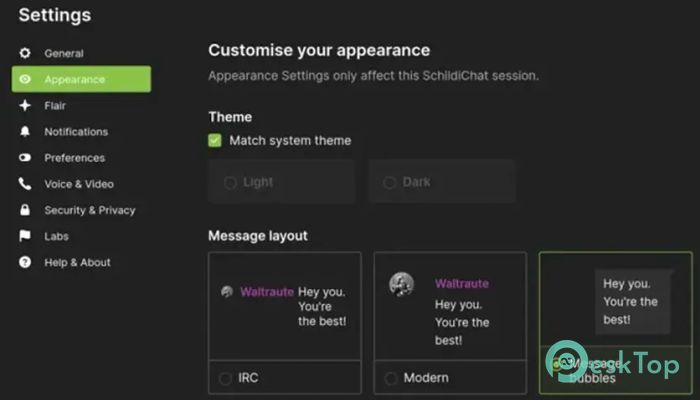
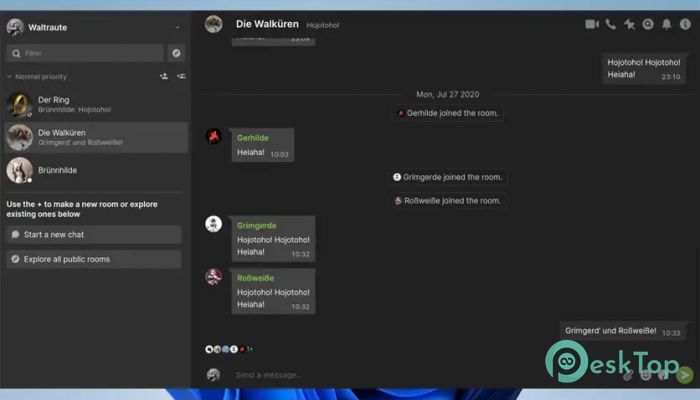
One of the first things you notice is its polished layout. The tool features attractive message bubbles, improved spacing, and a clear, easy-to-read chat structure. These details may look small, but they make everyday conversations clearer and more comfortable.
Customization options are also a major highlight. Users can adjust themes, toggle layout styles, and personalize the chat environment based on their own taste. By doing so, the software enables you to create a messaging space that aligns with your mood and workflow.
Performance And Stability
The software runs smoothly even when handling multiple chat rooms. Its lightweight design ensures that it doesn’t slow down your system. Whether you are chatting with friends, joining community groups, or interacting with professional teams, the client remains stable and responsive.
It also syncs well across devices. Messages update in real time, and switching from mobile to desktop feels seamless. This consistent performance helps users stay connected without interruption.
Security And Privacy
Since it operates on the Matrix protocol, end-to-end encryption is supported when enabled. This means your private conversations stay protected. The tool also gives users more control over their data because Matrix is decentralized. Instead of relying on a single company, you can choose your own server or host your own if you prefer.
For privacy-focused users, this level of control is a huge advantage. It offers a safer way to communicate compared to traditional centralized messengers.
Customization And Extra Tweaks
This messaging client stands out for its extra tweaks that are not available in standard Element builds. You will find options like compact mode, bubble view, improved reactions, and more straightforward navigation. These adjustments make the interface feel more polished and enjoyable.
These small yet useful changes make messaging a seamless daily experience. They also make the tool appealing for people who want more control over how their chat app looks and behaves.
Who Should Use It
This messenger is ideal for users who enjoy open-source tools and want a secure communication platform. It is also perfect for teams, communities, and individuals who use Matrix for group chats, collaboration, or personal messaging.
If you prefer flexibility, smooth performance, and modern design tweaks, this client provides a strong balance of style and function.
System Requirements and Technical Details
Operating System: Windows 11 / 10 / 8.1 / 7
Processor: Minimum 1 GHz Processor (2.4 GHz recommended)
RAM: 2GB (4GB or more recommended)
Free Hard Disk Space: 200MB or more is recommended

-
Program size121.29 MB
-
Version1.11.109
-
Program languagemultilanguage
-
Last updatedBefore 11 Month
-
Downloads6
 Cyotek WebCopy
 Linphone
 Cinny
Cinny AllMapSoft Bing Maps Downloader
  AllMapSoft Yandex Maps Downloader
  AllMapSoft google earth images downloader