
 Arabic
  English
  Turkish
  Chinese
  Japanese
  Russian
  Spanish
  German
  French
  Hindi
Hindi Download ScreenArc 1.4.1 for Windows
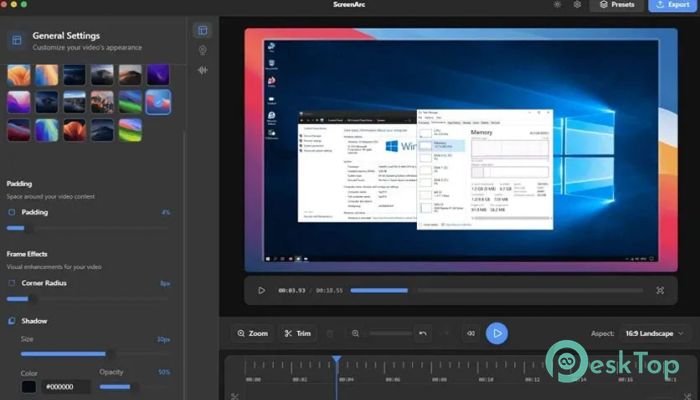
Download ScreenArc 1.4.1 for Windows.
ScreenArc Overview
This modern solution is built for people who want clean, engaging recordings without spending hours editing. It focuses on clarity, flow, and visual comfort, making recordings feel smooth and cinematic instead of raw and distracting. Whether you are explaining code, teaching a lesson, or showing a product demo, it helps your audience stay focused on what really matters.Features of ScreenArc
Designed for Effortless Recording
At its core, the software keeps things simple. You can capture the entire display, select a single application window, or draw a custom area to record exactly what you need. Multi-monitor support works naturally, so switching between screens feels like walking from one room to another instead of tripping over cables.
This flexibility is useful for developers who demonstrate workflows, educators who create lessons, and creators who record quick explainers. You hit record, do your thing, and let the tool handle the heavy lifting in the background.
Cinematic Mouse Tracking That Guides Attention
One of the standout ideas here is automatic mouse tracking. Instead of viewers having to guess where to look, it smoothly pans and zooms around your cursor and clicks. Think of it like a camera operator following the action in a movie, always keeping the important moment in frame.
This approach removes visual noise and keeps attention locked on interactions. Viewers do not feel lost, and your message lands more clearly without you saying a word.
Webcam Overlay for a Personal Touch
Sometimes, seeing a face makes all the difference. The built-in webcam overlay lets you add your camera feed directly into recordings. This small window creates a human connection, making tutorials and presentations feel more friendly and trustworthy.
You can position it neatly without blocking important content, so it feels like a helpful guide standing beside the screen rather than in the way.
A Visual Editor That Feels Natural
Editing does not need to feel like assembling a spaceship. The included visual timeline keeps everything clear and manageable. You can trim clips, adjust frames, and refine scenes with simple, intuitive controls.
Backgrounds can be customized using solid colors, gradients, or wallpapers. Shadows and spacing help give recordings a clean, modern look, similar to slides in a well-designed presentation.
Instant Aspect Ratios for Every Platform
Creating content for different platforms often means repeatedly re-editing the same content. Here, aspect ratio switching happens with a single click. You can jump from wide layouts for video platforms to vertical formats for short clips without starting over.
This is like resizing a photo frame instead of repainting the entire picture. The content stays intact while the format adapts instantly.
Presets That Save Time and Energy
Consistency builds recognition, especially for educators and creators. The preset system lets you save favorite styles, including layouts, backgrounds, and effects. Applying them to future projects takes seconds.
It is similar to having a favorite outfit ready in your closet. You already know it works, so you just put it on and go.
High-Quality Exports Without Complications
Once everything looks right, exporting is straightforward. Videos can be saved as MP4 files or lightweight GIFs, with resolutions reaching up to 2K. The results stay crisp and smooth, suitable for professional sharing.
This balance between quality and simplicity ensures that final files look sharp without requiring advanced technical knowledge.
Who Can Benefit the Most
The tool fits naturally into many workflows. Developers can clearly demonstrate features, educators can explain concepts without distractions, and content creators can deliver polished videos that feel thoughtfully produced.
It works like a helpful assistant who quietly improves everything you do on screen, without demanding extra effort in return.
System Requirements and Technical Details
Operating System: Windows 11 / 10 / 8.1 / 7
Processor: Minimum 1 GHz Processor (2.4 GHz recommended)
RAM: 2GB (4GB or more recommended)
Free Hard Disk Space: 500MB or more is recommended

-
Program size212.66 MB
-
Version1.4.1
-
Program languagemultilanguage
-
Last updatedBefore 2 Month
-
Downloads20Ralated programs
![Operant Peak Spectroscopy]() Operant Peak Spectroscopy
Operant Peak Spectroscopy ![NeverWrite]() NeverWrite
NeverWrite![FluentCleaner]() FluentCleaner
FluentCleaner![Snippai]() Snippai
Snippai![ChillShot AI]() ChillShot AI
ChillShot AI![Splunk Enterprise]() Splunk Enterprise
Splunk Enterprise
 Operant Peak Spectroscopy
  NeverWrite
 FluentCleaner
 Snippai
 ChillShot AI
 Splunk Enterprise