
 Arabic
  English
  Turkish
  Chinese
  Japanese
  Russian
  Spanish
  German
  French
  Hindi
Hindi Download Shelf-Life 0.10.1 for Windows
Download Shelf-Life 0.10.1 for Windows.
Shelf-Life Overview
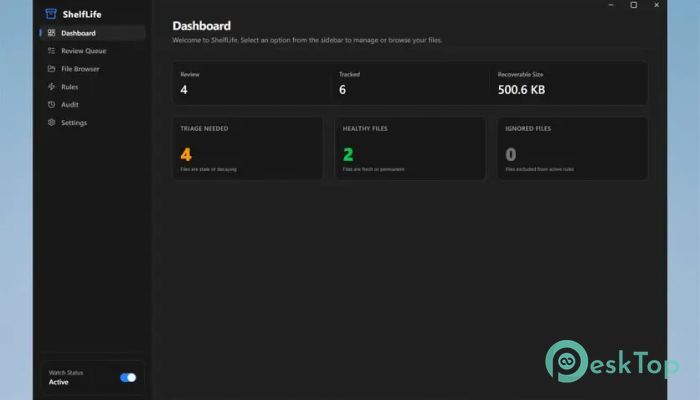
It is designed for people who constantly deal with folders that fill up with temporary files, downloads, installers, screenshots, or other clutter. Instead of manually cleaning these folders every few days, it automatically keeps everything under control according to the schedule you choose. Think of it as a smart digital shelf that quietly clears away old items before they become a mess. The software safely sends expired files to the Windows Recycle Bin instead of deleting them permanently. This gives you peace of mind because you can recover files if needed. With flexible automation, detailed previews, and an action history, it makes file management simple without taking control away from you.Features of Shelf-Life
Automatically Clean Temporary Folders
The software watches the folders you select and treats them as temporary storage areas. Every file placed inside can have its own lifespan, depending on the rules you create. Once the selected time has elapsed, the tool automatically moves the files to the Recycle Bin.
This approach keeps your Downloads, Screenshots, Temp, or project folders clean without requiring constant manual maintenance. Your workspace stays organized while you focus on more important tasks.
Flexible Automation Rules
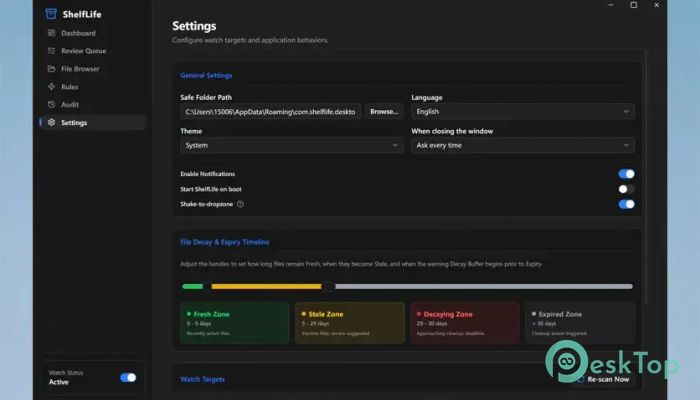
The tool provides powerful automation options that let you decide exactly how files should be handled. Rules can match files based on extension, file size, filename pattern, regular expressions, or even where the download originated.
This flexibility means you can create different behaviors for different file types. Large installers can disappear after a week, while important documents can remain untouched for as long as needed.
Safe Preview Before Running Rules
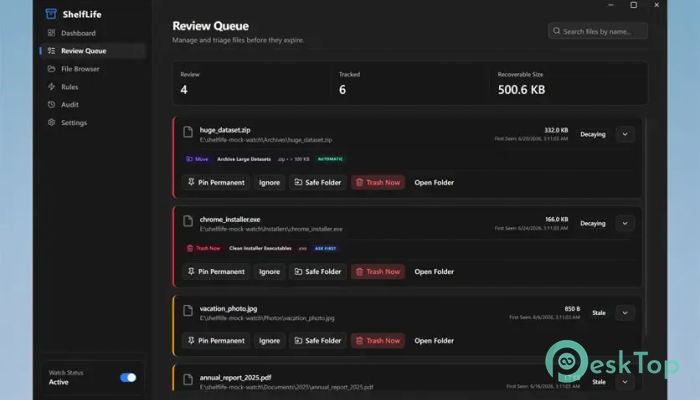
One of the best features is the ability to preview every automation rule before enabling it. Instead of guessing what will happen, you can see the expected results first.
The Preview Only mode works like a practice run. It shows exactly which files would be affected without making any real changes. This makes testing automation much safer, especially when working with valuable files.
Smart Rule Priorities
Sometimes multiple rules can apply to the same file. Instead of creating confusion, the software lets you assign priorities so the correct action always wins.
This gives you complete control over automation. You can build simple or advanced rule sets without worrying about unexpected results.
Move, Ignore, or Send Files to the Recycle Bin
Not every file needs the same treatment. The software allows different actions for different situations. Files can be moved to another folder, safely placed in the Recycle Bin, or completely ignored.
This makes it suitable for many workflows. You can archive certain files, discard temporary ones, and protect important content at the same time.
Automation That Stays Under Your Control
Unlike aggressive cleanup tools, automation is completely optional. Nothing happens unless you choose to enable it.
You can pause automation whenever necessary, making it easy to perform large-file transfers or temporary projects without interruption. Once finished, simply resume the rules and continue working normally.
Action History and Undo Support
Every automated action is recorded in a detailed audit trail. This history allows you to review exactly what happened and when.
Recoverable moves also support undo, allowing accidentally removed files to be restored quickly. It adds another layer of confidence, ensuring that automation never feels risky.
Lightweight Performance
The software is built to run quietly in the background without slowing down your computer. It consumes very few system resources while continuously monitoring selected folders.
Whether you leave your PC running all day or only use it occasionally, the tool performs its job efficiently without getting in the way.
Perfect for Everyday File Management
Anyone who downloads files regularly knows how quickly folders become crowded. Old installers, duplicate screenshots, temporary archives, and forgotten documents slowly pile up, making it difficult to find important files.
The software works like a personal assistant, constantly tidying your workspace. Instead of spending time cleaning folders every weekend, you simply create the rules once and let automation handle the rest.
System Requirements and Technical Details
Operating System: Windows 11 / 10
Processor: Minimum 1 GHz Processor (2.4 GHz recommended)
RAM: 2GB (4GB or more recommended)
Free Hard Disk Space: 200MB or more is recommended

-
Program size3.84 MB
-
Version0.10.1
-
Program languagemultilanguage
-
Last updatedBefore 2 Month
-
Downloads25Ralated programs
![Operant Peak Spectroscopy]() Operant Peak Spectroscopy
Operant Peak Spectroscopy ![NeverWrite]() NeverWrite
NeverWrite![FluentCleaner]() FluentCleaner
FluentCleaner![Snippai]() Snippai
Snippai![ChillShot AI]() ChillShot AI
ChillShot AI![Splunk Enterprise]() Splunk Enterprise
Splunk Enterprise
 Operant Peak Spectroscopy
  NeverWrite
 FluentCleaner
 Snippai
 ChillShot AI
 Splunk Enterprise