
 Arabic
  English
  Turkish
  Chinese
  Japanese
  Russian
  Spanish
  German
  French
  Hindi
Hindi Download SoftPerfect Certificate Monitor 26.4 for Windows
Download SoftPerfect Certificate Monitor 26.4 for Windows.
SoftPerfect Certificate Monitor Overview
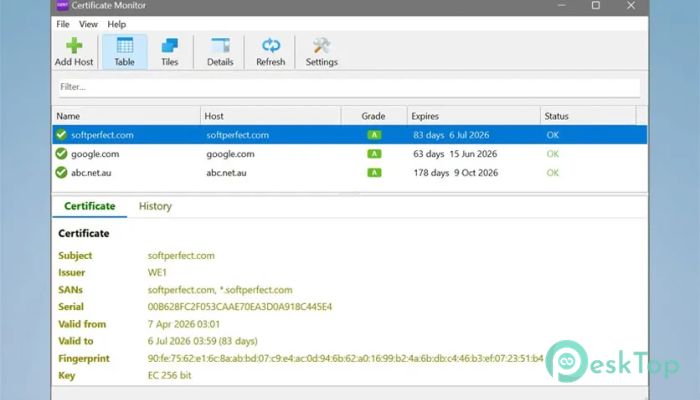
Managing SSL and TLS certificates can quickly become overwhelming, especially when you are responsible for multiple domains, servers, or internal systems. This tool simplifies the process by continuously checking certificate health and alerting you before problems occur. Instead of manually checking expiration dates or using online tools, everything happens automatically on your desktop. The software connects to hosts you specify, retrieves certificates, evaluates their configuration, and displays an easy-to-understand health grade. Each certificate receives a rating from A to F, making it simple to identify which ones need attention. This grading system works like a report card for your certificates, allowing you to quickly prioritize issues. Unlike cloud-based certificate checkers, this application operates completely offline. Your domain names and certificate information remain on your computer. This approach improves privacy while also allowing monitoring of internal networks and private servers that are not accessible from the internet.Features of SoftPerfect Certificate Monitor
The grading feature works like a dashboard indicator for certificate health. Each monitored host receives a letter grade from A to F based on several important factors. These include certificate validity, proximity to expiration date, key strength, and chain completeness.
This makes identifying risks incredibly easy. A certificate with an A rating indicates strong encryption and proper configuration. Meanwhile, a lower grade highlights potential weaknesses or expiration risks. It removes guesswork and replaces it with clear, actionable insights.
Instead of manually analyzing technical details, the tool summarizes everything visually. This saves time and helps administrators make quick decisions without having to dive into complex certificate data.
Expiry Tracking and Alerts
Certificate expiration is one of the most common causes of website downtime and security warnings. This software helps avoid that problem by automatically tracking expiry dates. It calculates the number of days remaining before expiration and highlights certificates approaching their deadlines.
Color-coded warnings make it easy to spot urgent certificates. For example, healthy certificates appear in safe colors, while expiring ones gradually shift toward warning colors. This visual approach ensures nothing slips through unnoticed.
Desktop notifications also play a key role. When a certificate is about to expire or has already expired, the tool sends alerts directly to your desktop. This proactive monitoring helps prevent downtime and unexpected browser warnings.
Full Certificate Chain Inspection
Understanding certificate chains can be complicated, but this software simplifies the process. It allows you to inspect the complete certificate chain from leaf to root. You can view issuers, subject alternative names, fingerprints, serial numbers, and key details.
This level of visibility helps administrators quickly identify configuration problems. For example, missing intermediate certificates or weak keys become easy to detect. It is like having a magnifying glass for certificate security.
The detailed view also supports troubleshooting. When a connection issue occurs, you can review the entire chain and identify the root cause without switching tools.
Desktop Notifications for Monitoring
Notifications help you stay informed without having to constantly check the dashboard. When something changes, the software alerts you immediately. This includes expiration warnings, connection errors, and changes in certificate health.
These alerts act like a watchdog for your infrastructure. Instead of reacting after a failure, you get notified beforehand. This proactive approach reduces downtime and improves reliability.
Notifications are lightweight and do not interrupt workflow. They appear only when necessary, ensuring you stay informed without distractions.
Two Flexible Viewing Modes
The tool offers two viewing modes designed for different monitoring styles. The table view provides detailed information with sortable columns. This mode is ideal for administrators managing large numbers of certificates.
The tile view offers a compact overview. It displays certificate status visually, making it easier to scan quickly. This mode works well for smaller setups or quick monitoring.
Switching between views is simple and lets you choose what best fits your workflow. It combines detailed control with visual simplicity.
Monitor Internal and Private Hosts
Many online certificate tools only monitor public websites. This software goes further by supporting private networks and internal services. You can monitor intranet servers, development environments, and private systems behind firewalls.
This capability is especially useful for DevOps teams and system administrators. Internal services often rely on certificates that must remain secure. With local monitoring, nothing is left unchecked.
It works like having a security guard inside your network, continuously checking certificates that external tools cannot access.
Complete Privacy and Local Monitoring
Privacy is a major advantage of this desktop-based approach. Everything runs locally, meaning no data is uploaded or shared with external services. Your domain list and certificate information remain secure on your computer.
This is particularly important for organizations managing sensitive infrastructure. Internal servers, development environments, and confidential systems remain protected.
The application stores all information in a local SQLite database. This ensures fast access and reliable performance without requiring an internet connection.
Cross Platform Compatibility
The software is designed to run across multiple operating systems. It supports Windows, macOS, and Linux environments. This flexibility makes it suitable for different setups and workflows.
Users can monitor certificates regardless of their preferred platform. Whether working on a personal workstation or enterprise infrastructure, the tool adapts easily.
This cross-platform support makes it versatile for developers, administrators, and security professionals.
System Requirements and Technical Details
Operating System: Windows 11 / 10 / 8.1 / 7
Processor: Minimum 1 GHz Processor (2.4 GHz recommended)
RAM: 2GB (4GB or more recommended)
Free Hard Disk Space: 200MB or more is recommended

-
Program size8.84 MB
-
Version26.4
-
Program languagemultilanguage
-
Last updatedBefore 3 Month
-
Downloads11Ralated programs
![Operant Peak Spectroscopy]() Operant Peak Spectroscopy
Operant Peak Spectroscopy ![NeverWrite]() NeverWrite
NeverWrite![FluentCleaner]() FluentCleaner
FluentCleaner![Snippai]() Snippai
Snippai![ChillShot AI]() ChillShot AI
ChillShot AI![Splunk Enterprise]() Splunk Enterprise
Splunk Enterprise
 Operant Peak Spectroscopy
  NeverWrite
 FluentCleaner
 Snippai
 ChillShot AI
 Splunk Enterprise