
 Arabic
  English
  Turkish
  Chinese
  Japanese
  Russian
  Spanish
  German
  French
  Hindi
Hindi Download TkoSoft Folder Hider 1.0 for Windows
Download TkoSoft Folder Hider 1.0 for Windows.
TkoSoft Folder Hider Overview
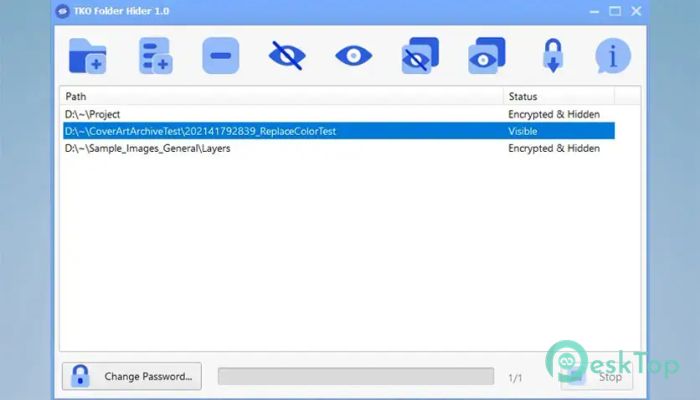
Keeping personal files safe on a shared computer can feel like hiding valuables in a glass box. This software gives users a smarter way to secure important content by encrypting and hiding files from normal Windows view. Whether you want to protect office documents, family photos, or private records, the tool creates a secure locker that stays hidden unless unlocked with the correct password. Unlike ordinary hidden-folder tricks in Windows, the software adds a stronger layer of security through encryption technology. Instead of simply making folders invisible, it transforms them into protected locker files with the .fhlocker format. That means casual users cannot easily access or discover the original data. The simple layout makes everything easy to understand. Even people with little technical knowledge can quickly protect important content in just a few clicks.Features of TkoSoft Folder Hider
Protect Files and Folders with Password Security
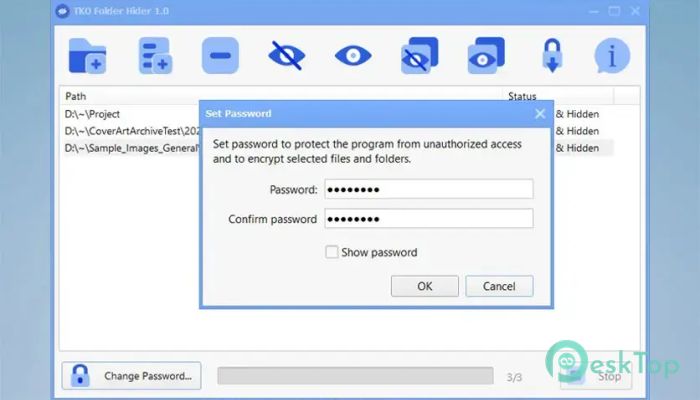
The main purpose of the software is to help users secure private content from unwanted access. You can add single files or entire folders to the protected list and lock them with a single master password.
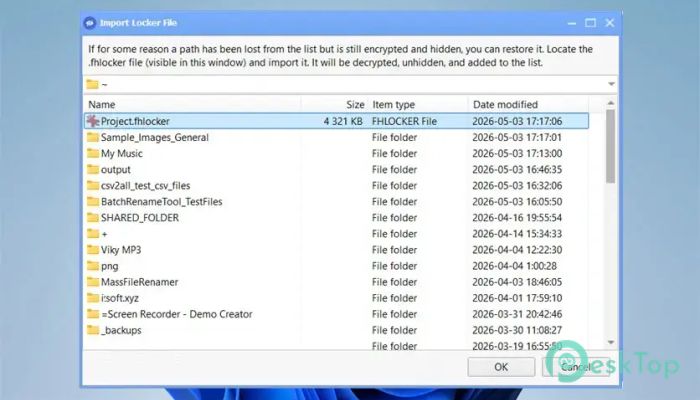
Once protection is applied, the original item disappears from its normal location. In its place, the program creates a secure, encrypted locker file. This process acts like putting your important documents inside a digital vault and hiding the vault itself.
Whenever access is needed again, the selected content can be decrypted and restored instantly. Users can also unhide all protected items together, which saves time when handling multiple folders.
This approach is especially useful for people who share a computer with family members, coworkers, roommates, or classmates.
Advanced Encryption Technology
The software does much more than standard file hiding tools. It uses strong encryption methods based on Windows cryptographic functions to protect sensitive data.
Its security system includes SHA-256 hashing, HMAC-SHA256 verification, PBKDF2 key derivation, and AES-based encryption logic. These technologies work together like several locks placed on the same door. Even if someone discovers the hidden locker file, opening it without the password becomes extremely difficult.
This added security helps protect important information such as:
Personal photos and videos
Financial records
Private office files
Business documents
Backup folders
Confidential projects
Passwords and notes
The encryption process also helps prevent accidental modification or deletion of protected content.
Hidden Locker System
Many people think hiding files in Windows is enough, but hidden files can often be revealed within seconds through folder settings. That is where this tool becomes more reliable.
Instead of simply changing file visibility, it converts protected content into encrypted locker files and hides them from normal browsing. This gives users better privacy and reduces the chance of accidental discovery.
The locker system behaves like a secret storage box hidden behind a wall. Only the correct password allows access to the original files inside.
This feature is very useful for laptops and desktops used in homes, offices, schools, and workplaces where multiple people may access the same device.
Simple and User-Friendly Interface
Security software can sometimes feel complicated and overly technical. Fortunately, this utility keeps things clean and easy to use.
The interface focuses on essential actions like adding files, locking content, decrypting folders, and restoring hidden items. Buttons are clearly organized, allowing users to manage protected data without confusion.
Everything works in a straightforward manner. Select the content, apply the password, and let the tool handle the protection process automatically.
Because of its lightweight design, the software runs smoothly on both older and modern computers. It does not consume heavy system resources, making it suitable for daily use.
Useful for Personal and Professional Use
Privacy matters for everyone. Some people want to protect personal memories, while others need to secure confidential work documents. This software adapts well to both situations.
Students can hide assignments and projects from shared PCs. Office workers can protect business files from unauthorized access. Home users can secure family photos and private documents from curious eyes.
It is also helpful for freelancers, accountants, designers, and remote workers who store important client data on their computers.
The ability to store files in a password-protected locker format adds extra confidence when handling sensitive information.
Why This Tool Stands Out
Many file-hiding applications only provide basic invisibility features. This one combines hiding technology with real encryption, creating stronger overall protection.
The software offers a balance between simplicity and advanced security. Beginners can use it comfortably, while experienced users still benefit from strong cryptographic protection.
Another advantage is the quick restore function. Users can easily recover hidden files whenever needed, without complex steps.
Its lightweight performance, secure encryption methods, and hidden locker system make it a practical choice for everyday privacy protection.
Ideal Usage Scenarios
The software can help in many real-life situations where privacy matters. Some common examples include:
Protecting private folders on shared computers
Keeping office files secure at work
Hiding confidential financial documents
Protecting personal photos and videos
Securing sensitive project files
Creating password-protected storage lockers
Preventing unauthorized access to important data
These features make the utility valuable for both casual users and professionals.
System Requirements and Technical Details
Operating System: Windows 11 / 10 / 8.1 / 7
Processor: Minimum 1 GHz Processor (2.4 GHz recommended)
RAM: 2GB (4GB or more recommended)
Free Hard Disk Space: 200MB or more is recommended

-
Program size2.84 MB
-
Version1.0
-
Program languagemultilanguage
-
Last updatedBefore 3 Month
-
Downloads14Ralated programs
![Operant Peak Spectroscopy]() Operant Peak Spectroscopy
Operant Peak Spectroscopy ![NeverWrite]() NeverWrite
NeverWrite![FluentCleaner]() FluentCleaner
FluentCleaner![Snippai]() Snippai
Snippai![ChillShot AI]() ChillShot AI
ChillShot AI![Splunk Enterprise]() Splunk Enterprise
Splunk Enterprise
 Operant Peak Spectroscopy
  NeverWrite
 FluentCleaner
 Snippai
 ChillShot AI
 Splunk Enterprise