
 Arabic
  English
  Turkish
  Chinese
  Japanese
  Russian
  Spanish
  German
  French
  Hindi
Hindi Download TkoSoft NextDiff 1.0 for Windows
Download TkoSoft NextDiff 1.0 for Windows.
TkoSoft NextDiff Overview
It is a smart comparison utility designed for Windows users who work with text files, source code, folders, and complex documents. It gives you a clean side-by-side layout where changes become easy to spot within seconds. Whether you are checking edited code, reviewing document revisions, or comparing folders after backups, the software keeps everything organized and simple. The tool works like a magnifying glass for your files. Instead of manually reading line by line, it automatically highlights changes, removed sections, and newly added content. This saves time and reduces mistakes, especially when handling large files or important documents.Features of TkoSoft NextDiff
Simple Side-by-Side File Comparison
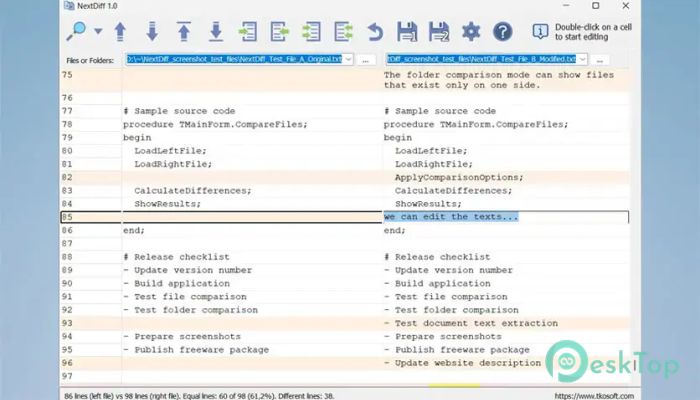
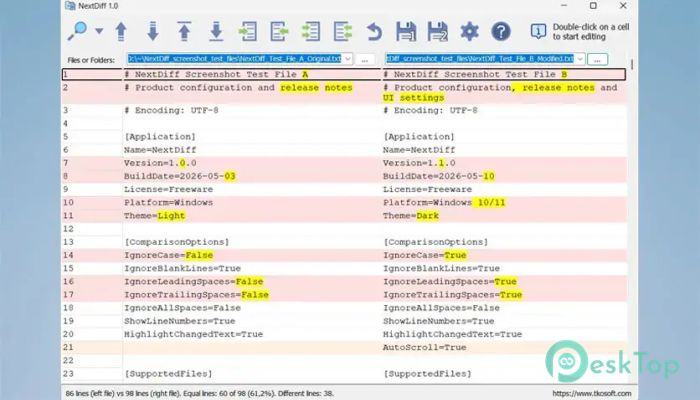
One of the software's strongest features is its clean two-column comparison view. Two files are displayed side-by-side so you can instantly see what changed. Different lines are highlighted in different colors, while modified words or characters within a line are marked separately.
This makes the process smooth for developers, writers, office workers, and students. Instead of feeling lost inside long documents, you can focus only on the lines that matter. It feels similar to placing two papers under a bright lamp, where every change becomes impossible to miss.
The interface stays uncluttered and beginner-friendly. Even people with little technical knowledge can quickly understand the comparison results.
Supports Multiple Text Encodings
The tool supports several common text encodings to ensure files open correctly without strange symbols or unreadable characters. Supported formats include ANSI/ASCII, UTF-8, UTF-8 with BOM, UTF-16 LE, and UTF-16 BE.
This flexibility becomes extremely useful when working with files from different systems or software environments. Developers often deal with encoding conflicts, and having proper support removes unnecessary frustration.
Instead of wasting time fixing unreadable text, users can continue comparing content smoothly and accurately.
Compare Complex Documents with Ease
The software is not limited to plain text files. It can also compare complex document formats using Apache Tika text extraction. This allows readable content to be extracted from PDF, DOCX, XLSX, PPTX, and many other document types.
Think of it as turning complicated files into readable text layers that can be analyzed side by side. This feature is extremely helpful for office environments where document revisions happen regularly.
For example, if someone edits a business report or presentation, you can quickly identify updated sections without manually reviewing every page. This improves productivity and helps teams work faster.
Smart Difference Navigation
Finding differences inside large files can sometimes feel like searching for tiny cracks in a huge wall. That is where the navigation controls become valuable. The software lets you jump directly to the first, previous, next, or last difference.
This navigation system keeps the workflow smooth and organized. Instead of endless scrolling, you move directly between important changes with a single click.
The comparison summary also provides useful statistics such as:
Number of lines in each file
Total equal lines
Percentage of matching content
Count of different lines
These details give users a quick overview of how similar or different two files are.
Edit and Merge Changes Directly
It is not just a viewer. It also allows users to edit text directly inside the comparison window. You can double-click a cell or use keyboard controls to modify content without opening another editor.
The merge tools are equally useful. They allow you to copy changes from the left file to the right file, or vice versa. This makes updating files much faster and easier.
Undo support adds another layer of safety. If a merge action fails, recent changes can be quickly reversed. It feels like having a safety rope while climbing a mountain because mistakes no longer become stressful.
Powerful Folder Comparison
The folder comparison feature helps users compare entire directories, including files inside subfolders. This becomes useful when checking backups, synchronizing project folders, or reviewing copied data.
The software clearly shows:
Files exist only on the left side
Files exist only on the right side
Files that appear different
Matching files
This organized structure makes folder management easier and more efficient. Instead of manually opening dozens of folders, users get a clear visual report within moments.
For developers and IT professionals, this feature can save hours of repetitive work.
Flexible Comparison Settings
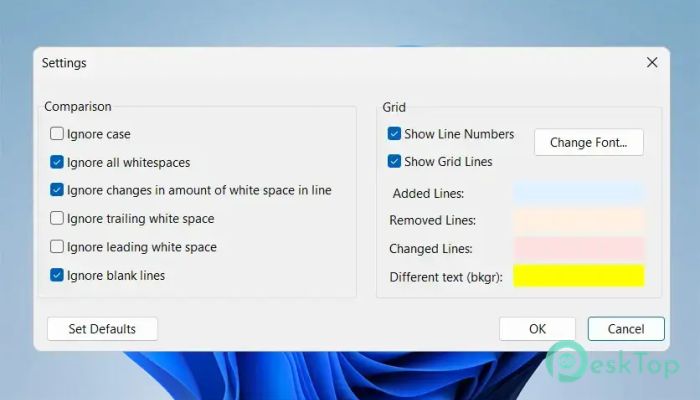
Sometimes, tiny formatting changes are not important. The software includes several comparison settings that help users focus only on meaningful differences.
Available options include:
Ignore case differences
Ignore all whitespace
Ignore changes in whitespace amount
Ignore leading or trailing whitespace
Ignore blank lines
These filters help remove unnecessary noise from comparison results. It becomes easier to focus on actual content changes instead of formatting variations.
This is especially useful for coding projects where spacing and indentation often change without affecting functionality.
Clean Interface and Smooth Performance
The program keeps everything lightweight and responsive. It does not overload the system with unnecessary visual effects or complicated menus. The layout remains simple, clean, and easy to understand.
Even when handling large files or comparing multiple folders, performance stays smooth. Navigation remains responsive, and highlighted changes appear instantly.
The software behaves like a reliable assistant, quietly organizing information in the background while you focus on the important work.
Why This Tool Is Useful for Everyday Work
Comparison tools are valuable in many situations. Programmers can track source code changes, office workers can review document revisions, and students can compare research drafts without confusion.
The software reduces human error by making changes visually obvious. It also improves productivity by reducing the time users spend manually checking files.
Whether you are organizing backups, reviewing edits, or managing coding projects, the tool delivers a fast and practical solution.
System Requirements and Technical Details
Operating System: Windows 11 / 10 / 8.1 / 7
Processor: Minimum 1 GHz Processor (2.4 GHz recommended)
RAM: 2GB (4GB or more recommended)
Free Hard Disk Space: 200MB or more is recommended

-
Program size2.63 MB
-
Version1.0
-
Program languagemultilanguage
-
Last updatedBefore 3 Month
-
Downloads10Ralated programs
![Operant Peak Spectroscopy]() Operant Peak Spectroscopy
Operant Peak Spectroscopy ![NeverWrite]() NeverWrite
NeverWrite![FluentCleaner]() FluentCleaner
FluentCleaner![Snippai]() Snippai
Snippai![ChillShot AI]() ChillShot AI
ChillShot AI![Splunk Enterprise]() Splunk Enterprise
Splunk Enterprise
 Operant Peak Spectroscopy
  NeverWrite
 FluentCleaner
 Snippai
 ChillShot AI
 Splunk Enterprise