
 Arabic
  English
  Turkish
  Chinese
  Japanese
  Russian
  Spanish
  German
  French
  Hindi
Hindi Download Tolaria 1.0 for Windows

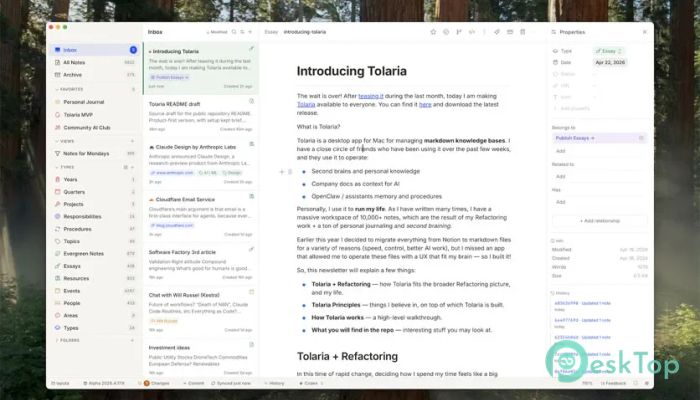
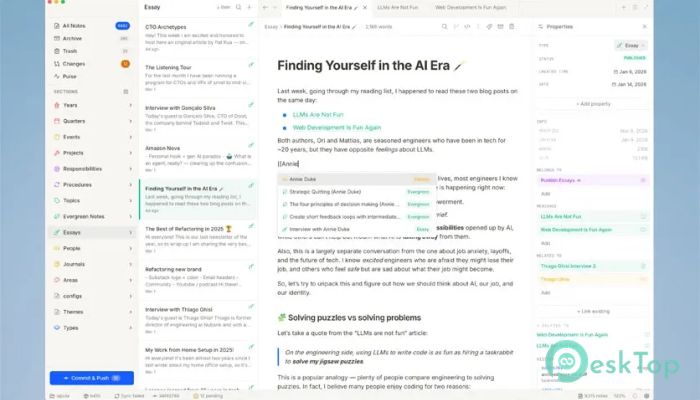
Download Tolaria 1.0 for Windows.
Tolaria Overview
This desktop tool is designed for people who want to keep their thoughts, notes, and documents in one structured place. It mainly works with Markdown files, which keep everything clean, readable, and easy to edit. Instead of juggling multiple apps, you can store everything in a single system that feels like your own digital brain. It is especially useful for developers, writers, researchers, and teams that rely on organized information. You can connect ideas, create structured notes, and build a system that grows with your knowledge over time. Why This Tool Stands Out Many note-taking apps try to do everything but end up feeling cluttered. This one focuses on simplicity and structure. Think of it like a well-organized library where every book is easy to find and connected to others. The software uses markdown, which keeps formatting simple. You do not need heavy editors or complex tools. Just write, organize, and connect your ideas without distractions.Features of Tolaria
Here are some of the main features that make this tool useful for daily work:
Clean markdown editing with real-time preview
Organized folder structure for managing notes
Fast search to find any information instantly
Linking system to connect related ideas
Offline access so your data stays with you
Lightweight performance with minimal system usage
Custom workflows for personal or team use
Personal Knowledge Management
One of the biggest uses of this tool is building a personal knowledge system. Imagine your brain extended into a digital space where every idea is stored and connected.
You can create notes about books, projects, or daily thoughts. Over time, these notes form a network of knowledge. When you revisit them, you can easily connect past ideas with new ones. This makes learning faster and more effective.
Building a Second Brain
Many users treat it like a second brain. Instead of trying to remember everything, you store it in a structured way. It is like having a trusted assistant who never forgets anything.
You can save insights, tasks, and plans. Later, you can search and reuse them. This reduces mental overload and helps you focus on what really matters.
Organizing Company Documentation
For teams, this tool becomes a central hub for documentation. Instead of scattered files and emails, everything lives in one organized system.
You can create guides, processes, and internal documentation. Team members can quickly find what they need without wasting time. It also helps new employees understand workflows faster.
Think of it as a shared brain for your company where knowledge is always available.
AI Context and Smart Workflows
This software also plays well with AI tools. You can use your organized notes as context for AI assistants. This means better answers, smarter automation, and more accurate results.
When your data is structured, AI can better understand it. This turns your knowledge base into something more powerful than just notes. It becomes a smart system that supports your daily tasks.
Memory and Procedure Storage
Another great use case is storing memory and procedures for assistants or workflows. You can document step-by-step processes and reuse them whenever needed.
For example, if you repeat certain tasks daily, you can write them once and follow them whenever you need to. This saves time and reduces mistakes. It is like having a checklist that evolves as your work does.
Simple Yet Powerful Interface
The interface is clean and easy to understand. You do not need hours to learn it. Everything is designed to keep your focus on writing and organizing.
It avoids unnecessary features and keeps only what matters. This makes it fast and reliable, even on older systems.
Flexible Use Cases
This tool is not limited to one purpose. You can use it in many ways depending on your needs:
Personal journaling and idea tracking
Project planning and documentation
Learning and research notes
Team collaboration and knowledge sharing
AI context management
It adapts to your workflow instead of forcing you to change how you work.
Offline First Approach
One of the best parts is that your data stays on your device. You do not need constant internet access. This gives you full control over your files and keeps your information private.
It also means faster performance because everything runs locally.
System Requirements and Technical Details
Operating System: Windows 11 / 10 / 8.1 / 7
Processor: Minimum 1 GHz Processor (2.4 GHz recommended)
RAM: 2GB (4GB or more recommended)
Free Hard Disk Space: 200MB or more is recommended

-
Program size12.13 MB
-
Version1.0
-
Program languagemultilanguage
-
Last updatedBefore 3 Month
-
Downloads10Ralated programs
![Operant Peak Spectroscopy]() Operant Peak Spectroscopy
Operant Peak Spectroscopy ![NeverWrite]() NeverWrite
NeverWrite![FluentCleaner]() FluentCleaner
FluentCleaner![Snippai]() Snippai
Snippai![ChillShot AI]() ChillShot AI
ChillShot AI![Splunk Enterprise]() Splunk Enterprise
Splunk Enterprise
 Operant Peak Spectroscopy
  NeverWrite
 FluentCleaner
 Snippai
 ChillShot AI
 Splunk Enterprise