
 Arabic
  English
  Turkish
  Chinese
  Japanese
  Russian
  Spanish
  German
  French
  Hindi
Hindi Download Toms Command Console 1.0 for Windows
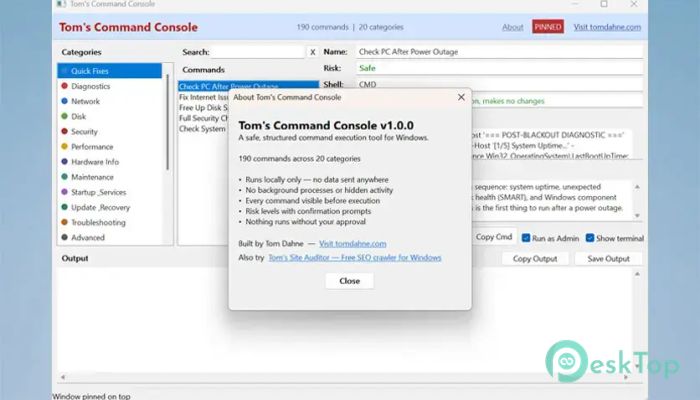
Download Toms Command Console 1.0 for Windows.
Toms Command Console Overview
Managing a Windows PC often requires using command-line tools, but remembering dozens of commands can feel like trying to navigate a city without a map. This software solves that problem by bringing together 190 useful commands, diagnostics, and search operators in one organized location. Instead of memorizing complex syntax, users can browse commands by category and read clear explanations before running them. The tool was designed for anyone who wants to troubleshoot, maintain, or learn more about Windows. Whether you are a beginner looking for guidance or an advanced user seeking quick access to commands, it provides a safe and efficient way to work with system tools.Features of Toms Command Console
Access to 190 Useful Commands
One of the biggest advantages of the software is its collection of 190 carefully organized commands spread across 20 categories. These commands cover many areas of Windows maintenance, networking, system information, diagnostics, and troubleshooting.
Instead of searching the internet for command examples, users can find everything in one place. Each command includes a description explaining its purpose before execution, helping users understand exactly what it does.
Quick Fixes for Faster Troubleshooting
Diagnosing computer problems often involves running multiple checks. The tool simplifies this process with Quick Fixes, automated workflows that execute multiple diagnostic commands in sequence.
This feature acts like a mechanic performing a complete vehicle inspection instead of checking one part at a time. It saves effort, speeds up troubleshooting, and helps identify common Windows issues more efficiently.
Built-In Google Dorks Collection
Beyond Windows commands, the software also includes a collection of Google search operators. These advanced search techniques can help users perform SEO research, locate specific file types, and conduct OSINT investigations.
Having these operators available within the same interface makes research tasks more convenient. Users can quickly discover useful search methods without needing separate reference guides.
Instant Search Functionality
Finding the right command is easy thanks to the built-in search box. With a simple keyword search or the Ctrl+F shortcut, users can instantly locate commands across all categories.
This feature is especially useful when working with a large command library. Instead of browsing through multiple sections, users can reach the desired command within seconds.
Real-Time Output Monitoring
The software provides real-time output streaming, allowing users to watch command results as they happen. This makes monitoring processes much easier and helps users understand what is taking place behind the scenes.
An optional terminal window mode is also available for those who prefer a traditional command-line experience while still benefiting from the organized interface.
Easy Command Copying
Sometimes users want to run commands manually or save them for future use. The integrated Copy Command button makes this simple by allowing instant copying of the raw command text.
This capability is useful for learning command-line operations because users can study, modify, and execute commands independently whenever needed.
Administrator Privilege Detection
Certain Windows commands require elevated permissions to function correctly. The tool automatically detects commands that need administrator access and informs users before execution.
This smart feature helps prevent confusion and reduces the likelihood of failed command execution due to insufficient permissions.
Pin-On-Top Convenience
When working alongside Command Prompt or Windows Terminal, keeping the utility visible can be extremely helpful. The pin-on-top mode keeps the application window above other programs.
This makes multitasking easier because users can reference commands and explanations while working in another terminal window.
Output Saving and Sharing
Command results often contain valuable information for troubleshooting and reporting. The software allows users to copy output directly to the clipboard or save it as a text file.
This feature makes it simple to share diagnostic information with support teams, colleagues, or technical communities when seeking assistance.
DPI-Aware Modern Interface
Modern displays come in many resolutions and scaling settings. The tool includes a DPI-aware layout that automatically adjusts to different screen sizes and display configurations.
This ensures that text remains readable and interface elements stay properly aligned, providing a consistent user experience across laptops, desktops, and high-resolution monitors.
User-Friendly Learning Environment
Many command-line utilities can appear intimidating to newcomers. This solution removes that barrier by providing clear descriptions and organized categories. Users can learn commands gradually while understanding their purpose and effects.
By combining education with functionality, it transforms the command line from a confusing tool into an accessible learning resource.
System Requirements and Technical Details
Operating System: Windows 11 / 10 / 8.1 / 7
Processor: Minimum 1 GHz Processor (2.4 GHz recommended)
RAM: 2GB (4GB or more recommended)
Free Hard Disk Space: 200MB or more is recommended

-
Program size261.44 KB
-
Version1.0
-
Program languagemultilanguage
-
Last updatedBefore 4 Month
-
Downloads64Ralated programs
![Operant Peak Spectroscopy]() Operant Peak Spectroscopy
Operant Peak Spectroscopy ![NeverWrite]() NeverWrite
NeverWrite![FluentCleaner]() FluentCleaner
FluentCleaner![Snippai]() Snippai
Snippai![ChillShot AI]() ChillShot AI
ChillShot AI![Splunk Enterprise]() Splunk Enterprise
Splunk Enterprise
 Operant Peak Spectroscopy
  NeverWrite
 FluentCleaner
 Snippai
 ChillShot AI
 Splunk Enterprise