
 Arabic
  English
  Turkish
  Chinese
  Japanese
  Russian
  Spanish
  German
  French
  Hindi
Hindi Download Toms PNG to ICO Converter 1.0 for Windows
Download Toms PNG to ICO Converter 1.0 for Windows.
Toms PNG to ICO Converter Overview
Creating custom icons for Windows applications, folders, shortcuts, and projects can sometimes feel like trying to fit a square peg into a round hole. This handy utility removes the hassle by offering a simple and reliable way to convert PNG files into ICO format. Whether you are a developer, designer, or casual user, it offers an easy way to create high-quality Windows icons in just a few clicks. The software is designed with speed and simplicity in mind. Users can drag and drop one or multiple PNG images directly into the window and instantly generate ICO files. It preserves transparency, maintains image quality, and ensures that icons appear clean across different Windows environments.Features of Toms PNG to ICO Converter
Simple and User-Friendly Interface
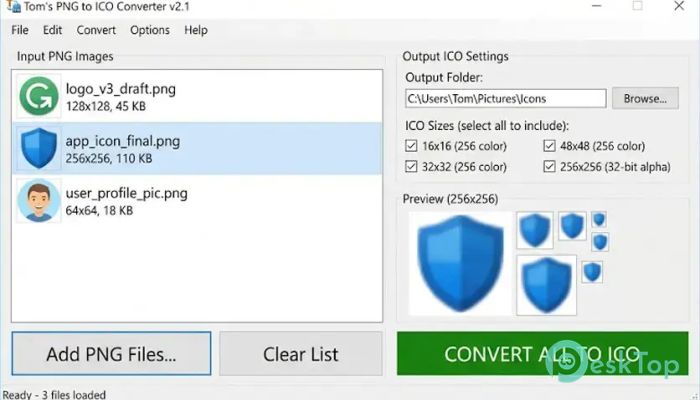
One of the biggest strengths of the tool is its straightforward interface. There are no complicated settings or confusing menus to navigate. Everything is organized clearly, allowing even first-time users to start converting images immediately.
The clean layout helps reduce distractions and keeps the focus on the conversion process. Simply add PNG files, choose the output location, and let the software do the rest.
Fast PNG to ICO Conversion
Speed is one of the most important factors when working with image conversion tools. The software processes images quickly, making it ideal for users who need icons without wasting valuable time.
Instead of spending minutes adjusting settings, you can complete conversions in seconds. This efficiency is especially useful when working with multiple files or large projects.
Supports Multiple File Conversion
Handling icons one at a time can become tedious when working on larger projects. Fortunately, the tool supports batch processing, allowing several PNG files to be converted simultaneously.
This feature saves time and improves productivity. Whether you need a handful or dozens of icons, the conversion process remains smooth and efficient.
Preserves Transparency Perfectly
Transparency is a critical part of modern icon design. Poor conversion tools often introduce unwanted edges, dark outlines, or strange halos around transparent areas.
The software maintains transparency accurately during conversion. As a result, icons blend naturally into the Windows interface without visual artifacts, creating a polished and professional appearance.
Clean and Sharp Icon Output
High-quality icons can make applications and folders look more professional. The tool ensures that converted files remain sharp and visually appealing.
By preserving image clarity and scaling properly, it helps prevent blurry or distorted icons. The result is a cleaner desktop experience and better visual consistency.
Ideal for App and Shortcut Icons
Developers often need custom icons for desktop applications, installers, and executable files. This utility provides an easy way to generate those icons from existing PNG artwork.
It is equally useful for creating personalized folder icons, desktop shortcuts, and branding assets. A simple image can quickly become a fully functional Windows icon.
Drag and Drop Convenience
The drag-and-drop functionality makes the entire workflow effortless. Users can simply drag image files into the application window and start the conversion process immediately.
This approach feels natural and eliminates unnecessary steps. It transforms what could be a technical task into something as easy as moving files between folders.
Lightweight and Resource Friendly
Many image editing applications require significant system resources and lengthy installation procedures. In contrast, this utility remains lightweight and efficient.
It launches quickly, uses minimal system memory, and performs conversions without slowing down the computer. This makes it suitable for both modern systems and older machines.
Reliable Scaling for Different Icon Sizes
Windows icons are often displayed in various sizes depending on where they are used. The software handles scaling effectively to ensure icons remain clear and recognizable.
Whether displayed as a small shortcut icon or a larger folder icon, the generated files maintain their visual quality and professional appearance.
Useful for Designers and Developers
Graphic designers can quickly transform artwork into usable icon files, while developers can create application resources without relying on complex image software.
This flexibility makes the utility a valuable addition to many workflows. It bridges the gap between image creation and Windows icon deployment in a simple and efficient way.
System Requirements and Technical Details
Operating System: Windows 11 / 10 / 8.1 / 7
Processor: Minimum 1 GHz Processor (2.4 GHz recommended)
RAM: 2GB (4GB or more recommended)
Free Hard Disk Space: 200MB or more is recommended

-
Program size261.40 KB
-
Version1.0
-
Program languagemultilanguage
-
Last updatedBefore 3 Month
-
Downloads22Ralated programs
![Operant Peak Spectroscopy]() Operant Peak Spectroscopy
Operant Peak Spectroscopy ![NeverWrite]() NeverWrite
NeverWrite![FluentCleaner]() FluentCleaner
FluentCleaner![Snippai]() Snippai
Snippai![ChillShot AI]() ChillShot AI
ChillShot AI![Splunk Enterprise]() Splunk Enterprise
Splunk Enterprise
 Operant Peak Spectroscopy
  NeverWrite
 FluentCleaner
 Snippai
 ChillShot AI
 Splunk Enterprise