
 Arabic
  English
  Turkish
  Chinese
  Japanese
  Russian
  Spanish
  German
  French
  Hindi
Hindi Download Turkay Software Glow 26.11 for Windows
Download Turkay Software Glow 26.11 for Windows.
Turkay Software Glow Overview
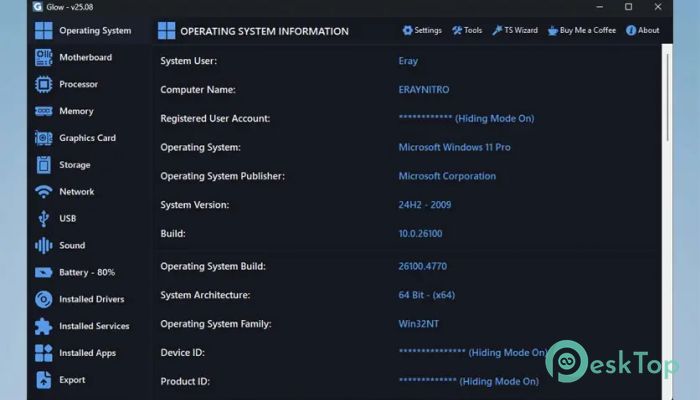
This all-in-one diagnostic and system information tool offers profound insight into every corner of your PC. From operating system details to the health of your battery, it provides advanced data in a clean, user-friendly interface. With export options, multilingual support, and built-in utilities, the tool is ideal for both casual users and tech professionals who want a better look at their machine's inner workings.Features of Turkay Software Glow
Detailed Operating System Information
The tool provides more than just the basic OS version. It dives deep, revealing serial numbers, device IDs, and model info. It’s like lifting the hood of your car and seeing not just the engine but every bolt labeled.
Motherboard and BIOS Insights
You get access to the model, brand, BIOS version, and serial number of your motherboard. This info is crucial for tech support or hardware upgrades. No more digging around inside your PC case to figure out what board you have.
Powerful CPU Monitoring
With live updates and detailed processor specs, you’ll always know how your CPU is doing. Clock speeds, core count, and real-time usage are all displayed clearly so you can track performance or detect potential issues.
Advanced RAM Analysis
Get everything from total capacity and speed to manufacturer and slot layout. It’s great for when you’re thinking of upgrading your memory or just curious about what your machine has under the hood.
GPU and Display Information
This section doesn’t just show your GPU model; it also details the manufacturer, driver status, and even monitor connections. It's handy for gamers, designers, or anyone using multiple displays.
Storage Device Overview
From HDDs to SSDs, it reveals every detail: capacity, available space, drive type, file system, and health status. It’s like having a health checkup for your storage with no tech jargon.
Network Adapter Summary
See all your connected network devices—Wi-Fi, Ethernet, Bluetooth, and even virtual connections. It helps troubleshoot connectivity problems in seconds instead of hours.
USB Device Tracking
This software keeps an eye on your USB ports. It lists connected devices and their statuses, so you know what’s plugged in and how it’s performing.
Sound System Breakdown
Every audio component, from sound cards to mixers, is displayed with driver details. It’s beneficial for setting up home studios or solving sound issues.
Battery Monitoring
Laptop users will love this. It shows battery capacity, health, charge cycles, and more. Think of it as your digital battery doctor—always on call.
Driver Management
Every installed driver is listed with status and compatibility. If something’s not working, you’ll know exactly which driver to check or update.
Running Services Insight
You can view all active background services. This is useful for spotting any unnecessary or suspicious activity that may be slowing down your system.
Installed Application Viewer
See everything installed on your system—even those sneaky apps that hide from the Control Panel. It’s great for decluttering or managing your programs efficiently.
Export Your System Data
You can export the complete system report in TXT or HTML format. This is handy for tech support, audits, or personal record-keeping.
Built-in Tools and Utilities
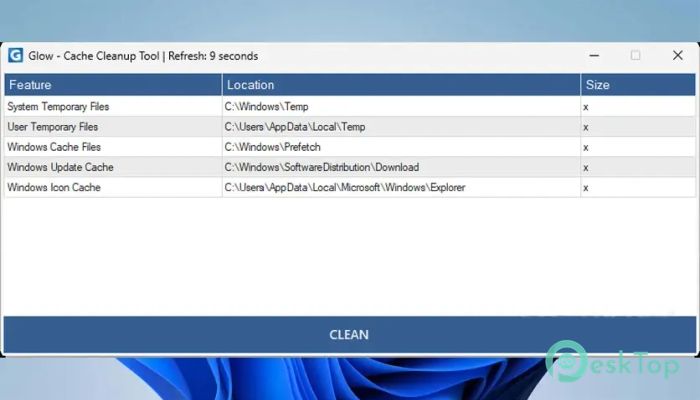
It includes useful tools like internet speed tests, monitor testing, and file cleanup utilities. It’s like having a mini repair kit built right into your PC.
Architecture Compatibility
Whether you're using Intel, AMD, or an ARM64 device like Apple M series or Snapdragon, this software supports both x64 and ARM64. You get smooth performance on almost any machine.
Easy Update System
Thanks to TS Wizard, updates are seamless. One click gets you the latest features and bug fixes without needing to download anything manually.
Dark and Light Mode Support
You can switch between light and dark themes, or let the tool adapt to your system theme automatically. The dark theme helps reduce eye strain during long sessions.
Multiple Language Options
This tool supports a wide range of languages, making it user-friendly for people all over the globe. It’s built for everyone, no matter your native tongue.
System Requirements and Technical Details
Operating System: Windows 10/11
Processor: Minimum 1 GHz Processor (2.4 GHz recommended)
RAM: 2GB (4GB or more recommended)
Free Hard Disk Space: 200MB or more is recommended

-
Program size1.54 MB
-
Version26.11
-
Program languagemultilanguage
-
Last updatedBefore 2 Month
-
Downloads16Ralated programs
![Operant Peak Spectroscopy]() Operant Peak Spectroscopy
Operant Peak Spectroscopy ![NeverWrite]() NeverWrite
NeverWrite![FluentCleaner]() FluentCleaner
FluentCleaner![Snippai]() Snippai
Snippai![ChillShot AI]() ChillShot AI
ChillShot AI![Splunk Enterprise]() Splunk Enterprise
Splunk Enterprise
 Operant Peak Spectroscopy
  NeverWrite
 FluentCleaner
 Snippai
 ChillShot AI
 Splunk Enterprise