
 Arabic
  English
  Turkish
  Chinese
  Japanese
  Russian
  Spanish
  German
  French
  Hindi
Hindi Download TweakHub 1.2.0 for Windows
Download TweakHub 1.2.0 for Windows.
TweakHub Overview
It is an all-in-one control panel designed for Windows 11 users seeking better performance and greater control over their computers. Instead of downloading multiple utilities for different tasks, it brings everything together into one clean, organized interface. Whether you want to speed up your PC, repair system files, or automate repetitive tasks, the software makes the process quick and easy. The software focuses on simplicity without sacrificing functionality. Every feature is carefully arranged into categories, making it easy for beginners while still offering enough flexibility for advanced users. With built-in safety measures like automatic backups and rollback support, you can make changes with confidence.Features of TweakHub
Curated Windows Optimization
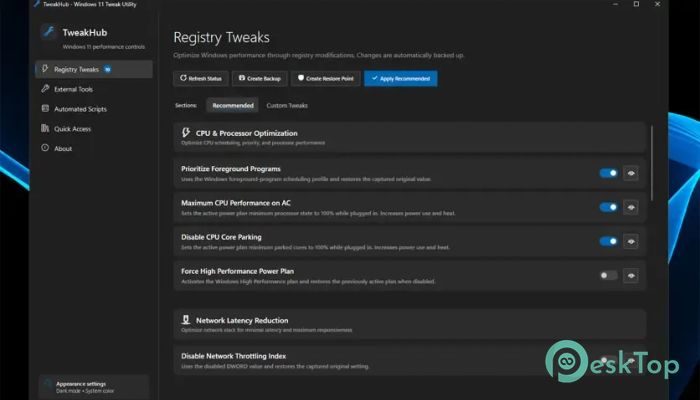
The software comes with a collection of carefully selected performance tweaks designed specifically for Windows 11. Instead of guessing which settings are safe to change, you get verified optimizations that improve responsiveness while maintaining system stability.
Making adjustments feels like using a well-organized toolbox instead of searching through dozens of hidden Windows settings. Everything is presented in a straightforward way, allowing you to enable or disable tweaks with just a few clicks.
Registry and Power Management
Managing registry settings and power configurations can greatly improve system performance when done correctly. The tool provides trusted tweaks to optimize these areas and creates automatic backups before making any changes.
If something doesn't work as expected, the built-in verification and rollback features let you quickly restore previous settings. This safety net gives users peace of mind when experimenting with different optimizations.
Portable Profiles
One of the most useful features is portable profile support. Your custom scripts, favorite tools, tweaks, appearance settings, and personal preferences are stored alongside the application rather than scattered throughout the system.
This makes moving the software between different computers incredibly simple. You can carry your complete setup on a USB drive and continue working without having to configure everything again.
Automation Made Simple
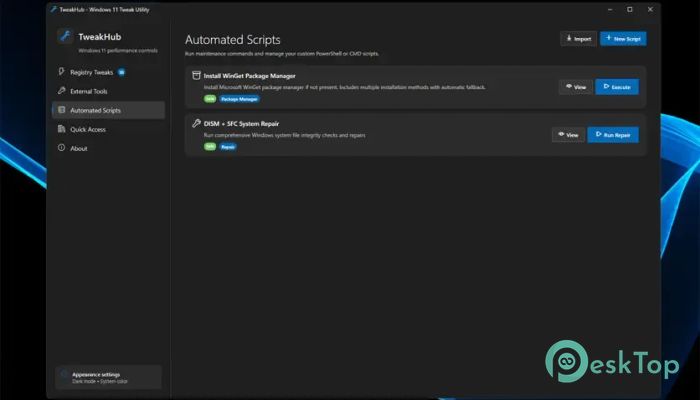
The software includes a flexible automation system for running PowerShell and Command Prompt scripts. Before execution, every script can be previewed so you know exactly what will happen.
It also supports administrator elevation, execution timeouts, and cancellation controls. These features make automation safer while giving users greater control over system maintenance and administrative tasks.
Built-In System Repair Tools
Windows problems can sometimes appear without warning. To help resolve them, the software includes verified repair workflows using Microsoft's DISM and SFC utilities.
The entire repair process is organized into simple steps, and all output logs are saved for future reference. This makes troubleshooting much easier than running commands manually from the command prompt.
Useful Toolbox
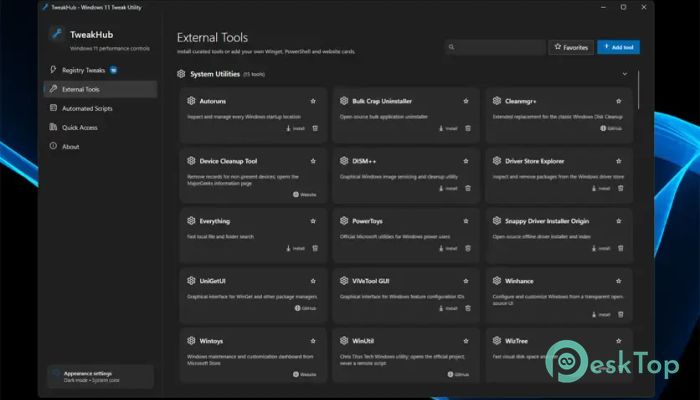
The integrated toolbox acts like a central hub for installing applications and accessing trusted online resources. It organizes Winget packages into categories, allowing users to install popular software quickly.
In addition to application management, it includes secure HTTPS links and customizable tool cards that let you organize your favorite utilities in one convenient location.
Quick Access to Windows Tools
Finding Windows administrative utilities often requires navigating through multiple menus. The software removes this hassle by placing commonly used administration consoles and Control Panel shortcuts into a single dashboard.
Whether you need Device Manager, Services, Disk Management, or other system utilities, everything remains only a click away, saving valuable time during maintenance.
Personalized Appearance
A comfortable workspace makes daily computer use more enjoyable. The software supports light and dark themes, so you can choose the appearance that best matches your preferences.
Additional controls for accent colors and transparency allow you to further personalize the interface, creating a clean, modern experience without unnecessary distractions.
Safe and Reliable Experience
System optimization always carries some level of risk, but this tool minimizes that concern through built-in protection. Automatic backups, verification checks, and rollback options ensure important settings can be restored whenever needed.
These safety features make it suitable for both casual users and experienced enthusiasts who regularly fine-tune their Windows installations.
System Requirements and Technical Details
Operating System: Windows 11 / 10
Processor: Minimum 1 GHz Processor (2.4 GHz recommended)
RAM: 2GB (4GB or more recommended)
Free Hard Disk Space: 200MB or more is recommended

-
Program size48.11 MB
-
Version1.2.0
-
Program languagemultilanguage
-
Last updatedBefore 3 Month
-
Downloads30Ralated programs
![Operant Peak Spectroscopy]() Operant Peak Spectroscopy
Operant Peak Spectroscopy ![NeverWrite]() NeverWrite
NeverWrite![FluentCleaner]() FluentCleaner
FluentCleaner![Snippai]() Snippai
Snippai![ChillShot AI]() ChillShot AI
ChillShot AI![Splunk Enterprise]() Splunk Enterprise
Splunk Enterprise
 Operant Peak Spectroscopy
  NeverWrite
 FluentCleaner
 Snippai
 ChillShot AI
 Splunk Enterprise