
 Arabic
  English
  Turkish
  Chinese
  Japanese
  Russian
  Spanish
  German
  French
  Hindi
Hindi Download Ventoy & Grub2FM Multiboot 1.0 for Windows
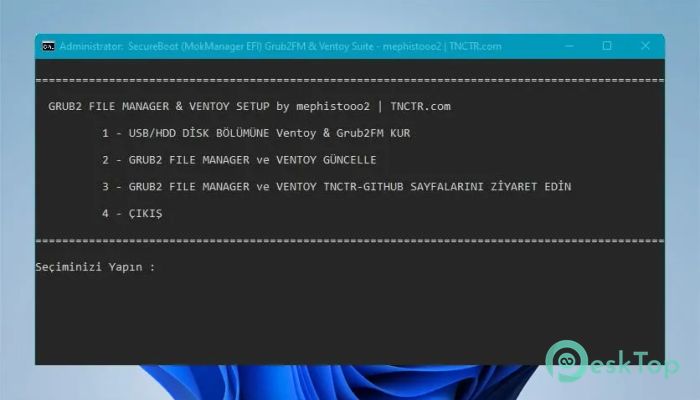
Download Ventoy & Grub2FM Multiboot 1.0 for Windows.
Ventoy & Grub2FM Multiboot Overview
This setup is designed for users who want flexibility and control when booting different operating systems from a single USB or external drive. It combines two well-known multiboot tools into a single working environment, letting you enjoy the strengths of both without switching between them. Instead of relying on just one boot manager, this combination gives you more options. You can load ISO files directly, manage boot entries more efficiently, and even work with multiple systems more smoothly. It feels like having two engines under one hood, each supporting the other. The script provided helps integrate both systems using their original files. This means you get the real performance and reliability without unnecessary modifications. It also tries to protect your data during installation, but taking a backup is always a smart move.Features of Ventoy & Grub2FM Multiboot
Installation Options Explained
There are two main installation methods available. The first one is a full installation that formats your drive. This option is ideal if you are starting fresh and want a clean setup without any leftover files.
The second option is non-destructive installation. This method tries to preserve existing data while setting up the boot system. It is a safer choice if you already have important files stored on your drive. However, even with this option, creating a backup is strongly recommended.
During the first installation, selecting the wrong option can result in data loss. So it is always better to double-check before proceeding. Think of it like renovating a house. You either rebuild from scratch or carefully work around what already exists.
Partition Structure Requirements
One important requirement is the partition structure. The drive must use MBR format. This ensures compatibility with both modern and older systems. Even though MBR is an older standard, it still provides excellent support for UEFI systems.
This setup allows the tool to run smoothly on both new computers and legacy machines. It bridges the gap between generations, making it a practical choice for users working across different hardware environments.
Secure Boot Compatibility
Both integrated systems support secure boot in EFI mode. This means you can run the setup on modern systems without disabling security features. It keeps your system protected while still giving you full control over boot operations.
To enable this feature, you need to add a certificate file to your BIOS during the first use. This step ensures that the system recognizes the bootloader as trusted. Once done, you can boot without any warnings or restrictions.
It may sound technical at first, but the process is straightforward. Just follow the instructions carefully, and you will have a secure and reliable boot environment ready to go.
Key Benefits of Using This Setup
Using both systems together gives you a powerful advantage. You get flexibility, speed, and compatibility in one place. It is like having a Swiss army knife for booting different operating systems.
You can easily test new operating systems, troubleshoot issues, or carry multiple tools on a single device. It saves time and reduces the need for multiple USB drives.
The integration also ensures you are not limited by the features of a single system. If one method does not work, the other one can handle the task. This dual support increases reliability and confidence during use.
Data Safety and Precautions
While the script tries to keep your data safe, no disk operation is completely risk-free. It is always a good idea to back up important files before starting the installation process.
Think of it as a safety net. Even if everything goes perfectly, having a backup gives you peace of mind. It ensures that your valuable data remains secure no matter what happens.
Also, pay attention to the installation options. Choosing the correct method can make a big difference in preserving your existing data.
Real-World Usage Scenarios
This setup is useful in many situations. IT professionals can use it for system recovery and testing. Students can experiment with different operating systems without installing them permanently.
It is also great for technicians who need a portable solution for fixing computers. Instead of carrying multiple tools, everything can be stored in one place. It speeds up and improves your workflow.
Even casual users can benefit from it. If you like exploring new systems or need a backup boot option, this setup makes the process simple and accessible.
System Requirements and Technical Details
Operating System: Windows 11 / 10 / 8.1 / 7
Processor: Minimum 1 GHz Processor (2.4 GHz recommended)
RAM: 2GB (4GB or more recommended)
Free Hard Disk Space: 200MB or more is recommended

-
Program size57.35 MB
-
Version1.0
-
Program languagemultilanguage
-
Last updatedBefore 3 Month
-
Downloads47Ralated programs
![Operant Peak Spectroscopy]() Operant Peak Spectroscopy
Operant Peak Spectroscopy ![NeverWrite]() NeverWrite
NeverWrite![FluentCleaner]() FluentCleaner
FluentCleaner![Snippai]() Snippai
Snippai![ChillShot AI]() ChillShot AI
ChillShot AI![Splunk Enterprise]() Splunk Enterprise
Splunk Enterprise
 Operant Peak Spectroscopy
  NeverWrite
 FluentCleaner
 Snippai
 ChillShot AI
 Splunk Enterprise