
 Arabic
  English
  Turkish
  Chinese
  Japanese
  Russian
  Spanish
  German
  French
  Hindi
Hindi Download WinZenith 1.2.1 for Windows
Download WinZenith 1.2.1 for Windows.
WinZenith Overview
It is a comprehensive Windows maintenance utility that combines several useful optimization tools into a single simple interface. Instead of installing different applications for cleaning, updating, and managing your computer, it provides everything from a centralized console. Whether you want to remove unnecessary files, update outdated drivers, uninstall programs, or improve disk performance, the software helps you complete these tasks with just a few clicks. The application is designed for both beginners and experienced users. Its organized layout makes every feature easy to access, while the portable design allows you to carry it on a USB drive and use it on multiple computers without installation. This makes regular maintenance faster, easier, and more convenient.Features of WinZenith
Simple and Well-Organized Interface
The software features a clean interface where every tool is placed in a logical category. You don't have to search through complicated menus or confusing settings. Everything is clearly labeled, making navigation feel natural even if you have never used a system optimizer before.
Its organized tabs allow you to jump between different maintenance tasks without wasting time. Whether you want to clean your system or update drivers, every option is only a click away.
Complete Windows Cleaning Tools
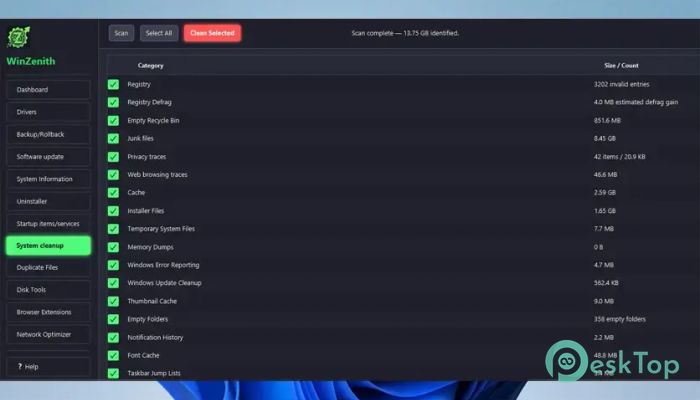
Over time, Windows collects temporary files, cache data, and leftover files that slowly consume storage space. The tool scans these unnecessary files and safely removes them to free up valuable disk space.
Cleaning your computer regularly is like giving your room a quick tidy-up. It removes unwanted clutter, helping your system stay organized and responsive while reducing unnecessary storage usage.
Powerful Application Uninstaller
Removing software through the default Windows uninstaller often leaves behind folders, registry entries, and unused files. The software performs a more complete uninstall by helping remove these leftovers that usually remain after standard removal.
This creates a cleaner operating system and prevents old applications from taking up valuable storage space. It also helps reduce system clutter that can build up after years of installing different programs.
Driver Update and Rollback Features
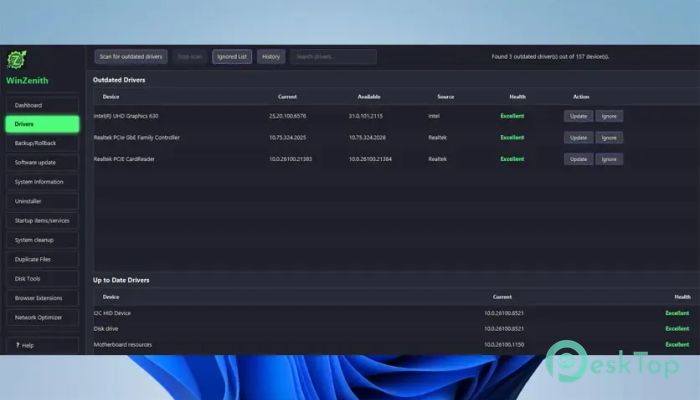
Keeping drivers up to date is important for hardware stability and performance. The software scans your computer to identify outdated drivers and helps install newer versions whenever they are available.
If a newly installed driver causes problems, the rollback feature lets you return to a previous version. This provides extra flexibility and helps users recover quickly from unexpected compatibility issues.
Software Update Management
Besides drivers, many installed applications also require regular updates. The tool checks for outdated software and helps you keep important programs up to date.
Updated software often includes security improvements, bug fixes, and new features. Staying current helps improve stability while reducing the risk of software-related issues.
General System Information
The software provides detailed information about your computer's hardware and operating system. You can quickly check processor details, memory information, storage devices, and other important system specifications from one location.
This information becomes useful when troubleshooting problems, upgrading hardware, or simply learning more about your computer's configuration.
Startup Program Management
Many applications automatically start when Windows boots, increasing startup time and consuming system resources. The software allows you to review and manage startup entries with ease.
Disabling unnecessary startup programs can significantly improve boot speed while making your computer feel more responsive immediately after turning it on.
Duplicate File Finder
Duplicate files can quietly occupy large amounts of storage without users realizing it. The software scans selected folders to locate duplicate photos, videos, documents, and other files.
After reviewing the results, you can safely remove unnecessary copies while keeping the originals. This helps recover storage space and keeps your files better organized.
Disk Optimization and Defragmentation
Hard drives may become fragmented over time, slowing down file access. The software includes disk optimization features that help reorganize data and improve drive performance on traditional HDDs.
Like organizing books neatly on a shelf instead of scattering them everywhere, optimized storage allows files to be accessed more efficiently, improving overall responsiveness.
Portable and Convenient
One of the biggest advantages is its portable nature. Since it doesn't require installation, you can store it on a USB flash drive and use it whenever needed on different Windows computers.
This flexibility makes it an excellent maintenance companion for IT professionals, technicians, and users who regularly work on multiple systems.
General System Scan
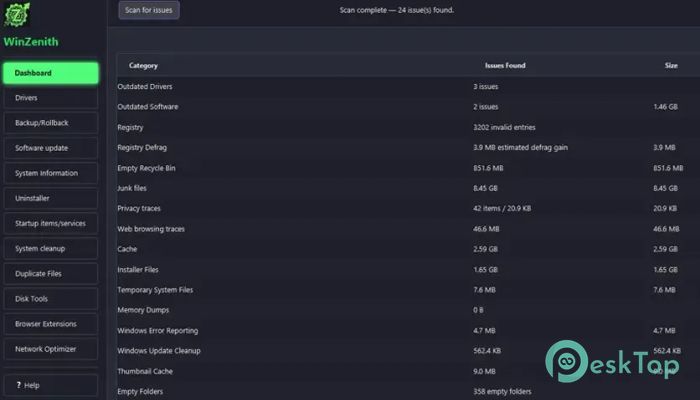
The software can perform a complete system scan that analyzes multiple areas of your computer in one operation. It checks drivers, startup items, unnecessary files, software updates, duplicate files, and other optimization opportunities.
Instead of checking each category separately, a single scan provides a complete overview of your system's health, helping you identify problems quickly and take appropriate action.
System Requirements and Technical Details
Operating System: Windows 11 / 10 / 8.1 / 7
Processor: Minimum 1 GHz Processor (2.4 GHz recommended)
RAM: 2GB (4GB or more recommended)
Free Hard Disk Space: 200MB or more is recommended

-
Program size55.54 MB
-
Version1.2.1
-
Program languagemultilanguage
-
Last updatedBefore 2 Month
-
Downloads31Ralated programs
![Operant Peak Spectroscopy]() Operant Peak Spectroscopy
Operant Peak Spectroscopy ![NeverWrite]() NeverWrite
NeverWrite![FluentCleaner]() FluentCleaner
FluentCleaner![Snippai]() Snippai
Snippai![ChillShot AI]() ChillShot AI
ChillShot AI![Splunk Enterprise]() Splunk Enterprise
Splunk Enterprise
 Operant Peak Spectroscopy
  NeverWrite
 FluentCleaner
 Snippai
 ChillShot AI
 Splunk Enterprise