
 Arabic
  English
  Turkish
  Chinese
  Japanese
  Russian
  Spanish
  German
  French
  Hindi
Hindi Download Xanasoft MajorPrivacy 0.100.0 for Windows
Download Xanasoft MajorPrivacy 0.100.0 for Windows.
Xanasoft MajorPrivacy Overview
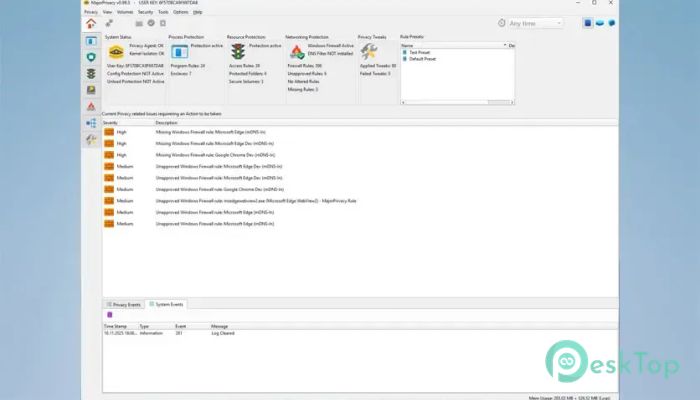
It is a powerful Windows privacy solution, the next generation of the PrivateWin10 project. It combines advanced protection with an easy-to-manage interface, making it suitable for both everyday users and experienced professionals. Instead of only blocking threats, it also gives you complete control over how applications interact with your system. The software works like a digital security guard, monitoring everything happening on your PC. It monitors files, registry entries, network connections, and running processes, allowing you to decide what to trust and what to block.Features of Xanasoft MajorPrivacy
Advanced Process Protection
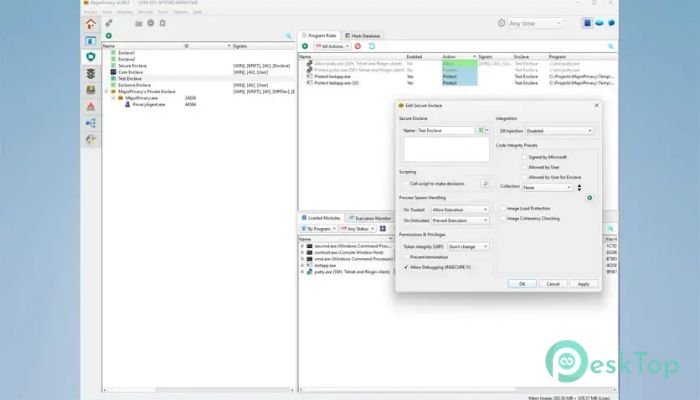
The software includes a powerful process protection system powered by a custom KernelIsolator driver. It can isolate important applications inside secure environments, making it extremely difficult for other programs to interfere with them.
Even if another application has administrator or system privileges, the tool helps prevent it from stealing information or modifying protected processes. This extra layer of security is especially useful for sensitive applications containing personal or confidential information.
Powerful Software Restriction
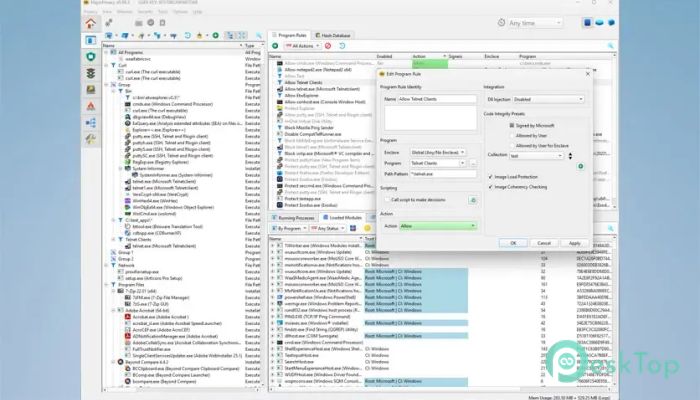
Not every application should be allowed to run freely. The software includes a flexible rule-based restriction engine that lets you decide which programs can start and which DLL files are allowed to load.
This feature reduces the risk of unknown software launching without permission. It also helps prevent unwanted background programs from running silently and consuming system resources.
File and Folder Protection
Protecting personal documents is one of the tool's strongest features. It allows you to choose specific files and folders that only trusted applications can access.
Unauthorized software attempting to read, modify, or delete protected content can be blocked instantly. This keeps important documents, personal photos, financial records, and work files safe from unwanted access.
Registry Security
The Windows Registry stores important system settings, and unauthorized changes can create security risks. The software is designed to extend its protection to registry keys, helping prevent unwanted modifications.
By controlling access to sensitive registry locations, you make it much harder for applications to change important Windows settings without your approval.
Advanced Network Firewall
The built-in firewall gives you detailed control over both outgoing and incoming network connections. Instead of relying only on default Windows settings, you can create customized rules that fit your privacy needs.
This allows you to decide exactly which applications are allowed to communicate over the internet, reducing unnecessary data sharing and improving overall privacy.
DNS Monitoring and Filtering
The software constantly watches DNS requests to identify which websites and online services your applications are contacting. This creates greater transparency and helps you understand network activity.
It also supports DNS filtering using predefined block lists and custom rules. Unwanted domains, trackers, advertisements, and malicious services can be blocked before a connection is even established.
Encrypted Secure Drives
Keeping confidential files protected becomes much easier with encrypted storage support. The tool is designed to create protected volumes stored inside encrypted container files.
Only users with the correct password can unlock these secure containers. When combined with file protection, confidential information remains inaccessible to unauthorized applications, even if they attempt to bypass normal security measures.
Privacy Tweaks and Windows Hardening
Modern Windows installations include various cloud features, telemetry services, and background components that collect usage information. The software provides an extensive tweak engine to disable unnecessary features and strengthen system privacy.
Instead of manually editing dozens of Windows settings, users can apply recommended privacy improvements through one convenient interface while maintaining full control over every change.
Activity Monitoring and Detailed Logs
Understanding what your applications are doing is often just as important as blocking them. The software records file activity, registry access, DNS requests, and network communication in detailed logs.
Visual reports help identify suspicious behavior quickly. If an application attempts to access unexpected locations or contact unknown servers, you can immediately investigate and decide whether to allow or block it.
Integrity Level Isolation
The software can raise protected applications to a higher integrity level inside secure enclaves. This isolates user objects, including application windows, from interference by other running programs.
This additional isolation creates another defensive barrier, making it much more difficult for malware or overreaching software to manipulate protected applications.
Designed for Everyday Privacy
The tool is not only built to defend against malware but also against legitimate software that collects more information than necessary. It gives users complete visibility into system activity while allowing them to control exactly what every application can access.
Whether you want to secure personal documents, limit internet access, monitor application behavior, or strengthen Windows privacy settings, it provides everything from one centralized dashboard.
System Requirements and Technical Details
Operating System: Windows 11 / 10 / 8.1 / 7
Processor: Minimum 1 GHz Processor (2.4 GHz recommended)
RAM: 2GB (4GB or more recommended)
Free Hard Disk Space: 200MB or more is recommended

-
Program size41.98 MB
-
Version0.100.0
-
Program languagemultilanguage
-
Last updatedBefore 3 Month
-
Downloads15Ralated programs
![Operant Peak Spectroscopy]() Operant Peak Spectroscopy
Operant Peak Spectroscopy ![NeverWrite]() NeverWrite
NeverWrite![FluentCleaner]() FluentCleaner
FluentCleaner![Snippai]() Snippai
Snippai![ChillShot AI]() ChillShot AI
ChillShot AI![Splunk Enterprise]() Splunk Enterprise
Splunk Enterprise
 Operant Peak Spectroscopy
  NeverWrite
 FluentCleaner
 Snippai
 ChillShot AI
 Splunk Enterprise