
 Arabic
  English
  Turkish
  Chinese
  Japanese
  Russian
  Spanish
  German
  French
  Hindi
Hindi Download YUMI Py 1.0.5 for Windows
Download YUMI Py 1.0.5 for Windows.
YUMI Py Overview
It is a modern Python-based version of the well-known multiboot USB creator. Built from a single codebase, it runs natively on both Windows and Linux, giving users the same familiar experience regardless of the operating system. Whether you are preparing recovery tools, installing operating systems, or managing multiple live environments, it keeps everything organized on a single USB drive. The software supports today's storage standards, including exFAT formatting and files larger than 4GB. It also accepts drag-and-drop for many popular bootable formats, making the whole process quick and beginner-friendly. Instead of jumping through complicated steps, you simply add your files and let the tool prepare everything automatically.Features of YUMI Py
Cross-Platform Compatibility
One of the biggest advantages of the software is that it works seamlessly on both Windows and Linux. Thanks to its shared Python codebase, users enjoy nearly identical features across both platforms without having to learn different interfaces or workflows.
This flexibility makes it an excellent choice for IT professionals, students, developers, and anyone who regularly switches between operating systems. A single application can now handle multiboot USB creation regardless of the computer being used.
Simple Multiboot USB Creation
The tool makes creating a multiboot USB drive feel as easy as filling a backpack with everything you need for a trip. Instead of carrying several USB drives, you can store multiple operating systems, recovery tools, utilities, and installers on one device.
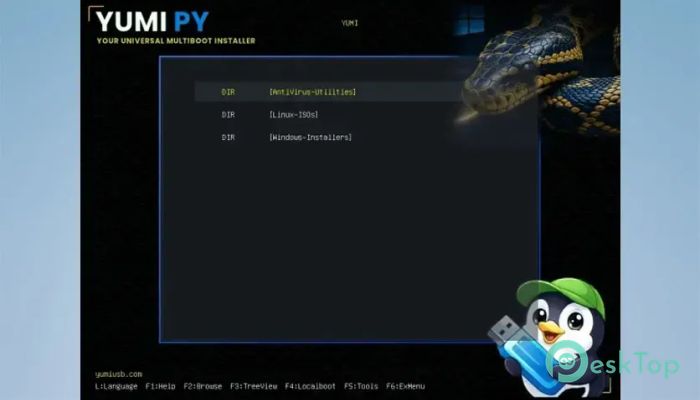
It automatically generates boot menus, allowing you to choose the operating system or utility you want each time the USB drive starts. This saves time and reduces the need to prepare separate drives for different tasks.
Supports Large Files and Modern Formats
Modern operating system images are often larger than the old FAT32 file size limit. The software solves this problem by supporting exFAT formatting, making it possible to store files well above 4GB without splitting them into smaller pieces.
It also accepts numerous bootable file types through simple drag-and-drop. Supported formats include ISO, IMG, WIM, EFI, VHD, and VHDX files, giving users plenty of flexibility when building their bootable collection.
Persistence for Live Operating Systems
Persistence is one of the most useful features available. Instead of losing your files and settings after every reboot, compatible Linux distributions can save your work directly on the USB drive.
The software supports persistence for several popular distributions, including Arch, Debian, Fedora, and Ubuntu-based systems. This allows you to install software, save documents, and keep personal settings between sessions.
Test Boot Without Restarting
Testing a bootable USB normally requires repeatedly restarting your computer, but the software eliminates that inconvenience. It can launch your prepared USB directly inside a temporary VirtualBox virtual machine.
For even faster testing, it can boot a single ISO using QEMU. Hardware acceleration is automatically enabled through WHPX on Windows or KVM on Linux whenever available, resulting in much smoother virtual performance.
Create Portable Virtual Machines
The software goes beyond simple boot testing by allowing you to install a complete operating system into a persistent virtual disk stored directly on the USB drive.
Unlike temporary test sessions, these virtual machines retain every change you make. Applications, updates, personal files, and settings remain available wherever you plug in the USB drive, creating a truly portable computing environment.
Backup, Restore, and Clone Drives
Protecting important bootable drives is easy thanks to the built-in backup features. The software can create a complete image of your prepared USB drive and store it safely for future use.
If something goes wrong later, restoring the drive takes only a few steps. It can also clone one physical drive directly to another while optionally verifying the copied data for additional peace of mind.
Linux and Windows Differences
The feature set remains almost identical across both supported operating systems. However, there is one platform-specific limitation worth mentioning.
Because Windows-On-VHD creation depends on Windows utilities such as DiskPart and DISM, Linux cannot build a brand-new Windows VHD installation. Existing VHD or VHDX files can still be copied onto a Linux-prepared USB drive and booted normally, providing nearly the same level of flexibility.
User-Friendly Experience
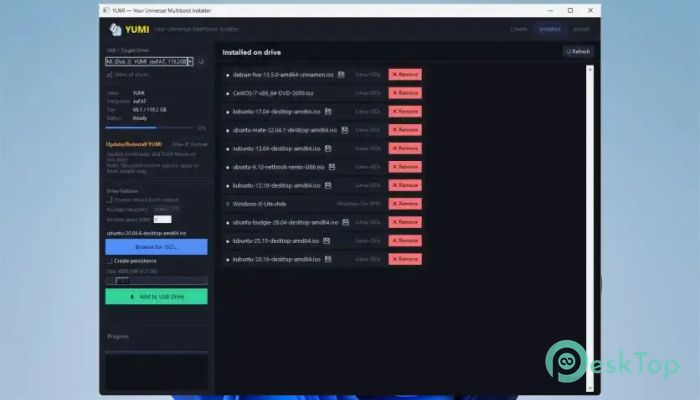
The interface focuses on simplicity without sacrificing powerful functionality. Most tasks involve selecting your USB drive, dragging supported images into the window, and letting the software handle the rest automatically.
This approach makes advanced multiboot management much less intimidating. Beginners can confidently create bootable drives, while experienced users still benefit from the extensive feature set and advanced options.
System Requirements and Technical Details
Operating System: Windows 11 / 10 / 8 / 7
Processor: Minimum 1 GHz Processor (2.4 GHz recommended)
RAM: 2GB (4GB or more recommended)
Free Hard Disk Space: 200MB or more is recommended

-
Program size27.91 MB
-
Version1.0.5
-
Program languagemultilanguage
-
Last updatedBefore 2 Month
-
Downloads31Ralated programs
![Operant Peak Spectroscopy]() Operant Peak Spectroscopy
Operant Peak Spectroscopy ![NeverWrite]() NeverWrite
NeverWrite![FluentCleaner]() FluentCleaner
FluentCleaner![Snippai]() Snippai
Snippai![ChillShot AI]() ChillShot AI
ChillShot AI![Splunk Enterprise]() Splunk Enterprise
Splunk Enterprise
 Operant Peak Spectroscopy
  NeverWrite
 FluentCleaner
 Snippai
 ChillShot AI
 Splunk Enterprise