
 Arabic
  English
  Turkish
  Chinese
  Japanese
  Russian
  Spanish
  German
  French
  Hindi
Hindi Download Atom 3.0.5 AI Agent for After Effects for Windows
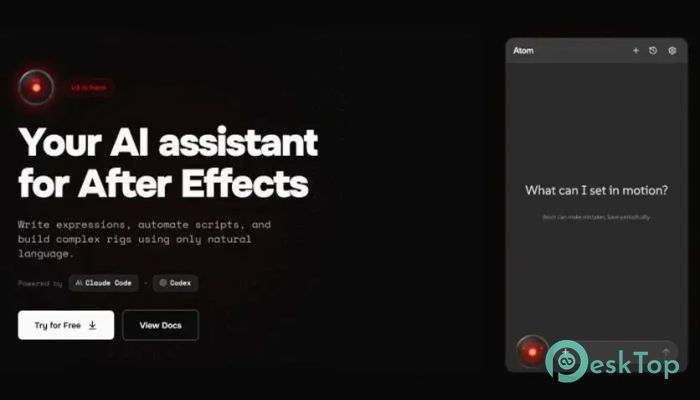
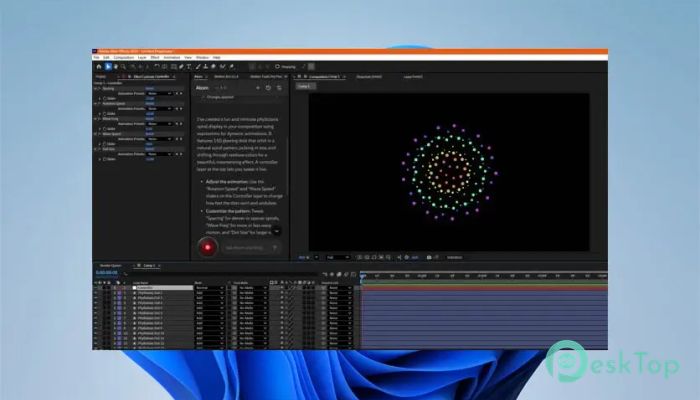
Download Atom 3.0.5 AI Agent for After Effects for Windows.
Atom Overview
Creating animations in After Effects can sometimes feel like solving a puzzle without instructions. You know what you want to build, but writing expressions, automating repetitive tasks, or designing complex rigs often requires technical expertise. That is where this intelligent assistant changes everything. It works like a creative partner that understands your instructions and turns them into working expressions, scripts, and automation tools. Instead of searching tutorials, copying code, or spending hours debugging expressions, you simply describe what you want. The software then generates the required scripts and rigs instantly. This dramatically speeds up your workflow while also reducing errors. Whether you are a beginner learning animation or a professional working on large projects, this solution makes animation faster, smarter, and more intuitive. The tool integrates smoothly with After Effects and becomes part of your everyday workflow. From building motion graphics to automating repetitive tasks, it transforms how animations are created. It feels less like software and more like having an expert animator sitting beside you, ready to help whenever needed. AI-Powered Expression Generation Writing expressions in After Effects can be challenging, especially if you are not familiar with scripting. The tool removes this complexity by allowing you to type simple instructions. For example, you can request a bouncing animation, automatic scaling, or dynamic motion, and the assistant generates the expression instantly. This feature helps users create advanced animations without deep technical knowledge. Even experienced designers benefit because it saves time and improves productivity. Instead of manually writing lines of code, everything is handled automatically. Natural Language Workflow Automation Automation is one of the strongest features offered here. Many designers repeat the same tasks daily, such as renaming layers, adjusting properties, or applying effects. The software allows users to automate these processes using simple commands. Imagine telling the tool to apply fade-in animations to all layers or create smooth transitions between scenes. Within seconds, the task is completed automatically. This reduces manual effort and helps designers focus more on creativity rather than technical steps. Build Complex Animation Rigs Easily Creating rigs usually requires advanced knowledge of expressions and parenting systems. This solution simplifies everything. Users can describe the rig they want, and the assistant builds it automatically. For example, you can create character rigs, responsive motion graphics, or automated UI animations. The assistant generates controls, sliders, and expressions that work together seamlessly. It transforms complex rigging into a simple, fast process. Smart Script Creation Scripts help automate large workflows and speed up animation production. However, writing scripts often requires programming knowledge. The software solves this by generating scripts based on natural instructions. Users can request scripts for batch processing, animation presets, or layer management. The assistant produces ready-to-use scripts that integrate directly with After Effects. This feature saves hours of manual work and increases productivity. User-Friendly Interface The interface is designed to be simple and easy to use. Everything is organized in a clean layout, allowing users to access features quickly. Even beginners can start using it without a steep learning curve. The tool behaves like a chat assistant. You type instructions, and it generates results instantly. This conversational workflow makes the entire experience smooth and efficient. Boost Productivity and Creativity Creativity often slows down when technical barriers appear. This assistant removes those barriers. By automating tasks and generating expressions, users can focus entirely on creative ideas. It also helps experiment with new animation styles. Designers can test multiple concepts quickly without spending hours manually building them. This leads to better results and faster project completion. Perfect for Beginners and Professionals Beginners benefit from simplified animation workflows and easy learning. Professionals benefit from automation and advanced rigging capabilities. The tool adapts to different skill levels and improves overall efficiency. Whether you create motion graphics, UI animations, or character animations, the software provides helpful assistance at every step. Seamless After Effects Integration The tool works smoothly inside After Effects. Users do not need complicated setups or external workflows. Everything operates within the familiar environment. This integration ensures that designers can continue working without interruptions. It feels like a natural extension of After Effects rather than a separate application.Features of Atom
AI-powered expression generation
Natural language automation
Advanced rig creation
Smart script generation
Beginner-friendly interface
Time-saving automation tools
Seamless After Effects integration
Boosts productivity and creativity
Supports complex animation workflows
Lightweight and efficient performance
Workflow Simplification
Animation projects often involve multiple steps and technical adjustments. This solution simplifies everything. It reduces complexity, allowing users to focus on storytelling and visual creativity.
The assistant acts like a shortcut to advanced animation techniques. Tasks that once required expertise have now become accessible to everyone.
Fast Performance
Speed is another major advantage. The software processes commands quickly and generates results instantly. This ensures that designers do not lose momentum during creative sessions.
Even complex animations can be created within seconds. This makes it ideal for professionals working under tight deadlines.
System Requirements and Technical Details
Operating System: Windows 11 / 10 / 8.1 / 7
Processor: Minimum 1 GHz Processor (2.4 GHz recommended)
RAM: 2GB (4GB or more recommended)
Free Hard Disk Space: 200MB or more is recommended

-
Program size762.31 KB
-
Version3.0.5 AI Agent for After Effects
-
Program languagemultilanguage
-
Last updatedBefore 6 Month
-
Downloads21
 Paragon Hard Disk Manager 18 Business
 Aescripts MaskMotion
 Aescripts AE Glass
 Aescripts PreFlight
 Aescripts Risograph
 Aescripts Folder Fanatic