
 Arabic
  English
  Turkish
  Chinese
  Japanese
  Russian
  Spanish
  German
  French
  Hindi
Hindi Download Aescripts AutoCaption 2.6.0 for Windows
Download Aescripts AutoCaption 2.6.0 for Windows.
Aescripts AutoCaption Overview
It is a smart captioning tool built specifically for Adobe After Effects users who want fast, clean, and editable subtitles without leaving their project. Instead of jumping between apps or uploading files to third-party platforms, everything happens right inside your timeline. It feels less like an add-on and more like a natural extension of your editing process. The tool uses advanced speech recognition engines such as Deepgram Nova-3 and OpenAI Whisper Large v3 to convert spoken words into text with high accuracy. Whether you are working on YouTube videos, social media reels, explainer animations, or client presentations, it helps you move from raw audio to polished captions in just minutes.Features of Aescripts AutoCaption
Native After Effects Workflow
One of the best parts is how smoothly it fits into After Effects. The generated captions are not locked graphics or baked-in layers. They are real After Effects text layers. That means you can treat them like any other text in your composition.
You can change fonts, adjust colors, modify line breaks, tweak tracking, and apply animations. Want to add expressions? Go ahead. Need to sync text with motion graphics? Easy. It gives you full creative freedom. Think of it as a rough sketch you can fully refine and style to match your vision.
Powered by Advanced Speech Recognition
Accuracy is everything when it comes to captions. The software uses Deepgram Nova-3 and OpenAI Whisper Large v3, both known for their high-quality speech-to-text performance. The result is a clean transcription with minimal mistakes.
Instead of spending hours fixing words line by line, you can focus on design and storytelling. Clear audio delivers the best results, but even average recordings are handled surprisingly well. It feels like having a virtual assistant listening carefully and typing everything for you in real time.
From Zero to Polished Captions in Minutes
Speed matters, especially when you are working on tight deadlines. This tool quickly takes you from raw audio to fully timed captions. You can choose from five different caption pacing modes, depending on how you want the text to appear.
Fast-paced dialogue? There is a mode for that. Slow and dramatic storytelling? Covered. These pacing options help match the speaker's rhythm, making the captions feel natural rather than robotic. It is like adjusting the tempo of a song so it flows perfectly with the beat.
18+ Ready-to-Use Caption Styles
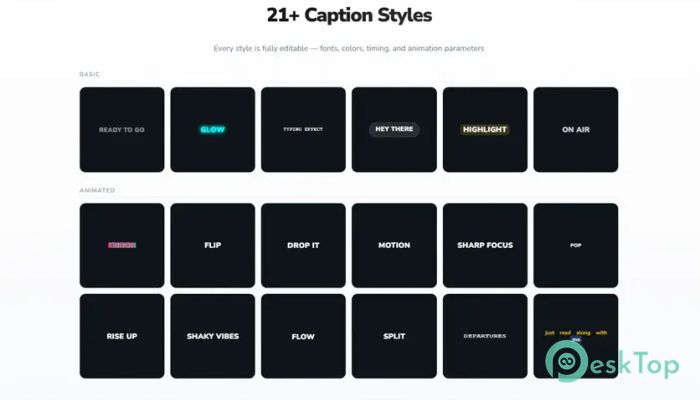
Designing captions from scratch can be time-consuming. That is why it comes with over 18 ready-to-use caption styles. These presets are designed for modern content such as social media posts, reels, YouTube videos, explainers, and motion-heavy projects.
Each preset is fully editable. You are not stuck with default looks. Change colors, resize text, adjust alignment, or add animation effects. It gives you a strong starting point, but you still control the final result. Think of it as a stylish template you can personalize to match your brand.
No Usage Limits
Many captioning tools restrict you to credits, minutes, or per-caption charges. That can feel like driving a car with a speed limiter. This software removes those limits. Once you have the license, you can use it as much as you want.
No hidden costs. No countdown timers. No worrying about how many minutes you have left. The only investment is the license itself. After that, you are free to generate captions for as many projects as you like.
Nothing Is Baked In
Flexibility is key in creative work. The captions created are completely editable. Nothing is permanently embedded into your video. You can adjust timing, change wording, fix typos, or completely redesign the layout even after generation.
This level of freedom is important. Projects change. Clients ask for revisions. Styles evolve. With fully editable text layers, you stay in control from start to finish.
No API Key Needed
Setting up third-party tools can sometimes feel like assembling furniture without instructions. Here, you do not need to create external accounts or enter API keys. After activation, it works out of the box.
This simple setup saves time and removes technical headaches. You install it, activate it, and start generating captions. That is it. Clean and straightforward.
Song and Lyrics Recognition
It is not limited to spoken dialogue. The tool can detect sung vocals and generate song captions when lyrics are clearly audible. This is perfect for music videos, lyric videos, and creative edits.
As long as the audio is clean and the vocals are understandable, it can transcribe lyrics into editable text layers. It feels like turning sound waves into visual poetry directly inside your composition.
Multi-Language Support
Content creators today work with global audiences. The software supports multiple languages, making it useful for creators worldwide. Clear speech and clean recordings always provide the best outcome.
Whether you are working in English or another supported language, the transcription engine adapts to your audio. This makes it easier to reach broader audiences without switching tools or workflows.
System Requirements and Technical Details
Operating System: Windows 11 / 10 / 8.1 / 7
Processor: Minimum 1 GHz Processor (2.4 GHz recommended)
RAM: 2GB (4GB or more recommended)
Free Hard Disk Space: 200MB or more is recommended
After Effects: 2026, 2025, 2024, 2023, 2022, 2021, 2020

-
Program size5.20 MB
-
Version2.6.0
-
Program languagemultilanguage
-
Last updatedBefore 7 Month
-
Downloads310
 Paragon Hard Disk Manager 18 Business
 Aescripts MaskMotion
 Aescripts AE Glass
 Aescripts PreFlight
 Aescripts Risograph
 Aescripts Folder Fanatic