
 Arabic
  English
  Turkish
  Chinese
  Japanese
  Russian
  Spanish
  German
  French
  Hindi
Hindi Download Aescripts BAO Bones 1.5.10 for Windows
Download Aescripts BAO Bones 1.5.10 for Windows.
Aescripts BAO Bones Overview
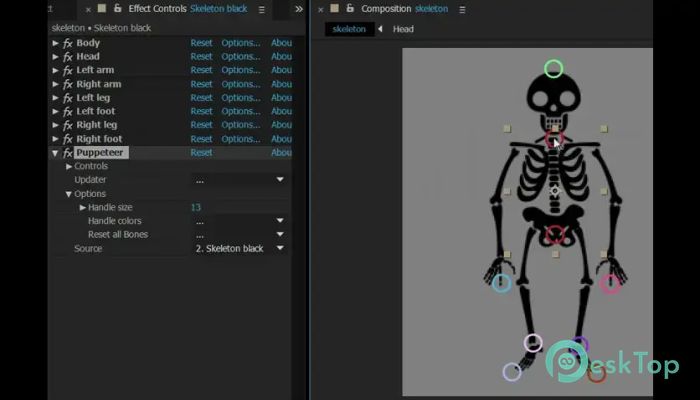
Creating character animations in After Effects can sometimes feel like trying to control a puppet with tangled strings. This tool changes that experience completely by making rigging fast, smooth, and simple. It is designed for animators, motion designers, and video creators who want to build natural movement without wasting hours on complex setups. The software focuses on IK (Inverse Kinematics). Instead of moving every part manually, users can control limbs and connected objects more intelligently. This means arms, legs, tails, ropes, and other flexible elements move naturally with less effort. Even beginners can create professional-looking animation scenes thanks to the clean, easy-to-understand interface. With only a few clicks, users can connect layers, build skeletons, and animate smoothly inside After Effects.Features of Aescripts BAO Bones
Fast and Simple Rigging
One of the biggest advantages of this tool is speed. Traditional rigging in After Effects can take a long time because every part requires careful linking and adjustment. This plugin removes that headache and turns the process into something quick and enjoyable.
Users can build rigs almost instantly by selecting layers and applying controls. It feels like snapping together building blocks instead of solving a difficult puzzle. This makes it perfect for both quick projects and large animation work.
The automatic system helps reduce mistakes and keeps movement organized. Because of this, creators can spend more time designing animation instead of fixing technical problems.
Easy IK Animation Controls
Inverse Kinematics is the heart of the plugin. It allows connected body parts to move naturally when one control point is adjusted. For example, moving a hand can automatically reposition the arm and shoulder realistically.
This feature creates smoother movement and saves a huge amount of time. Animators no longer need to manually adjust every joint frame by frame. The controls behave naturally, almost like controlling a real puppet.
The setup process is also beginner-friendly. Even users with little experience can understand how to create movement quickly. The controls are responsive, lightweight, and easy to customize according to different animation styles.
Improves Character Animation Workflow
Animation projects often become messy when multiple layers and controls are involved. The plugin helps organize everything more cleanly. It creates a smoother workflow that feels less stressful and more creative.
Instead of fighting with complicated expressions and parenting systems, creators can focus on storytelling and movement. This is especially useful for YouTube animators, explainer video creators, and motion graphics artists.
The software also works well for cartoon animation, creature movement, and dynamic object control. Whether someone is creating a simple stick figure or a complex animated character, the process becomes much easier.
Clean Interface for Beginners and Professionals
Many animation tools look intimidating at first glance, but this one keeps things simple. The interface is organized to avoid confusion and facilitate quick learning.
Buttons are clearly placed, controls are easy to identify, and most actions require only a few steps. This helps beginners start creating immediately without watching endless tutorials.
Professionals also benefit from the streamlined design, which speeds up production. It feels like driving on an open highway instead of getting stuck in city traffic.
Flexible Uses for Different Projects
The plugin is not limited to character animation alone. It can also handle flexible objects, chains, ropes, tails, tentacles, mechanical parts, and other creative motion designs.
This flexibility gives creators freedom to experiment with unique animation ideas. Small indie creators and large production teams alike can use it for various styles and workflows.
The software fits perfectly into motion graphics projects because it works directly inside After Effects. There is no need to switch between multiple programs just to create advanced rigging effects.
Smooth Performance and Lightweight Design
Heavy plugins sometimes slow down animation software and make previews frustrating. Thankfully, this tool is lightweight and optimized for smooth performance.
Users can work on projects without experiencing major lag or crashes. This becomes extremely important during deadlines when every second matters.
The optimized performance also helps during playback previews. Animators can test movements quickly and make adjustments without waiting for long rendering times.
Helpful for Motion Designers
Motion designers often need quick results while still maintaining professional quality. This plugin acts like a shortcut that saves time without reducing creativity.
It allows creators to animate connected objects naturally while keeping complete control over the final movement. This makes explainer videos, social media animations, and promotional content look more polished and engaging.
Even simple scenes gain a more professional appearance because the movement feels realistic and fluid. The difference becomes obvious immediately after using the plugin.
Perfect for Creative Storytelling
Animation is all about bringing ideas to life. This tool helps transform static designs into moving characters full of personality and emotion.
Creators can produce expressive movement with less technical effort. A simple arm wave, body movement, or walking cycle becomes much easier to create naturally.
Because the technical barriers are reduced, storytellers can focus more on creativity. It feels similar to sketching freely on paper instead of struggling with complicated machinery.
System Requirements and Technical Details
Operating System: Windows 11 / 10 / 8.1 / 7
Processor: Minimum 1 GHz Processor (2.4 GHz recommended)
RAM: 2GB (4GB or more recommended)
Free Hard Disk Space: 200MB or more is recommended
After Effects: 2026, 2025, 2024, 2023, 2022, 2021, 2020, CC 2019, CC 2018, CC 2017, CC 2015.3, CC 2015, CC 2014, CC, CS6

-
Program size6.58 MB
-
Version1.5.10
-
Program languagemultilanguage
-
Last updatedBefore 4 Month
-
Downloads106
 Paragon Hard Disk Manager 18 Business
 Aescripts MaskMotion
 Aescripts AE Glass
 Aescripts PreFlight
 Aescripts Risograph
 Aescripts Folder Fanatic